

SOR: Site Inspection Report
Stuart Nunn Business iPhoneiPadiPod touch
SOR: Site Inspection Report is a free Business app for iPhone and iPad by Stuart Nunn. Requires iOS 15.0. Updated October 13, 2026.
- Price
- Free
- on the App Store
- Size
- 24 MB
- Age 4+
- Updated
- Oct 13
- 2026 · v1.3.1
Screenshots



About SOR: Site Inspection Report
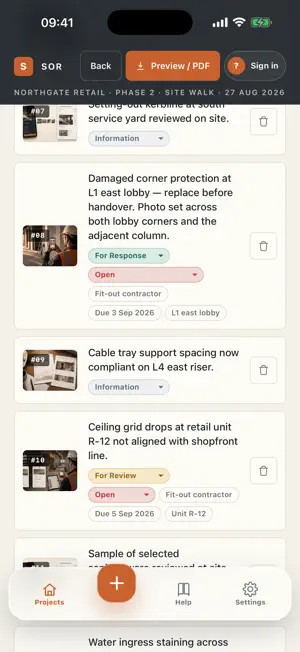
SOR turns a site walk into a finished, branded observation report before you leave the building. Photograph the condition, add a short caption, and the observation is logged. When something needs fixing, set the responsible party and a due date, then export the whole walk as a clean A4 PDF and send it straight from your phone. Built for site, not for spreadsheets. CAPTURE IN THE FIELD • Photo first — open the camera, take the shot, and the observation exists. No form to fight through before you can move to the next room. • Mark up the photo — draw, add arrows, shapes and text directly on the image. The markup is flattened into the photo, so it survives the export. • Add only the context that matters — caption, location, and the party responsible. • Works offline. Walk a basement or a lift core with no signal and nothing is lost. RECORD IT RIGHT THE FIRST TIME Four observation types, so the reader knows exactly what you are asking for: • Information — a record for the file, no response required. • For Review — needs confirmation, inspection or approval before it closes. • For Response — needs a reply, ownership or follow-up from the responsible party. • Non-Compliant — an NCR-style record where corrective action and close-out evidence are required. TRACK IT THROUGH TO CLOSE-OUT • Assign a responsible party and a due date to anything that needs action. • Statuses run open, responded, closed and verified, with close-out evidence attached to the entry. • Filter a project by type, status, party or location to see what is still outstanding. • SOR remembers your locations, contractors and consultants, so the second report is faster to write than the first. ISSUE A REPORT THAT LOOKS DELIBERATE • A fixed A4 PDF with a cover page carrying your company name and logo, and a clean summary strip. • Six observations to a page — wide, report-like cards, not cramped thumbnails. • Status and party chips on every entry, so an outstanding action is obvious at a glance. • The same crisp pagination every time you export. YOUR PROJECTS, ON EVERY DEVICE One SOR account keeps projects, reports, observations and photos together across your phone and your laptop. Capture offline on site and it syncs once you are back in signal. WHO IT IS FOR Site and resident engineers, construction and project managers, QA/QC and quality inspectors, architects and consultants on site visits, and contractors running snag and punch lists — anyone who has to issue a defect, inspection or handover report and wants it out the same day. PRIVACY SOR collects only what an account needs: your email address, an optional display name, and the reports and photos you choose to sync. Nothing is sold or shared with third parties, and there is no advertising and no tracking. You can delete your account and all of its data from inside the app. SOR PRO SUBSCRIPTION SOR Pro is available as an auto-renewable subscription, billed monthly or annually. Payment is charged to your Apple ID at confirmation of purchase. The subscription renews automatically unless cancelled at least 24 hours before the end of the current period. Manage or cancel any time in your App Store account settings. Terms of Use (EULA): https://www.apple.com/legal/internet-services/itunes/dev/stdeula/ Privacy Policy: https://sorapp.io/privacy sorapp.io
What’s new
Version 1.3.1 · Updated October 13, 2026
New in 1.3.1: - Move items up and down in a report, so it reads as a true walk-through. - Add a floor plan while you are pinning an item. - Dimension tool in photo markup: drag a line and type the measurement. - Choose your own report cover photo, with an option to show a whole logo above the title (SOR Pro). - Long descriptions now get a full-width row in the PDF and are no longer cut off. - Fixed: marking up a photo that was already saved now saves.
App privacy
The developer, Stuart Nunn, reported these privacy practices to Apple.
Data Linked to You
The following data, which may be collected and linked to your identity, may be used for the following purposes:
- Contact Info: Email Address, Name
- User Content: Photos or Videos, Other User Content
- Identifiers: User ID
Used for: App Functionality
Alternatives to SOR: Site Inspection Report
Looking for apps like SOR: Site Inspection Report? Here are 6 similar apps on the App Store.
-
 Hotel Defect Manager
-
 Site Survey Pro
-
 Punch List AI: Site Inspection
-
 CIWEM The Environment Magazine
-
 SIAPP: Site Inspection App
-
 Site Inspect Pro
| App | Rating | Price | Last updated | Compare |
|---|---|---|---|---|
| SOR: Site Inspection Report | – | Free | October 13, 2026 | |
| Hotel Defect Manager | – | Free | Oct 11, 2024 | Compare |
| Site Survey Pro | – | Free | Oct 9, 2026 | Compare |
| Punch List AI: Site Inspection | – | Free | Oct 27, 2026 | Compare |
| CIWEM The Environment Magazine | – | Free | Oct 30, 2026 | Compare |
| SIAPP: Site Inspection App | – | Free | Oct 21, 2026 | Compare |
| Site Inspect Pro | – | Free | Oct 27, 2025 | Compare |