

CookieCrumble for Safari
Michael Preidel Utilities iPhoneiPadiPod touchMac
CookieCrumble for Safari is a paid Utilities app for iPhone and iPad by Michael Preidel. Requires iOS 18.6. Updated October 1, 2026.
- Price
- 4.99 USD
- on the App Store
- Size
- 18 MB
- Age 4+
- Updated
- Oct 1
- 2026 · v2.0
Screenshots

About CookieCrumble for Safari
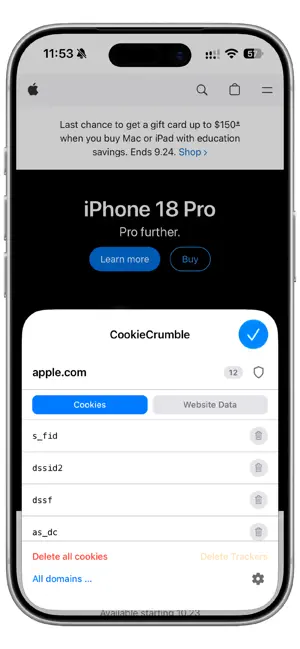
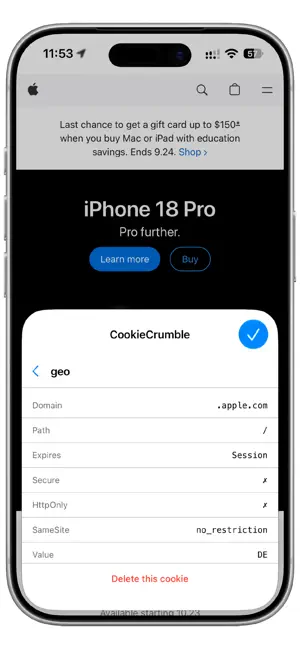
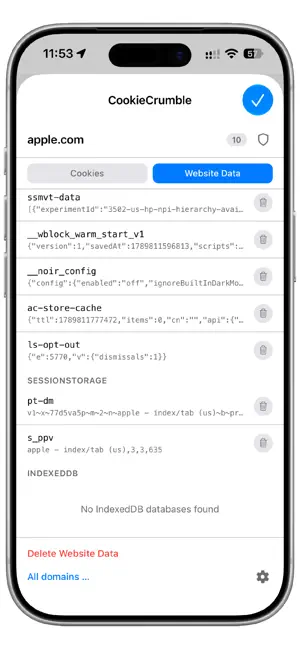
CookieCrumble gives you back control over your Safari cookies and website data. Searched for a birthday gift once – and seen matching ads for weeks? Tracking cookies make it possible. But websites store even more: localStorage holds shopping carts, user profiles and app states – usually without you knowing. Deleting all data isn't the answer – you'd be logged out of everything. CookieCrumble solves this: delete what bothers you. Keep the rest. FEATURES - View cookies for the current website and delete them individually or all at once - Block known trackers: optionally removes known tracker cookies and storage entries automatically when each page loads - Website Data: view and delete localStorage, sessionStorage and IndexedDB entries for any domain - Whitelist shortcut: add or remove the current domain from your whitelist with a single tap on the shield icon - Whitelist: add domains that should never be deleted – ideal for your bank, email or important logins - Whitelist sync: whitelist is automatically synced via iCloud across iPhone, iPad and Mac - Auto-Delete: automatically delete cookies and website data of a domain as soon as its last tab is closed - Interval Auto-Delete: automatically delete cookies at configurable intervals (30 minutes to 48 hours) - Custom trackers: add your own cookie and storage keys to the tracker list - Tracker list is automatically updated in the background - Overview of all domains with stored cookies - Tap any domain to view its cookies individually - Cookie details: expiry date, HttpOnly, Secure, SameSite, value - Badge shows the cookie count for the current domain directly in the Safari toolbar - Optional monochrome icon for the Safari toolbar - Search in the domain overview - Dark Mode and Light Mode - 11 languages: German, English, French, Spanish, Italian, Portuguese, Japanese, Chinese, Dutch, Polish, Korean CookieCrumble is a Safari extension and needs to be enabled once in Settings → Apps → Safari → Extensions.
What’s new
Version 2.0 · Updated October 1, 2026
- Interval Auto-Delete: automatically delete cookies at configurable intervals (30 minutes to 48 hours) - Whitelist sync: whitelist is automatically synced via iCloud across iPhone, iPad and Mac - Whitelist shortcut: add or remove the current domain from your whitelist with a single tap on the shield icon - Website Data: view and delete IndexedDB databases for the current domain - Notice when cookies could not be deleted due to an iOS limitation
App privacy
The developer, Michael Preidel, reported these privacy practices to Apple.
Data Not Collected
The developer does not collect any data from this app.
Alternatives to CookieCrumble for Safari
Looking for apps like CookieCrumble for Safari? Here are 6 similar apps on the App Store. The highest rated is Keepnet SMS/Call Reporter (1.0/5), and 5 of the 6 are free to download.
-
 MemoMapper
-
 Upkeep: Home & Car Maintenance
-
 ClearDays: Calendar Cleaner
-
 Keepnet SMS/Call Reporter
1.0
Keepnet SMS/Call Reporter
1.0
-
 Sketch360
-
 Clipmunk – Save Copied Text
| App | Rating | Price | Last updated | Compare |
|---|---|---|---|---|
| CookieCrumble for Safari | – | 4.99 USD | October 1, 2026 | |
| MemoMapper | – | Free | Jul 30, 2025 | Compare |
| Upkeep: Home & Car Maintenance | – | 1.99 USD | Sep 27, 2026 | Compare |
| ClearDays: Calendar Cleaner | – | Free | Oct 21, 2026 | Compare |
| Keepnet SMS/Call Reporter | 1.0 / 5 (1) | Free | Aug 4, 2026 | Compare |
| Sketch360 | – | Free | Sep 1, 2026 | Compare |
| Clipmunk – Save Copied Text | – | Free | Apr 13, 2026 | Compare |