

PodMelody: Podcasts & Music
Slip Angle Dynamics Pty Ltd News iPhoneiPadiPod touch
PodMelody: Podcasts & Music is a free News app for iPhone and iPad by Slip Angle Dynamics Pty Ltd. Requires iOS 26.0. Updated September 27, 2026.
- Price
- Free
- on the App Store
- Size
- 30 MB
- Age 12+
- Updated
- Sep 27
- 2026 · v1.1.5
Screenshots
About PodMelody: Podcasts & Music
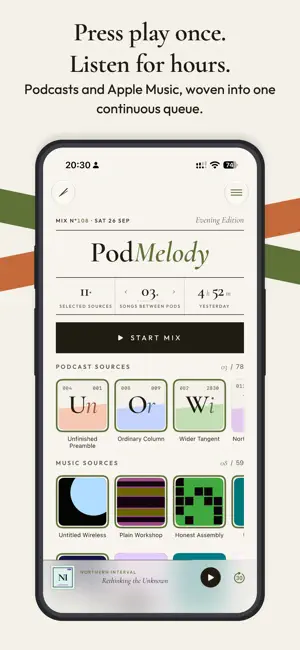
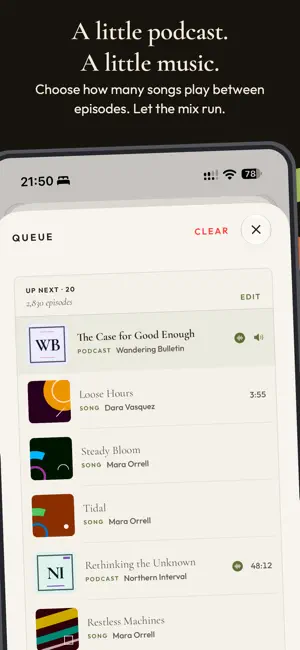
PodMelody turns podcasts and Apple Music into one continuous listening flow - with reusable podcast stations and a queue you control. Choose individual podcast shows or build podcast stations that bring several shows together. Browse your subscriptions and stations in a visual grid that makes larger libraries quick to scan. Add Apple Music playlists or radio stations, decide how many songs should play between episodes, and start a mix. PodMelody builds the queue and keeps it moving across the app, Lock Screen, Control Center, and CarPlay. PodMelody is designed to make faster listening sound natural, not merely quicker. Laughter-aware playback eases off automatically when laughter is detected, giving jokes and reactions room to land before returning to your chosen speed. CarPlay is a complete PodMelody experience, not just a Now Playing screen. Use Mix to choose your podcast stations, shows, and music sources and start listening, Queue to see what is coming and jump around it, or Browse to open a show or playlist. You can also allow or exclude explicit content directly from CarPlay. Artwork, source selections, and playback changes stay in step with your phone. PodMelody is built for people who want podcasts and music together without constantly switching apps or rebuilding queues by hand. Mix your way: - Create reusable podcast stations that combine the shows you choose into one source - Build one continuous queue from individual shows, podcast stations, and Apple Music playlists or radio stations - Set how many songs play between podcast episodes, including zero for a podcast-only mix Explore your podcasts: - Browse podcast subscriptions and stations in a visual grid built for scanning larger libraries - Read transcripts that follow playback, search for a remembered moment, and see standout quotes in the show notes - Import shows from RSS or Apple Podcasts, download episodes for offline listening, and move subscriptions with OPML - Save bookmarks and track played, skipped, and unplayed episodes Listen your way: - Listen from 0.5x to 3.0x with voice-clarity processing that keeps speech easy to follow at high speeds - Keep jokes and reactions natural with laughter-aware playback that eases off automatically when laughter is detected - Level podcast loudness so episodes and music sit at a consistent volume - Compress silences and see how much listening time you have saved - Set a sleep timer for long listening sessions Take it everywhere: - Use the full CarPlay app to choose sources, allow or exclude explicit content, start a mix, browse shows and playlists, and see or jump around the queue - Turn an iPhone sideways for a two-pane Now Playing, or use the full-screen player and queue on iPad - Resume unfinished episodes across devices with iCloud - Control playback from the Lock Screen, Control Center, and Shortcuts - Ask Siri to play, follow and queue your shows and playlists by name on iOS 27 Make it yours: - Choose PodMelody's signature Editorial interface or the Apple-style System interface - both included free - Pick PodMelody's accent color, in either interface, with PodMelody Plus - Use PodMelody in English or German PodMelody keeps the queue under your control. Music plays through Apple Music itself, so your play counts and listening history stay up to date just as if you were using the Music app. Core listening works for free. PodMelody Plus unlocks extra comfort, audio, download, color, and CarPlay features. An Apple Music subscription is required for Apple Music playback. Podcast availability depends on each podcast feed. Screenshots use representative artwork and sample names. When you connect your sources on device, PodMelody displays their available artwork. Explicit-content filtering relies on songs and podcast episodes being identified as explicit in their source metadata. Terms of Use: https://www.apple.com/legal/internet-services/itunes/dev/stdeula/
What’s new
Version 1.1.5 · Updated September 27, 2026
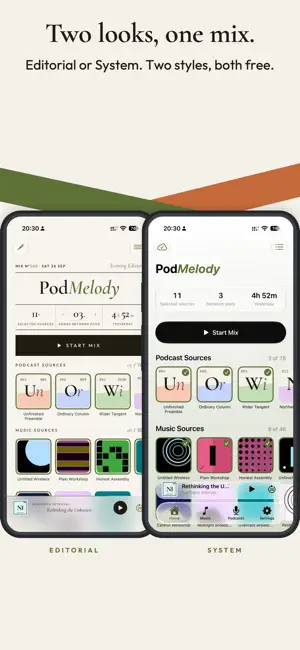
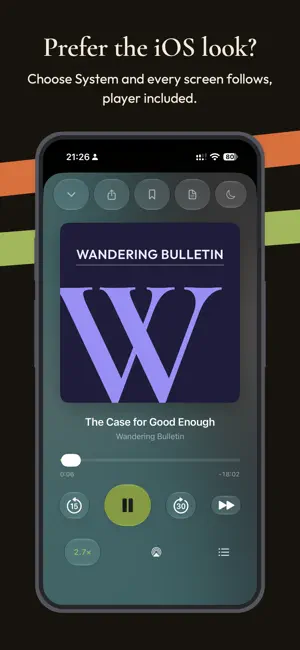
Made for iOS 27. Ask Siri to play a show, station or playlist by name, follow a new podcast, add an episode to Up Next, skip back, change the speed or set a sleep timer. Your followed shows, stations and episodes appear in Spotlight search too. Two looks, one mix. Choose PodMelody's signature Editorial design or familiar iOS controls with System, in light, dark or automatic appearance, from Settings > Appearance. Both interfaces are included free, and nothing changes for anyone who already chose one. Your accent color. PodMelody Plus adds a choice of 28 accent colors that recolor the marks and plates of either interface, and follow you to every device through iCloud. The default is still free, and if Plus access ends your saved color waits for it to return. Using PodMelody on more than one device? Update each of them to 1.1.5, so an older version can't reset your accent color. Easier with VoiceOver. VoiceOver can now change page in the Editorial interface, with a three-finger swipe or from the rotor, so Settings is reachable from Home again. Source tiles say what their numbers count instead of reading bare digits, and Home's stats read as single items. Room to listen. Editorial Home gives your podcast and music sources more room, the Podcasts page keeps its search in view, and Home's controls and Settings rows adapt better to larger text sizes. Playback slower than 1x sounds cleaner, a pre-processed episode resumes at the right place after its render finishes, and a Plus renewal no longer trims your mix.
App privacy
The developer, Slip Angle Dynamics Pty Ltd, reported these privacy practices to Apple.
Data Not Linked to You
The following data, which may be collected but is not linked to your identity, may be used for the following purposes:
- Diagnostics: Crash Data, Performance Data
Used for: Analytics
Alternatives to PodMelody: Podcasts & Music
Looking for apps like PodMelody: Podcasts & Music? Here are 6 similar apps on the App Store. The highest rated is Clearcast: Podcast App (5.0/5), and all 6 are free to download.
-
 PodInbox: Podcast Queue
-
 Clearcast: Podcast App
5.0
Clearcast: Podcast App
5.0
-
 podcasts.so
5.0
podcasts.so
5.0
-
 Podcast Player - Arvocast
3.0
Podcast Player - Arvocast
3.0
-
 PodPulse
5.0
PodPulse
5.0
-
 opencast: podcast player
4.3
opencast: podcast player
4.3
| App | Rating | Price | Last updated | Compare |
|---|---|---|---|---|
| PodMelody: Podcasts & Music | – | Free | September 27, 2026 | |
| PodInbox: Podcast Queue | – | Free | Jul 23, 2026 | Compare |
| Clearcast: Podcast App | 5.0 / 5 (4) | Free | Aug 11, 2026 | Compare |
| podcasts.so | 5.0 / 5 (2) | Free | Aug 22, 2026 | Compare |
| Podcast Player - Arvocast | 3.0 / 5 (1) | Free | Sep 21, 2026 | Compare |
| PodPulse | 5.0 / 5 (1) | Free | Dec 9, 2025 | Compare |
| opencast: podcast player | 4.3 / 5 (7) | Free | Sep 27, 2026 | Compare |