

ShiftCam One
ShiftCam Limited Photo & Video iPhoneiPadiPod touch
ShiftCam One is a free Photo & Video app for iPhone and iPad by ShiftCam Limited. Rated 3.0/5 from 1 ratings. Requires iOS 15.0. Updated October 21, 2026.
- Rating
- 3.0
- 1 ratings
- Price
- Free
- on the App Store
- Size
- 57 MB
- Age 4+
- Updated
- Oct 21
- 2026 · v1.5
Screenshots


About ShiftCam One
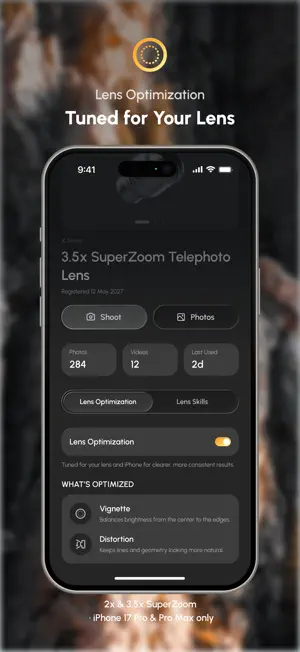
ShiftCam One is the companion app for your ShiftCam lenses, mounts, and accessories. It is built around how you actually shoot with ShiftCam gear, from setting up a lens to sharing the shot. SET UP YOUR GEAR • Register your ShiftCam lenses by scanning the code in the box, or add them manually if you no longer have it • Tell the app which mounting system you use — phone case, or universal — so the instructions match your setup • Follow a mounting guide drawn for your exact iPhone model, showing which camera the lens goes over • Open a page for each lens you own: specs and space for your own notes LENS SKILLS • AutoSteady on Super Zoom — video stabilization engages automatically at 2× and above, with an on-screen shake indicator so you can tell when you are steady SHOOT • Full-screen viewfinder with a lens picker that adapts the controls to the lens you select • A zoom dial that shows the real range your lens reaches, not the iPhone's default numbers • Photo and video: HEIF or JPEG, 1080p and 4K at 24/30/60 fps • Flash, timer, grid, level, aspect ratio, exposure compensation, and focus and exposure lock ORGANIZE AND SHARE • Browse your library with full capture details, including which lens took each shot • Filter by lens to see everything you have shot with a particular piece of glass • See your whole photo library in one place, with ShiftCam One shots marked • Share to Instagram, TikTok, or the iOS share sheet, or save to Photos WARRANTY AND ACCOUNT • Activate your warranty by uploading a photo of your receipt • Manage your lenses, mounting systems, and account settings from one place YOUR DATA The photos and videos you take stay on your device. They leave it only when you choose. PERMISSIONS • Camera — to shoot photos and video, and to scan the code on your lens box • Microphone — to record audio with your videos • Photo Library — to save the shots you take • Location — optional, to tag where a photo was taken ShiftCam One is free to download.
What’s new
Version 1.5 · Updated October 21, 2026
Preview LUTs in real time, adjust their intensity, and apply looks to photos and supported video formats. Import your own .cube files and manage your looks in the new LUT Library, with centered previews and faster loading when you first open it. Record video at up to 120fps on supported iPhones. Use Auto Studio to edit photos from local folders and external SSDs while preserving the originals. This update also adds a Film look and an expandable lens picker, plus improvements to camera transitions, recording stability and interface consistency.
App privacy
The developer, ShiftCam Limited, reported these privacy practices to Apple.
Data Linked to You
The following data, which may be collected and linked to your identity, may be used for the following purposes:
- Identifiers: Device ID, User ID
- Usage Data: Product Interaction
- Purchases: Purchase History
- Contact Info: Email Address, Name
- User Content: Photos or Videos
- Diagnostics: Crash Data
Used for: Analytics, App Functionality
Alternatives to ShiftCam One
Looking for apps like ShiftCam One? Here are 6 similar apps on the App Store. The highest rated is Moment Pro Camera II (4.5/5), and 4 of the 6 are free to download.
-
 SANDMARC Camera
4.1
-
 ProCam MK II - Pro Camera
4.4
-
 ReefColor - FujiFilm & ProCam
3.2
-
 VSCO Studio Pro: Photo Editor
3.7
-
 Moment Pro Camera II
4.5
-
 Pro Camera - Reeflex
4.4
| App | Rating | Price | Last updated | Compare |
|---|---|---|---|---|
| ShiftCam One | 3.0 / 5 (1 rating) | Free | October 21, 2026 | |
| SANDMARC Camera | 4.1 / 5 (37) | Free | Oct 27, 2026 | Compare |
| ProCam MK II - Pro Camera | 4.4 / 5 (28) | 19.99 USD | Oct 23, 2026 | Compare |
| ReefColor - FujiFilm & ProCam | 3.2 / 5 (15) | Free | Sep 25, 2026 | Compare |
| VSCO Studio Pro: Photo Editor | 3.7 / 5 (10) | Free | Oct 28, 2026 | Compare |
| Moment Pro Camera II | 4.5 / 5 (503) | 9.99 USD | Oct 17, 2026 | Compare |
| Pro Camera - Reeflex | 4.4 / 5 (1,000) | Free | Sep 25, 2026 | Compare |
Compare ShiftCam One with the top alternatives: ratings, updates, ASO score and keyword gaps →