

PixelCut Pro - AI BG Remover
SELMAN ALTINAY Photo & Video iPhoneiPadiPod touch
PixelCut Pro - AI BG Remover is a free Photo & Video app for iPhone and iPad by SELMAN ALTINAY. Rated 5.0/5 from 4 ratings. Requires iOS 15.5.
- Rating
- 5.0
- 4 ratings
- Price
- Free
- on the App Store
- Size
- 55 MB
- Age 4+
- Updated
- Oct 19
- 2026 · v1.15.1
Screenshots


About PixelCut Pro - AI BG Remover
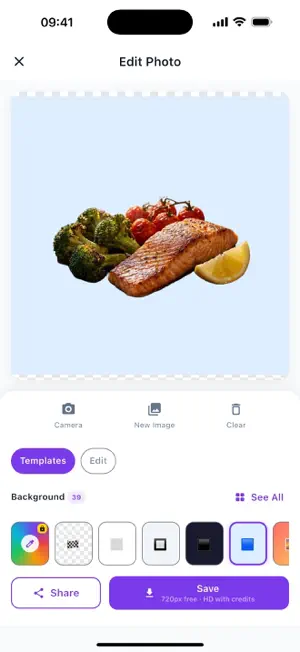
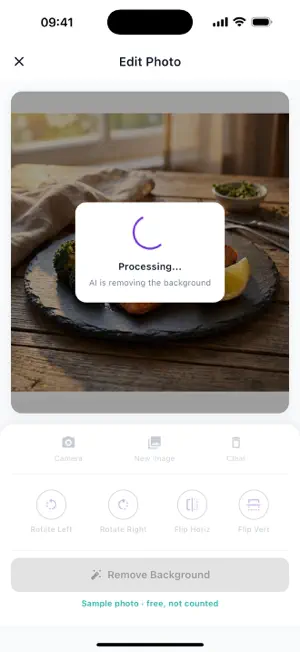
PixelCut Pro cuts the subject out of a photo and puts it on a clean new background, ready for a shop listing, a profile picture or a social post. Pick a photo or take one, tap Remove Background, and our cloud AI separates people, products, pets and objects from what is behind them. If one engine is busy, another takes over automatically, and while you wait the editor can show how many photos are ahead of yours. Then choose a background: transparent, a solid colour, or one of 39 designs across Basic, Gradient, E-Commerce, Studio, Social and Nature. Need your exact brand colour? Pick it from a palette, with sliders or as a HEX code. Save the result to Photos as a PNG, in HD or 4K up to 4096 px, or share it to any app. Not sure where to start? Run the whole thing on the built-in sample photo first. It is free and does not use your daily removals. Every cut-out, save and new background earns XP. Levels unlock free removals, HD credits and Pro backgrounds; three daily missions and a weekly challenge pay out rewards of their own, and a daily gift waits when you come back. With Batch you can process up to 10 photos in one go. Using PixelCut Pro for free gives you 3 background removals a day, 5 backgrounds and exports up to 720 px with a small watermark. When you need more, choose what suits you: - Pro, monthly or yearly (the yearly plan starts with a 3-day free trial): unlimited removals, every background, HD and 4K, no watermark, no ads, Batch. - Lifetime Pro: everything in Pro for a single payment. - HD credits in packs of 10, 50 or 200: one credit unlocks one photo in HD/4K without watermark, with any background. Credits never expire. - Remove Ads: a one-time purchase. - Starter Pack for new users: 30 HD credits plus Remove Ads. Payment is charged to your Apple ID when you confirm the purchase. Subscriptions renew automatically unless cancelled at least 24 hours before the end of the current period, and you can manage or cancel them in your Apple ID account settings. Restore Purchases is in Settings. Your photos are sent to our servers only to remove the background and are not kept there. Questions or ideas? Send feedback from the Profile tab, or write to [email protected]. PixelCut Pro speaks 12 languages and comes with light and dark themes. Terms of Use: https://pixelcutpro.ruicodex.com/Home/Terms Privacy Policy: https://pixelcutpro.ruicodex.com/Home/Privacy
What’s new
Version 1.15.1 · Updated October 19, 2026
What's new since the last iOS version (1.12.1): - Try it first on a sample photo. It is free and does not count against your daily removals. - New tab bar: Create, Gallery, Goals, Store and Profile. - Goals: creator levels, three daily missions, a weekly challenge and achievements. Rewards include free removals, HD credits and Pro backgrounds. - Brand colour backgrounds: any colour from a palette, sliders or a HEX code. - More ways to pay: HD credits (one photo in HD/4K without watermark, no subscription), Lifetime Pro, Remove Ads, and a Starter Pack for new users. The yearly plan starts with a 3-day free trial. - A daily gift for coming back, and your saved gallery is fully unlocked. - No full-screen ad on your very first cut-out, and none after you save. - Send feedback from the app: Profile > Send feedback. - While the AI works, the editor can show the live queue on our servers. - Privacy choices for ads and analytics in Settings, where your region requires them. - Smoother editing: heavy image work no longer runs on the main thread. - New app icon.
App privacy
The developer, SELMAN ALTINAY, reported these privacy practices to Apple.
Data Used to Track You
The following data may be used to track you across apps and websites owned by other companies:
- Identifiers: Device ID
Data Linked to You
The following data, which may be collected and linked to your identity, may be used for the following purposes:
- Location: Coarse Location
- Identifiers: Device ID
- Usage Data: Product Interaction, Advertising Data
- Purchases: Purchase History
- User Content: Customer Support
- Contact Info: Email Address
Used for: Third-Party Advertising, Analytics, App Functionality
Data Not Linked to You
The following data, which may be collected but is not linked to your identity, may be used for the following purposes:
- Diagnostics: Performance Data, Other Diagnostic Data, Crash Data
- Identifiers: User ID
- Other Data: Other Data Types
- User Content: Photos or Videos
Used for: Third-Party Advertising, Analytics, App Functionality
Alternatives to PixelCut Pro - AI BG Remover
Looking for apps like PixelCut Pro - AI BG Remover? Here are 6 similar apps on the App Store. The highest rated is Studio Zero: AI Product Photos (4.8/5), and all 6 are free to download.
-
 Boogie - AI Dance Video Maker
-
 Restore Old Photos | PhotoFix
1.0
Restore Old Photos | PhotoFix
1.0
-
 Studio Zero: AI Product Photos
4.8
Studio Zero: AI Product Photos
4.8
-
 Text on Photo Editor - Pixo
1.0
Text on Photo Editor - Pixo
1.0
-
 Pixel Go - AI Photo Enhancer
4.6
Pixel Go - AI Photo Enhancer
4.6
-
 JPG PNG Image Photo Converter
4.0
JPG PNG Image Photo Converter
4.0
| App | Rating | Price | Last updated | Compare |
|---|---|---|---|---|
| PixelCut Pro - AI BG Remover | 5.0 / 5 (4 ratings) | Free | October 19, 2026 | |
| Boogie - AI Dance Video Maker | – | Free | Jun 30, 2026 | Compare |
| Restore Old Photos | PhotoFix | 1.0 / 5 (1) | Free | Apr 1, 2026 | Compare |
| Studio Zero: AI Product Photos | 4.8 / 5 (5) | Free | Aug 25, 2026 | Compare |
| Text on Photo Editor - Pixo | 1.0 / 5 (1) | Free | Jan 22, 2025 | Compare |
| Pixel Go - AI Photo Enhancer | 4.6 / 5 (100) | Free | Apr 15, 2024 | Compare |
| JPG PNG Image Photo Converter | 4.0 / 5 (40) | Free | Oct 19, 2026 | Compare |