

Scramble Cloud
Lurus GmbH Productivity iPhoneiPadiPod touch
Scramble Cloud is a free Productivity app for iPhone and iPad by Lurus GmbH. Rated 5.0/5 from 1 ratings. Requires iOS 15.0. Updated November 11, 2026.
- Rating
- 5.0
- 1 ratings
- Price
- Free
- on the App Store
- Size
- 16 MB
- Age 4+
- Updated
- Nov 11
- 2026 · v1.0.1
Screenshots
About Scramble Cloud
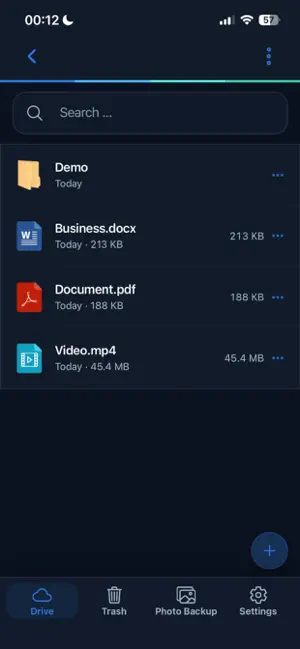
Scramble Cloud protects your files with client-side encryption and keeps them available across your devices. Securely upload files, organize them in folders, and access them wherever you are. Supported documents, photos, and videos can be viewed directly in the app. Automatic photo and video backup securely stores new media in your encrypted cloud—even for larger photo libraries. Features: Client-side file encryption Browse and manage files and folders Secure uploads and downloads Automatic photo and video backup View supported content directly in the app Privacy-focused cloud storage Access your files on the go Scramble Cloud combines secure cloud storage with a simple mobile experience for your documents, photos, and videos.
What’s new
Version 1.0.1 · Updated November 11, 2026
- FaceID / Biometric unlock - Upload stability improvements
App privacy
The developer, Lurus GmbH, reported these privacy practices to Apple.
Data Linked to You
The following data, which may be collected and linked to your identity, may be used for the following purposes:
- Contact Info: Email Address
- Identifiers: User ID
Used for: App Functionality
Alternatives to Scramble Cloud
Looking for apps like Scramble Cloud? Here are 6 similar apps on the App Store.
-
 ICNDrive
-
 Sulody
-
 CloudSpace - Cloud Storage
-
 CloudFile Secure Storage
-
 Daily Reminder : By k27
-
 bCloud - Cloud Storage
| App | Rating | Price | Last updated | Compare |
|---|---|---|---|---|
| Scramble Cloud | 5.0 / 5 (1 rating) | Free | November 11, 2026 | |
| ICNDrive | – | Free | Mar 14, 2026 | Compare |
| Sulody | – | Free | Nov 18, 2026 | Compare |
| CloudSpace - Cloud Storage | – | Free | Sep 16, 2026 | Compare |
| CloudFile Secure Storage | – | Free | Jun 2, 2026 | Compare |
| Daily Reminder : By k27 | – | Free | Jun 24, 2026 | Compare |
| bCloud - Cloud Storage | – | Free | Aug 8, 2026 | Compare |
Compare Scramble Cloud with the top alternatives: ratings, updates, ASO score and keyword gaps →