

Plyst — Live Requests & Tips
Adam Stuber Music iPhoneiPadiPod touch
Plyst — Live Requests & Tips is a free Music app for iPhone and iPad by Adam Stuber. Rated 5.0/5 from 1 ratings. Requires iOS 15.1. Updated October 12, 2026.
- Rating
- 5.0
- 1 ratings
- Price
- Free
- on the App Store
- Size
- 38 MB
- Age 4+
- Updated
- Oct 12
- 2026 · v1.2.0
Screenshots


About Plyst — Live Requests & Tips
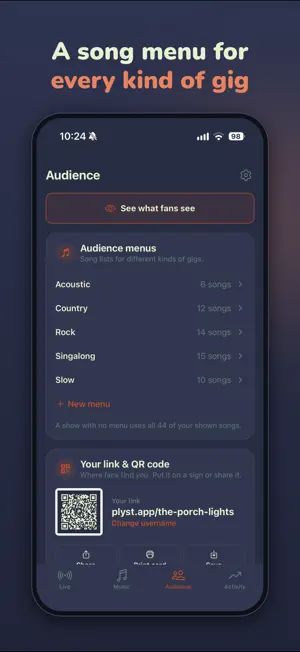
Play what you know. Get tipped without asking. Plyst gives live musicians a better way to take song requests, collect tips, and manage their shows. Build your song catalog, start an event, and share your unique QR code. Fans scan it to browse the songs you play, request their favorites, and leave a tip from their phones. They only see the songs you choose, so every request is something you actually know. No app required for your audience. Display your QR code wherever it fits your setup: on a table sign, tip jar, merch table, printed card, or screen. SONG REQUESTS Let your audience browse your catalog and request what they want to hear. See which songs are getting the most interest and decide what makes it into the show. TIPS Fans can tip with or without requesting a song, so you can give them an easy way to support you without stopping the music to ask. Choose the tip amounts fans pick from, and change them for any show. Payments are securely processed by Stripe, and payouts go directly to your connected bank account. REQUEST QUEUE Keep incoming requests organized when the show gets busy. Plyst helps surface the songs your audience wants most, while you stay in control of what you play next. AUDIENCE MENUS Create reusable song menus for different venues, crowds, or types of gigs. Choose a menu for each event to control exactly what your audience can browse and request. Hide any song with one tap and it disappears from every menu. SEE WHAT FANS SEE Preview your fan page any time, exactly as your audience will see it, before you ever go live. PRACTICE SHOWS Try a show before your first gig. Send yourself test requests, some with tips, and queue, play, or skip them just like you would on stage. Only you can see it, and nothing is charged. New accounts start with sample songs, so you can explore everything before adding your own. SETLISTS Plan your show and arrange songs in the order you want to play them. CHORD CHARTS & LYRICS Import PDFs, text and ChordPro files, or bring your whole library over from OnSong or Songbook Pro. Change keys in one tap, and use adjustable auto-scroll to follow along at your own pace while you perform. BAND VIEW Share a live view with your bandmates so everyone can follow incoming requests and help keep the show moving. HOW IT WORKS 1. Add the songs you play. 2. Try a practice show to see how a gig runs. 3. Connect your bank account to receive tips. 4. Start an event and display your QR code. 5. Manage requests and tips while you perform. Whether you play solo, as a duo, or with a full band, Plyst keeps audience interaction organized so you can focus on the show.
What’s new
Version 1.2.0 · Updated October 12, 2026
A new home for everything your audience sees • New Audience tab: your QR code and link, song menus, tip settings and profile, all in one place • See what fans see: preview your fan page any time, not just during a show • New QR code designs to print: table tents, handout cards and posters, with your name up top • Settings now lives behind the gear at the top of each tab • Tap the eye next to a song in Music to show or hide it from your audience Try it before your first gig • Practice shows: send yourself test requests, some with tips, and run a show from your couch. Only you can see it, and nothing is charged • New accounts start with sample songs and a past show to explore. They clear out when you add your first song Running your shows • Show settings have their own screen now, so the live view stays focused on the show • Choose which tip amounts fans can pick from, show by show • Pro: turn tips off for a private gig • See your live page: open the exact page fans see, mid-show Tips • Fans tip in your own currency • Clearer setup: it's obvious when tips are off and what's left • Venmo shows next to card tips once Stripe is set up Importing • Files with several songs split into separate songs • Better PDF charts, including chords like Dmaj7#5 • Charts saved as attachments in other apps' libraries now come across
App privacy
The developer, Adam Stuber, reported these privacy practices to Apple.
Data Linked to You
The following data, which may be collected and linked to your identity, may be used for the following purposes:
- Purchases: Purchase History
- Contact Info: Email Address, Name
- User Content: Other User Content
- Identifiers: User ID
Used for: App Functionality
Data Not Linked to You
The following data, which may be collected but is not linked to your identity, may be used for the following purposes:
- Usage Data: Product Interaction
- Search History: Search History
Used for: Analytics, App Functionality
Alternatives to Plyst — Live Requests & Tips
Looking for apps like Plyst — Live Requests & Tips? Here are 6 similar apps on the App Store. The highest rated is CrowdCue (5.0/5), and all 6 are free to download.
-
 CrowdCue
5.0
-
 Track Meet App
-
 Tiply - Live Music Tipping
4.0
-
 Elysian Marching
2.6
-
 Cortex Studio
2.2
-
 mySet
4.5
| App | Rating | Price | Last updated | Compare |
|---|---|---|---|---|
| Plyst — Live Requests & Tips | 5.0 / 5 (1 rating) | Free | October 12, 2026 | |
| CrowdCue | 5.0 / 5 (1) | Free | Jul 19, 2026 | Compare |
| Track Meet App | – | Free | Oct 7, 2026 | Compare |
| Tiply - Live Music Tipping | 4.0 / 5 (4) | Free | Oct 27, 2026 | Compare |
| Elysian Marching | 2.6 / 5 (5) | Free | Jul 28, 2026 | Compare |
| Cortex Studio | 2.3 / 5 (4) | Free | Oct 26, 2026 | Compare |
| mySet | 4.5 / 5 (55) | Free | Nov 27, 2025 | Compare |