

CountUp - Tally Counter Widget
Tien Dat Nguyen Utilities iPhoneiPadiPod touchApple Watch
CountUp - Tally Counter Widget is a free Utilities app for iPhone and iPad by Tien Dat Nguyen. Requires iOS 17.0. Updated October 10, 2026.
- Price
- Free
- on the App Store
- Size
- 13 MB
- Age 4+
- Updated
- Oct 10
- 2026 · v1.5.0
Screenshots

About CountUp - Tally Counter Widget
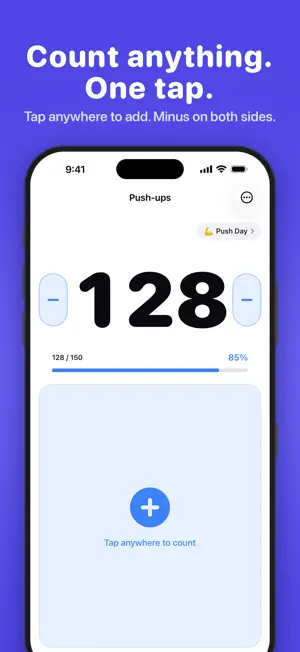
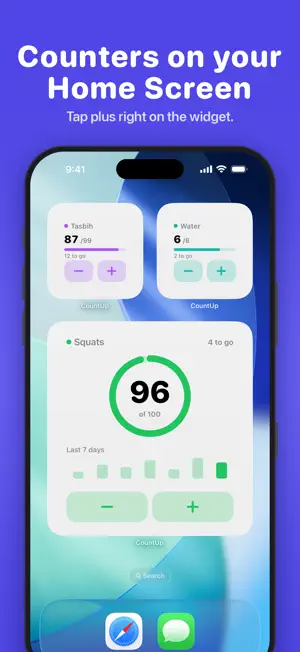
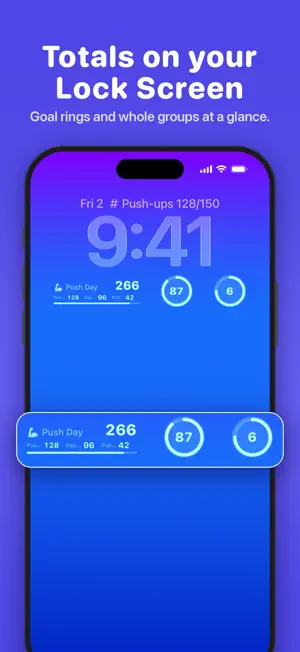
Tap anywhere to count. Reps at the gym, people through a door, laps in the pool, prayer beads on a commute: CountUp is a tally counter that stays out of your way, on your iPhone, your Home Screen and your Apple Watch. START FROM A TEMPLATE Pick a starting point and CountUp sets it up for you: Workout, Inventory, Habit, Baby, Sports, Classroom, Warehouse, Prayer or Gardening. Each template fills in the name, color and goal, so you are counting in one tap. Templates are free, on first launch and every time you add a counter. COUNT FROM YOUR WRIST The Apple Watch app is included for everyone. Tap to add, count with your phone in your bag, and your counts sync back to your iPhone in seconds. It keeps counting offline. A COUNTER ON YOUR HOME SCREEN Add the small CountUp widget and tap plus without opening the app. Pick the counter from a list, pick its look, choose plus and minus or just plus, choose what a tap adds, and show the goal ring or hide it. CountUp Pro adds the medium and large sizes, the Lock Screen, a widget for a whole group, and a CountUp button in Control Center on iOS 18. COUNTER GROUPS Keep related tallies together and give each group an emoji you recognize at a glance. All your lifts in Push Day. Your whole class in Class 4B. Home and away in one match. The combined total is the big number, and each counter sits underneath it with its own plus button, so you can tally a whole session without opening a thing. WHAT PEOPLE COUNT - Gym: reps, sets and laps - Faith: tasbih, dhikr, rosary and mantra repetitions - Events and classrooms: headcount, attendance, people through a door - Work: stock counts and quick inventory tallies - Everything else: golf strokes, knitting rows, scores, glasses of water WHAT YOU CAN DO - Unlimited named, color-coded counters - Start from a free template or a blank counter - Group counters, give the group an emoji, and see the combined total - Tap anywhere in the lower half of the screen to add, long-press minus to subtract - Set a goal per counter and watch the progress ring fill - Every counting session logged with net change and peak value - Count on Apple Watch, offline, syncing back in seconds BUILT TO BE SAFE Reset and delete sit behind a confirmation with an undo window, never next to the count button. Your counts do not disappear by accident. ACCESSIBILITY FIRST VoiceOver announces every count out loud. The counting zone is the whole lower half of the screen. Dynamic Type, Reduce Motion, and full light and dark support throughout. NO ACCOUNT NEEDED No sign-up and no login. Your counters and history are stored on your device. FREE AND PRO Free gives you unlimited counters and groups, every template, goals, sessions, the Apple Watch app, the last 30 days of history, and the small Home Screen widget. CountUp Pro is a one-time unlock, not a subscription, and adds: - Medium and large Home Screen widgets - Every Lock Screen widget, including a whole group above the clock - The group and multi-counter widgets - The Control Center button on iOS 18 - Watch-face complications - Your full history, with charts and CSV export - Custom step sizes - Custom sounds: pick a count sound for each counter and preview it first Restore Purchases is always available in Settings. Small team. Fair prices. Apps that do one thing well.
What’s new
Version 1.5.0 · Updated October 10, 2026
iPhone Duo support. Unfold your Duo and CountUp shows your counters and the open counter side by side; tap a counter in the list to switch without leaving the screen. On the outer display and in landscape, the counter screen now fits without clipping. CountUp no longer shows ads, for anyone. Settings has a new More apps from us section. Fixes and polish throughout.
App privacy
The developer, Tien Dat Nguyen, reported these privacy practices to Apple.
Data Not Linked to You
The following data, which may be collected but is not linked to your identity, may be used for the following purposes:
- Identifiers: Device ID
- Usage Data: Other Usage Data
- Diagnostics: Other Diagnostic Data
Used for: Third-Party Advertising, Analytics, App Functionality
Alternatives to CountUp - Tally Counter Widget
Looking for apps like CountUp - Tally Counter Widget? Here are 6 similar apps on the App Store. The highest rated is Arithmos - Tally Counter (5.0/5), and 5 of the 6 are free to download.
-
 Re:Count - Tally Counter
-
 Arithmos - Tally Counter
5.0
Arithmos - Tally Counter
5.0
-
 Tally One
-
 Calculator DE
5.0
Calculator DE
5.0
-
 Tick – Haptic Tally Counter
-
 Tallyn: Tally Counter
5.0
Tallyn: Tally Counter
5.0
| App | Rating | Price | Last updated | Compare |
|---|---|---|---|---|
| CountUp - Tally Counter Widget | – | Free | October 10, 2026 | |
| Re:Count - Tally Counter | – | Free | Oct 7, 2026 | Compare |
| Arithmos - Tally Counter | 5.0 / 5 (1) | Free | Sep 1, 2026 | Compare |
| Tally One | – | Free | May 13, 2026 | Compare |
| Calculator DE | 5.0 / 5 (2) | 1.99 USD | Jun 17, 2026 | Compare |
| Tick – Haptic Tally Counter | – | Free | Aug 3, 2026 | Compare |
| Tallyn: Tally Counter | 5.0 / 5 (1) | Free | Oct 16, 2026 | Compare |