

MeCode: QR Barcode Scanner
佩佩 杨 Utilities iPhoneiPadiPod touch
MeCode: QR Barcode Scanner is a free Utilities app for iPhone and iPad by 佩佩 杨. Rated 5.0/5 from 6 ratings. Requires iOS 18.6. Updated October 18, 2026.
- Rating
- 5.0
- 6 ratings
- Price
- Free
- on the App Store
- Size
- 24 MB
- Age 4+
- Updated
- Oct 18
- 2026 · v1.3.1
Screenshots


About MeCode: QR Barcode Scanner
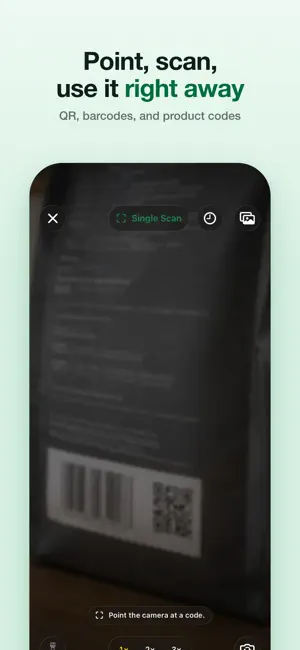
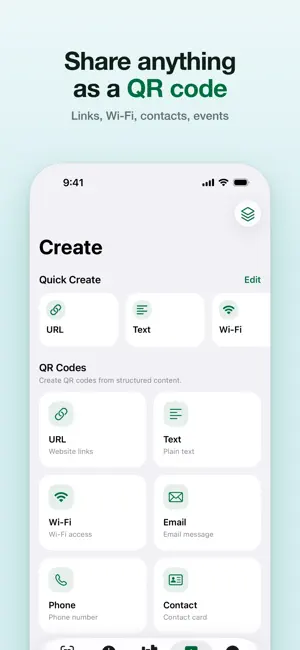
MeCode is a code tool for iPhone and iPad. Everything you scan or make stays in one place, ready to find and show when you need it. Scan and recognize - Scan QR codes, barcodes, product codes, and 2D matrix codes right away - Recognize codes in photos, screenshots, and PDFs, review every result, and save what you need - Open links, copy content, share, and favorite results Create codes - QR codes for links, text, Wi-Fi, email, phone, contacts, SMS, locations, and events - Product codes, ISBN, Code 128, Code 39, Code 93, Codabar, ITF-14, and Interleaved 2 of 5 - Data Matrix, PDF417, and Aztec - Turn content shared from Safari, Notes, Messages, and other apps into QR codes QR style and export - Start with a template, adjust colors, shapes, finder style, and margin, then add a logo - See reliability status and risk reasons while you edit, before you export - Export PNG, PDF, or SVG depending on the format, always on a clear high-contrast background Batches and scan sessions - Paste lines, paste a table, or import a UTF-8 CSV to generate a whole batch - Review valid, invalid, and duplicate records, then export a ZIP or import results into History - Inventory, verification, collection, and audit sessions show what is missing or unexpected - Export scan session results as CSV Organize, quick access, and privacy - History keeps scans, recognition results, shared records, manual creations, and batch output together - Search and filter records, and organize frequent codes with Favorites, Collections, and Tags - Home Screen widgets keep codes such as Wi-Fi ready to show, including in StandBy - Open scanning and common create flows from Control Center, the Lock Screen, and the Action button - No ad SDKs or third-party tracking SDKs; iCloud sync is your choice, and you can export your data anytime Terms of Use (EULA): https://www.apple.com/legal/internet-services/itunes/dev/stdeula/
Ratings & reviews
5.0
6 ratings
What’s new
Version 1.3.1 · Updated October 18, 2026
New Features - Added iPhone Duo support with a sidebar layout that shows lists and details side by side when unfolded - Added outer display support for iPhone Duo so you can scan, create, and manage codes while folded
App privacy
The developer, 佩佩 杨, reported these privacy practices to Apple.
Data Not Collected
The developer does not collect any data from this app.
Alternatives to MeCode: QR Barcode Scanner
Looking for apps like MeCode: QR Barcode Scanner? Here are 6 similar apps on the App Store. The highest rated is Moonglow: Soft Night Light (5.0/5), and 5 of the 6 are free to download.
-
 FlowClock - Standby Clock
-
 TwoCamera
1.0
TwoCamera
1.0
-
 Boundless Screenshot
3.7
Boundless Screenshot
3.7
-
 SnapFrame - On-device AI
-
 Moonglow: Soft Night Light
5.0
Moonglow: Soft Night Light
5.0
-
 Found It: Home Inventory
4.7
Found It: Home Inventory
4.7
| App | Rating | Price | Last updated | Compare |
|---|---|---|---|---|
| MeCode: QR Barcode Scanner | 5.0 / 5 (6 ratings) | Free | October 18, 2026 | |
| FlowClock - Standby Clock | – | Free | Apr 22, 2026 | Compare |
| TwoCamera | 1.0 / 5 (1) | Free | Jul 2, 2026 | Compare |
| Boundless Screenshot | 3.7 / 5 (6) | Free | Sep 11, 2026 | Compare |
| SnapFrame - On-device AI | – | 3.99 USD | Oct 28, 2026 | Compare |
| Moonglow: Soft Night Light | 5.0 / 5 (3) | Free | Oct 28, 2026 | Compare |
| Found It: Home Inventory | 4.7 / 5 (3) | Free | Oct 29, 2026 | Compare |