

PostureSense: Posture Reminder
juram park Health & Fitness iPhoneiPadiPod touch
PostureSense: Posture Reminder is a free Health & Fitness app for iPhone and iPad by juram park. Requires iOS 14.0. Updated October 2, 2026.
- Price
- Free
- on the App Store
- Size
- 28 MB
- Age 4+
- Updated
- Oct 2
- 2026 · v1.0.9
Screenshots

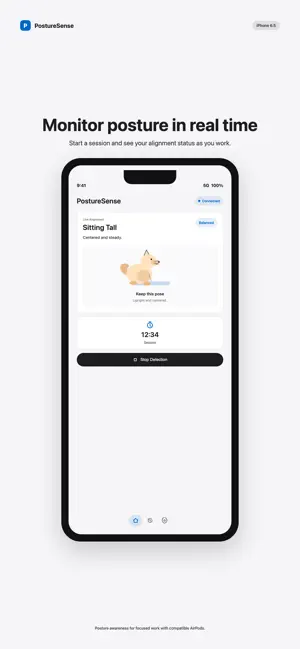
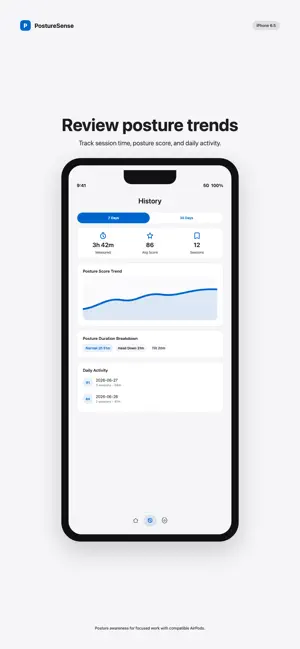

About PostureSense: Posture Reminder
Notice when your head drifts while you work or study. PostureSense turns motion from compatible AirPods into live posture feedback and adjustable slouch reminders. Build awareness of your sitting posture during desk work and focus sessions. Sign in, connect compatible AirPods, and follow a five-second calibration to set your comfortable neutral position. LIVE POSTURE FEEDBACK • See clear cues when your head moves away from your calibrated baseline • Notice looking down, forward lean, and sideways head tilt • Monitor with AirPods alone without turning on a camera • Choose when sustained posture changes trigger reminders BUILD A CONSISTENT ROUTINE • Review completed sessions and posture trends in History • Use reminders during work, study, and everyday focus OPTIONAL CAMERA ASSIST (BETA) Tap Use Camera Assist during an AirPods session to add posture evidence when your head and torso are visible. Grant camera permission and explicitly add a camera reference while holding your neutral posture. Camera Assist works while the app is in the foreground and the Camera Assist screen is visible. Camera images are processed on device and are never recorded or uploaded. Camera Assist is an optional beta and may not always work correctly; compatible AirPods are still required. GET STARTED 1. Sign in or create your PostureSense account. 2. Connect compatible AirPods and check that motion data is available. 3. Calibrate your neutral position, then begin your session. COMPATIBILITY Live posture monitoring requires compatible AirPods and an iPhone or iPad. Motion-data availability depends on your AirPods model, connection, device, and system software. AirPods are sold separately. PostureSense supports general wellness and habit awareness. It is not a medical device and does not diagnose, treat, cure, or prevent any condition. Stop use and consult a qualified professional if you have pain or health concerns.
What’s new
Version 1.0.9 · Updated October 2, 2026
PostureSense 1.0.9 adds a penguin that reflects your posture, including Looking Up. Settings are simpler with one reminder delay and cleaner rows. Camera Assist is labeled beta and asks before enabling. This update also improves foreground reminders, startup and login recovery, and removes Goals.
App privacy
The developer, juram park, reported these privacy practices to Apple.
Data Linked to You
The following data, which may be collected and linked to your identity, may be used for the following purposes:
- Health & Fitness: Fitness
- Contact Info: Email Address
- User Content: Customer Support
- Identifiers: User ID
- Diagnostics: Other Diagnostic Data
- Body: Head
Used for: App Functionality
Data Not Linked to You
The following data, which may be collected but is not linked to your identity, may be used for the following purposes:
- Identifiers: Device ID
- Usage Data: Product Interaction
- Diagnostics: Crash Data
Used for: Analytics, App Functionality
Alternatives to PostureSense: Posture Reminder
Looking for apps like PostureSense: Posture Reminder? Here are 6 similar apps on the App Store. The highest rated is PosturePal: Posture Scanner (5.0/5), and 4 of the 6 are free to download.
-
 SynoPosture
-
 Posture · Baro
-
 PosturePal: Posture Scanner
5.0
PosturePal: Posture Scanner
5.0
-
 Body Evaluation
1.0
Body Evaluation
1.0
-
 Sit Smart - Posture Corrector
5.0
Sit Smart - Posture Corrector
5.0
-
 SUMRY – Activity Insights
4.8
SUMRY – Activity Insights
4.8
| App | Rating | Price | Last updated | Compare |
|---|---|---|---|---|
| PostureSense: Posture Reminder | – | Free | October 2, 2026 | |
| SynoPosture | – | 3.99 USD | Apr 29, 2026 | Compare |
| Posture · Baro | – | Free | Oct 5, 2026 | Compare |
| PosturePal: Posture Scanner | 5.0 / 5 (2) | Free | Jul 18, 2026 | Compare |
| Body Evaluation | 1.0 / 5 (1) | 1.99 USD | Jun 29, 2026 | Compare |
| Sit Smart - Posture Corrector | 5.0 / 5 (1) | Free | Dec 10, 2024 | Compare |
| SUMRY – Activity Insights | 4.8 / 5 (5) | Free | Aug 11, 2026 | Compare |