

VibeBuddy: Agent Monitor
Xianwei Zhang Developer Tools iPhoneiPadiPod touchApple Watch
VibeBuddy: Agent Monitor is a free Developer Tools app for iPhone and iPad by Xianwei Zhang. Rated 5.0/5 from 1 ratings. Requires iOS 17.0.
- Rating
- 5.0
- 1 ratings
- Price
- Free
- on the App Store
- Size
- 29 MB
- Age 4+
- Updated
- Oct 12
- 2026 · v1.3.39
Screenshots

About VibeBuddy: Agent Monitor
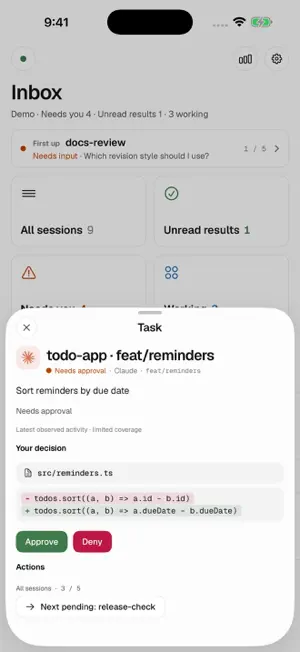
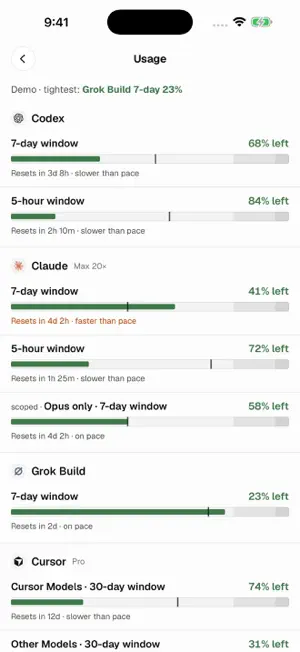
Follow Claude Code, Codex and Grok Build tasks, observe Grok Bot, and check Cursor account usage on iPhone. Handle supported approvals and questions. VibeBuddy puts three clear states in your pocket: Needs Response, Working and Done. Live task data comes from your own Mac. Install the free Mac companion, pair by QR code, and keep your Mac running and reachable. No VibeBuddy account is required. A built-in demo is available without a Mac. SEE WHAT NEEDS YOU Browse tasks by status, with project details and available model and context information. Find the task waiting for you without checking every window. DEEPER CODEX INTEGRATION Follow Codex Desktop and CLI tasks on your Mac. Through supported connections, answer questions, send follow-up instructions or start a task. Claude Code is also supported. Available actions depend on the agent version, setup and whether a request can be handled remotely. GROK BUILD, GROK BOT AND CURSOR Start Mac-managed Grok tasks, continue conversations, answer questions, handle supported approvals and stop tasks from iPhone. Instructions sent while running wait for the next turn. Live controls require the Mac companion to remain open. Grok Bot offers optional read-only task observation, completion summaries and separate account usage; respond in its official Mac app. Cursor account usage uses your existing Cursor app or CLI login on Mac, with separate Cursor Models and Other Models pools. Usage depends on available account data. REVIEW, THEN RESPOND Read a command or a bounded change preview before approving or denying it. Reply to supported questions from your phone. Requests that need the Mac say so. Remote actions require a reachable paired Mac. YOUR TASKS, ON YOUR WRIST New Apple Watch complications show followed tasks in a rectangular slot and remaining Claude, Codex or combined quota in a circular slot. Choose from five quota display styles. A paired iPhone is required; values depend on available source data and refresh timing is controlled by the system. A REFRESHED COMPANION EXPERIENCE A shared cat identity, consistent agent icons and a simpler phone connection menu make status easier to recognize. The updated Mac menu-bar interface, notch glance and task cards keep progress close at hand on your desktop too. NOTIFICATIONS AND LOCK-SCREEN STATUS Check task status through notifications, Live Activities and Dynamic Island. Availability depends on connectivity, notification settings and system scheduling. Reconnect to your Mac before taking action when offline. Background remote push requires a separately configured APNs provider on the Mac; the public Mac download does not include a project push credential. OPTIONAL VOICE COMPANION Use your own provider API key to enable voice conversations. Voice is off by default. Audio and selected session context go directly to your chosen provider, whose fees may apply. The dashboard and approvals work without voice. GET STARTED WITH YOUR MAC 1. Open the GitHub download page below on your Mac. Under Assets, download the DMG and install the free Mac companion. 2. Put iPhone and Mac on the same local network. On Mac, open “Devices & connection” and choose “Show connection code”. 3. On first launch, tap “Scan to pair” on iPhone. Follow Setup in the Mac settings to connect your agent. Download the Mac companion: https://github.com/semantic-craft/iOS-vibebuddy/releases/latest Requires an Apple Silicon Mac with macOS 14 or later. Just exploring? Tap “See the demo (no Mac needed)” on the connection screen to try sample tasks. Free and open source. No VibeBuddy account, advertising or tracking. Task connections go directly to your Mac. When enabled, notifications use Apple's push service; optional voice connects to your selected provider. VibeBuddy operates no session cloud service. VibeBuddy is an independent companion and is not affiliated with OpenAI, Anthropic, xAI or Anysphere.
What’s new
Version 1.3.39 · Updated October 12, 2026
Task results no longer have read or unread states. Completed results remain available without adding to pending counts. Historical, read-only tasks no longer count as needing your attention, including past failures. Older historical tasks stay in history, while live questions and approvals remain visible.
App privacy
The developer, Xianwei Zhang, reported these privacy practices to Apple.
Data Linked to You
The following data, which may be collected and linked to your identity, may be used for the following purposes:
- User Content: Audio Data, Other User Content
- Identifiers: Device ID
Used for: App Functionality
Alternatives to VibeBuddy: Agent Monitor
Looking for apps like VibeBuddy: Agent Monitor? Here are 6 similar apps on the App Store. The highest rated is Contribution Counts (5.0/5), and all 6 are free to download.
-
 AgStatus: Coding Agent Board
-
 MLX Companion
-
 Mossh: Codex SSH Terminal
-
 Contribution Counts
5.0
Contribution Counts
5.0
-
 AI Usage Tracker: Pulse
-
 Charge - AI Usage Tracker
| App | Rating | Price | Last updated | Compare |
|---|---|---|---|---|
| VibeBuddy: Agent Monitor | 5.0 / 5 (1 rating) | Free | October 12, 2026 | |
| AgStatus: Coding Agent Board | – | Free | Oct 5, 2026 | Compare |
| MLX Companion | – | Free | Oct 17, 2026 | Compare |
| Mossh: Codex SSH Terminal | – | Free | May 25, 2026 | Compare |
| Contribution Counts | 5.0 / 5 (1) | Free | Oct 1, 2026 | Compare |
| AI Usage Tracker: Pulse | – | Free | Oct 25, 2026 | Compare |
| Charge - AI Usage Tracker | – | Free | Sep 17, 2026 | Compare |