

ShotKit: Screenshot Studio
永 张 Graphics & Design iPhoneiPadiPod touch
ShotKit: Screenshot Studio is a free Graphics & Design app for iPhone and iPad by 永 张. Requires iOS 17.0. Updated July 1, 2026.
- Price
- Free
- on the App Store
- Size
- 1 MB
- Age 4+
- Updated
- Jul 1
- 2026 · v1.0
Screenshots


About ShotKit: Screenshot Studio
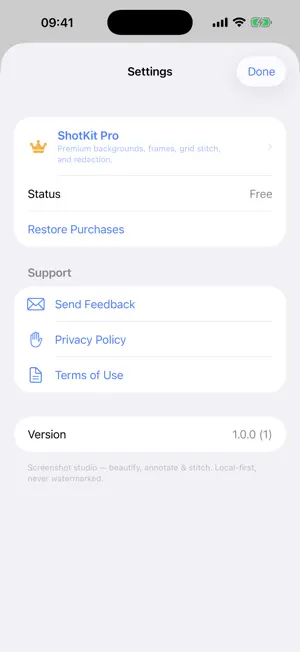
ShotKit is the all-in-one screenshot studio for iPhone and iPad. Beautify, annotate, and stitch — three tools every screenshot needs, in one fast, native, fully on-device app. No watermark, ever. Most screenshot apps do one thing. ShotKit does the three that matter: drop a shot on a gorgeous background, mark it up with arrows and text, and stitch long pages into a single image. All offline. The full core toolkit is built in. — WHAT MAKES SHOTKIT DIFFERENT — • THREE TOOLS, ONE APP Beautify, annotate, and stitch live side by side. Stop juggling a mockup app, a markup app, and a long-screenshot app. ShotKit replaces all three. • BEAUTIFY IN SECONDS Drop any screenshot onto gradient, solid, or wallpaper backgrounds. Add iPhone, iPad, Mac, or browser device frames. Tune padding, shadow, rounded corners, and a subtle 3D tilt. Export at full resolution. • POWERFUL ANNOTATION Arrows, rectangles, ellipses, lines, freeform text, highlighter, and numbered step badges. Spotlight and zoom to draw the eye. Blur or pixelate to redact emails, faces, and API keys before you share. • LONG-SCREENSHOT STITCHING Combine a scrolling capture into one tall image, or lay shots out in a clean side-by-side grid. Seams align automatically. • 100% LOCAL, ZERO TELEMETRY No cloud, no tracking, no accounts. Every pixel is processed on your device. Network access is for StoreKit only. • NEVER A WATERMARK The core beautify and basic annotation tools are built in, and your exports are always clean. Pro adds premium backgrounds and frame packs, unlimited stitch, batch export, and advanced redaction — never a watermark on any export. — WHO IS SHOTKIT FOR? — • Designers and PMs who post UI screenshots and want them to look polished • Developers documenting bugs who need arrows, text, and quick redaction • Support and ops teams stitching long chat or settings screens into one image • Anyone tired of switching between three separate screenshot apps — PRICING — The core beautify and basic annotation tools are built in, with no watermark on exports. Pro unlocks premium backgrounds and frame packs, unlimited stitching, batch export, and advanced redaction via a yearly subscription with a one-week trial, or a one-time lifetime purchase. — BUILT FOR APPLE — Requires iOS 17.0 or later. Built with SwiftUI, PhotosUI, Core Image, and PencilKit. Universal app for iPhone and iPad. — FEEDBACK — Made by Peter Zhang. Every email at [email protected] is read personally. Learn more: https://obelisk.club/shotkit Terms of Use (EULA): https://obelisk.club/shotkit/terms
App privacy
The developer, 永 张, reported these privacy practices to Apple.
Data Not Collected
The developer does not collect any data from this app.
Alternatives to ShotKit: Screenshot Studio
Looking for apps like ShotKit: Screenshot Studio? Here are 6 similar apps on the App Store. The highest rated is BetterShots - Edit Screenshots (5.0/5), and all 6 are free to download.
-
 BetterShots - Edit Screenshots
5.0
-
 Xnapper - Beautiful Screenshot
4.2
-
 Toolbox for Microsoft Word
4.6
-
 Wallpapers Neo: Live Wallpaper
5.0
-
 Caricature Cartoons Neon ToonU
3.7
-
 Cartoon Caricature Blend Pic
2.9
| App | Rating | Price | Last updated | Compare |
|---|---|---|---|---|
| ShotKit: Screenshot Studio | – | Free | July 1, 2026 | |
| BetterShots - Edit Screenshots | 5.0 / 5 (2) | Free | Sep 13, 2026 | Compare |
| Xnapper - Beautiful Screenshot | 4.2 / 5 (21) | Free | Mar 12, 2026 | Compare |
| Toolbox for Microsoft Word | 4.6 / 5 (66) | Free | Apr 30, 2026 | Compare |
| Wallpapers Neo: Live Wallpaper | 5.0 / 5 (2) | Free | Sep 23, 2026 | Compare |
| Caricature Cartoons Neon ToonU | 3.7 / 5 (7) | Free | May 2, 2025 | Compare |
| Cartoon Caricature Blend Pic | 2.9 / 5 (14) | Free | Oct 21, 2026 | Compare |