

PDF Converter, Scanner
Murat Kul Productivity iPhoneiPadiPod touch
PDF Converter, Scanner is a free Productivity app for iPhone and iPad by Murat Kul. Rated 5.0/5 from 1 ratings. Requires iOS 18.0. Updated August 29, 2026.
- Rating
- 5.0
- 1 ratings
- Price
- Free
- on the App Store
- Size
- 5 MB
- Age 4+
- Updated
- Aug 29
- 2026 · v1.0.4
Screenshots

About PDF Converter, Scanner
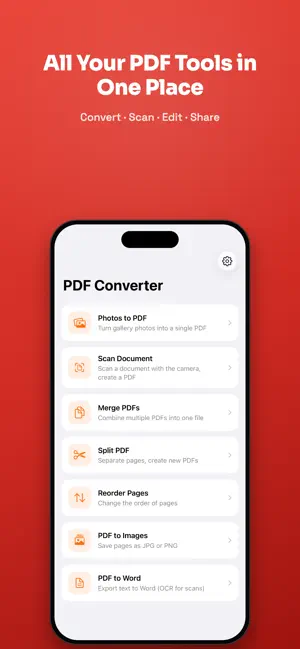
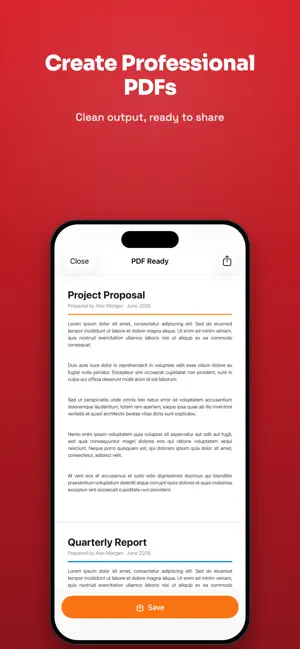
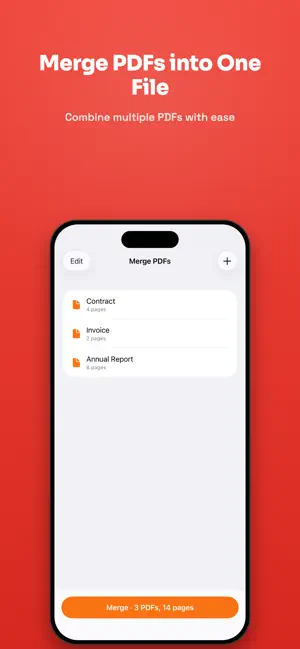
PDF Converter is built to handle your PDF tasks quickly and simply. Every screen focuses on one job — no clutter, easy to learn. FEATURES • Photos to PDF Pick one or more photos from your gallery and create a single PDF. Choose the page size (original, A4, Letter). • Scan Document Scan a document with your camera, or pick a photo from your gallery; edges are detected automatically (adjust them by hand if you like), and the perspective is corrected into a clean PDF. Photo-based scanning works even on devices without a camera. • Merge PDFs Drag to reorder multiple PDFs and combine them into one file. • Split PDF View a PDF's pages, select the ones you want, and extract them as a new PDF. • Reorder Pages Rearrange pages with drag and drop, then save as a new PDF. • Save & Share Save your PDFs to the Files app or iCloud Drive, and share them with any app. • Share Extension Convert images straight to PDF from other apps using "Convert to PDF". • Personalization Light and dark themes, Turkish and English — set it your way in Settings. Love it? Share the app and leave a rating with a single tap. • PDF to Images Save each page of a PDF as a JPG or PNG image. • PDF to Word Export a PDF's text to a Word document (.docx). For scanned documents, text is extracted with OCR. PRIVACY FIRST PDF Converter works entirely on your device. No servers, no accounts, no tracking. Your documents never leave your iPhone. PREMIUM Photos to PDF and Scan Document are free. Unlock merging, splitting, page reordering, PDF to images, and PDF to Word with a single one-time purchase — no subscription.
What’s new
Version 1.0.4 · Updated August 29, 2026
This update turns the app from a toolbox into a real document hub. • My Documents: every PDF you create now collects in a library. Search, rename, share — or send it into another tool in one tap. Select several documents to merge, compress, share or delete them in one go. • 5 new tools: Compress PDF (fit it in an email), Protect PDF (add or remove a password), Searchable PDF (search and copy inside a scan), Add Watermark, Page Numbers. • Shortcuts, widget and Control Center: put "Scan Document" in Control Center or on the Action Button. Compressing, merging and protecting run from Shortcuts without opening the app. • Tap "Open" on a PDF in Files or Mail and we're right there — the document goes straight into the tool you pick. • Smart naming and summaries: documents are named from their own content, and long files get a three-sentence summary. Powered by Apple's on-device model — no internet, your document never leaves the phone. (iOS 26 with Apple Intelligence.)
App privacy
The developer, Murat Kul, reported these privacy practices to Apple.
Data Not Linked to You
The following data, which may be collected but is not linked to your identity, may be used for the following purposes:
- Identifiers: Device ID
- Usage Data: Product Interaction
- Diagnostics: Performance Data
Used for: Analytics
Alternatives to PDF Converter, Scanner
Looking for apps like PDF Converter, Scanner? Here are 6 similar apps on the App Store. The highest rated is Loominote: Smart AI Note Taker (4.9/5), and all 6 are free to download.
-
 Scan Flow: PDF Scanner
-
 PDF Editor & Scanner Pro
-
 Loominote: Smart AI Note Taker
4.9
Loominote: Smart AI Note Taker
4.9
-
 ScannerX: PDF Scanner App
-
 Nova Dictate: Pro Mic Speech
-
 SafeSign: Lease Analyzer
| App | Rating | Price | Last updated | Compare |
|---|---|---|---|---|
| PDF Converter, Scanner | 5.0 / 5 (1 rating) | Free | August 29, 2026 | |
| Scan Flow: PDF Scanner | – | Free | Sep 20, 2026 | Compare |
| PDF Editor & Scanner Pro | – | Free | Jul 23, 2026 | Compare |
| Loominote: Smart AI Note Taker | 4.9 / 5 (34) | Free | Sep 17, 2026 | Compare |
| ScannerX: PDF Scanner App | – | Free | Aug 13, 2026 | Compare |
| Nova Dictate: Pro Mic Speech | – | Free | Aug 5, 2026 | Compare |
| SafeSign: Lease Analyzer | – | Free | Sep 7, 2026 | Compare |