

QR Scanner · Baro
Euiseok Kim Utilities iPhoneiPadiPod touch
QR Scanner · Baro is a free Utilities app for iPhone and iPad by Euiseok Kim. Rated 1.0/5 from 1 ratings. Requires iOS 13.0. Updated September 28, 2026.
- Rating
- 1.0
- 1 ratings
- Price
- Free
- on the App Store
- Size
- 26 MB
- Age 4+
- Updated
- Sep 28
- 2026 · v1.0.24
Screenshots

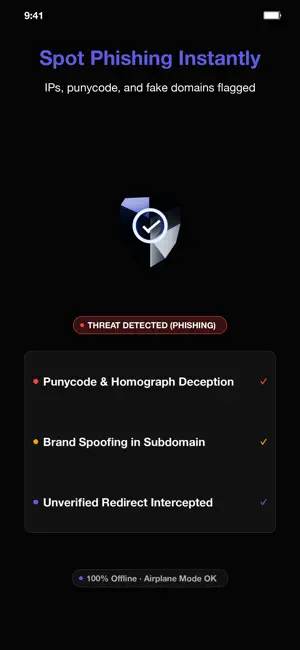
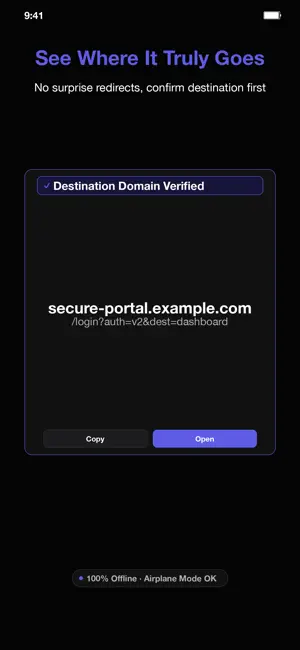

About QR Scanner · Baro
■ The tools you reach for first. Apple's Camera opens a scanned QR link the instant you tap it — you never see where it really goes. QR Scanner shows you the FULL destination and runs an on-device phishing check BEFORE anything opens. See exactly where a code leads, decide for yourself, then open. No internet, no account, no ads, no tracking. Turn on airplane mode and it still works. That's the whole point. Scan, the safety check, and your history all happen on your device. No subscription, no ads. ------------------------------- ● See the link before you open it ------------------------------- • The result sheet shows the decoded destination in full — no instant redirect, no surprise. • Got a code in a screenshot or a saved picture? Scan it straight from your photos. The decoding runs on your device, and it works even when the camera isn't available. • An on-device phishing check flags the usual traps: not-https, a raw IP-address host, punycode and look-alike characters, the "real-looking name hides the true destination" trick, overly deep subdomains, link shorteners, and abused domain endings. • A clear verdict — green safe, amber caution, red danger — always with an icon and a label, never colour alone. • A dangerous link needs an explicit second confirmation before it can open. No accidental taps. ------------------------------- ● Make codes, keep your own history ------------------------------- • Offline QR code maker — turn typed text into a code, no connection needed. • Ready-made templates: Wi-Fi, a contact, an email or a phone number. Fill in the fields and the code is built on your phone. • A scan history that lives only on your phone and is never uploaded. ------------------------------- ● Private and offline by design ------------------------------- • The camera is used ONLY to read codes on-device — no frame is recorded or uploaded. Scanning runs on ZXing, on your device, not in any cloud. • Zero network calls after install — provable in airplane mode. Privacy label: Data Not Collected. • You can see it, not just read it: an OFFLINE badge sits on the viewfinder while the camera runs, and your history states plainly that it stays on this phone. • No analytics, no ads, no account. ------------------------------- ● Built to be used by anyone ------------------------------- • 64 × 64 pt touch targets · AMOLED black · Electric Indigo accent · WCAG-AAA contrast • English · Korean · Japanese · German · French · Arabic · Simplified Chinese ------------------------------- ● No subscriptions, no ads ------------------------------- No subscription. No ads. No account. QR Scanner joins Scanner and the rest of Baro — lightweight tools that respect your data. "The tools you reach for first."
What’s new
Version 1.0.24 · Updated September 28, 2026
Continuous batch scan mode, history category filters, and CSV export. Faster scanning and reliability improvements.
App privacy
The developer, Euiseok Kim, reported these privacy practices to Apple.
Data Not Collected
The developer does not collect any data from this app.
Alternatives to QR Scanner · Baro
Looking for apps like QR Scanner · Baro? Here are 6 similar apps on the App Store.
-
 Scanner Gun
-
 CellArc
-
 NeatPaste: Clean & Check Text
-
 Site Calc Pro
-
 PDF Encrypt Assisant
-
 MagStud Pro: Stud Finder
| App | Rating | Price | Last updated | Compare |
|---|---|---|---|---|
| QR Scanner · Baro | 1.0 / 5 (1 rating) | Free | September 28, 2026 | |
| Scanner Gun | – | Free | Jan 18, 2024 | Compare |
| CellArc | – | 1.99 USD | Sep 14, 2026 | Compare |
| NeatPaste: Clean & Check Text | – | Free | Oct 5, 2026 | Compare |
| Site Calc Pro | – | Free | May 31, 2026 | Compare |
| PDF Encrypt Assisant | – | 9.99 USD | May 13, 2026 | Compare |
| MagStud Pro: Stud Finder | – | 2.99 USD | Oct 5, 2026 | Compare |
Compare QR Scanner · Baro with the top alternatives: ratings, updates, ASO score and keyword gaps →