

Easy Photo Sticker Maker
Tsuyoshi Yonemoto Photo & Video iPhoneiPadiPod touch
Easy Photo Sticker Maker is a free Photo & Video app for iPhone and iPad by Tsuyoshi Yonemoto. Requires iOS 17.0. Updated September 30, 2026.
- Price
- Free
- on the App Store
- Size
- 44 MB
- Age 4+
- Updated
- Sep 30
- 2026 · v1.3.10
Screenshots


About Easy Photo Sticker Maker
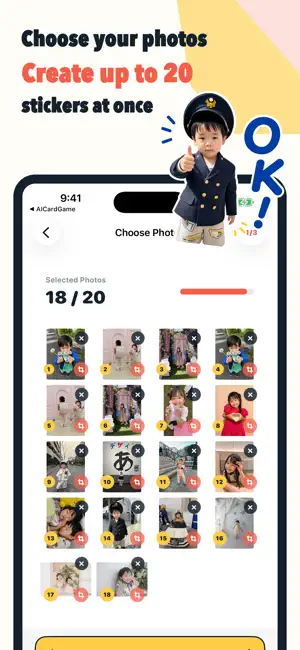
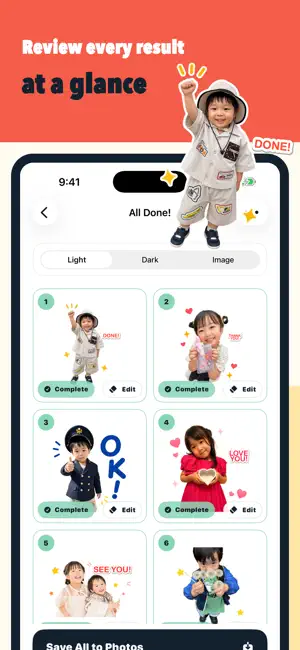
Just choose photos to create up to 20 sticker images at once that are easy to use in conversations. An in-app purchase is required to create sticker images. Easy AI Sticker Maker creates captioned sticker images from photos of family, children, pets, friends, favorite people, and more. It keeps the original feel of your photos while adding a white outline and large, easy-to-read text, creating images you can save and use right away. ■ KEY FEATURES - Create up to 20 sticker images at once from photos (in-app purchase required) - Get suggestions for useful everyday captions such as “Good morning,” “Thank you,” and “OK” (available after in-app purchase) - Change captions and text colors, and preview how the background looks (available after in-app purchase) - Review completed images in a list (available after in-app purchase) - Save completed sticker images to the Photos app (available after in-app purchase) - Use generated images as submission assets for LINE Creators Market and similar services ■ RECOMMENDED FOR - People who want to turn photos of children or family into stickers - People who want to use their pet’s cute expressions in chats - People who want to create original sticker images even if they cannot draw - People who want to create several images at once and compare the results - People who want to check how backgrounds and text look before submitting ■ HOW TO USE 1. Select the photos you want to turn into stickers 2. Choose captions and colors 3. Review the finished images in a list 4. Save and use the images ■ ABOUT IN-APP PURCHASES An in-app purchase is required to create sticker images. Each purchase lets you create up to 20 sticker images at once. The price is shown on the App Store purchase screen. Generated images may be used for personal purposes, social media posts, sticker submissions, and more, subject to the rules of the service where you use them. ■ IMPORTANT This app is not an official LINE app. Users are responsible for submissions, review, sales, and publication settings on LINE Creators Market. Approval and sales results are not guaranteed. Use only photos that you own the rights to or have permission to use.
What’s new
Version 1.3.10 · Updated September 30, 2026
I have made bug fixes and improvements to performance and other aspects.
App privacy
The developer, Tsuyoshi Yonemoto, reported these privacy practices to Apple.
Data Used to Track You
The following data may be used to track you across apps and websites owned by other companies:
- Purchases: Purchase History
- Identifiers: Device ID
- Usage Data: Product Interaction
Data Linked to You
The following data, which may be collected and linked to your identity, may be used for the following purposes:
- Purchases: Purchase History
- Contact Info: Email Address
- User Content: Photos or Videos, Customer Support
- Identifiers: User ID, Device ID
- Usage Data: Product Interaction, Other Usage Data
- Diagnostics: Crash Data, Performance Data
Used for: App Functionality
Alternatives to Easy Photo Sticker Maker
Looking for apps like Easy Photo Sticker Maker? Here are 6 similar apps on the App Store.



| App | Rating | Price | Last updated | Compare |
|---|---|---|---|---|
| Easy Photo Sticker Maker | – | Free | September 30, 2026 | |
| MyStamp AI | – | Free | Mar 13, 2026 | Compare |
| Chibi Me - Cartoon Sticker | – | Free | Oct 5, 2026 | Compare |
| Y2K Photo Editor: KIRAKIRA | – | Free | Oct 6, 2026 | Compare |
| exhivision | – | Free | Feb 19, 2026 | Compare |
| FoV+ | – | Free | Sep 22, 2026 | Compare |
| Rain Drop Cam | – | Free | Jul 7, 2026 | Compare |