

Fax: Send & Receive from Phone
Cricket Live Line Business iPhoneiPadiPod touch
Fax: Send & Receive from Phone is a free Business app for iPhone and iPad by Cricket Live Line. Requires iOS 17.0. Updated October 3, 2026.
- Price
- Free
- on the App Store
- Size
- 22 MB
- Age 4+
- Updated
- Oct 3
- 2026 · v1.0.4
Screenshots



About Fax: Send & Receive from Phone
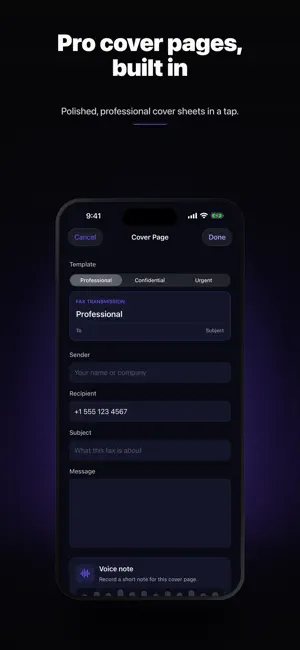
Send and receive faxes right from your phone — no fax machine, no landline, no trip to the office. Scan a document, add a cover sheet, and fax it to any number in seconds. Every send comes with a printable delivery confirmation, so you always know it went through. Whether it's a medical form, a signed contract, an insurance claim, or tax paperwork, Fax turns your iPhone into a full fax machine that fits in your pocket. WHY PEOPLE CHOOSE FAX • Send a fax in under a minute — scan, type the number, tap send • Receive faxes too — get your own fax number and read incoming faxes instantly • Delivery receipts — a printable confirmation page for every fax you send • Built-in scanner — auto-crops, straightens, and sharpens pages into clean PDFs • OCR text recognition — your documents become searchable • Sign documents — add your signature before you fax • Cover sheets — add a professional cover page in one tap • Import from anywhere — Files, iCloud Drive, Photos, email attachments, or other apps • Fax to 200+ countries SECURE & PRIVATE Your documents are encrypted in transit and stored securely. We never sell your data. Faxing remains one of the most trusted ways to send sensitive paperwork — and Fax keeps it that way. PERFECT FOR • Healthcare forms and prescriptions • Legal contracts and agreements • Insurance and claims paperwork • Tax and accounting documents • HR, banking, and government forms • Real estate and mortgage documents HOW IT WORKS 1. Scan a document with your camera or import a PDF 2. Enter the recipient's fax number 3. Add a cover sheet if you need one 4. Tap Send — and get a delivery receipt when it arrives NO FAX MACHINE REQUIRED Stop hunting for a fax machine or paying for a second phone line. Everything you need to send and receive faxes is in one simple app. Download Fax and send your first fax today. — Subscription unlocks unlimited faxing. Payment is charged to your Apple ID at confirmation of purchase. Subscriptions auto-renew unless turned off at least 24 hours before the period ends. Manage or cancel anytime in your App Store account settings. Terms: https://arioapps.com/terms Privacy: https://arioapps.com/privacy
What’s new
Version 1.0.4 · Updated October 3, 2026
Improved startup reliability, durable document drafts and recovery when sending is not yet confirmed. Clearer errors help you retry without losing your work. Updated Ario Pass membership and reward feedback.
App privacy
The developer, Cricket Live Line, reported these privacy practices to Apple.
Data Linked to You
The following data, which may be collected and linked to your identity, may be used for the following purposes:
- Purchases: Purchase History
- Contact Info: Email Address, Name, Phone Number
- User Content: Other User Content
- Identifiers: User ID, Device ID
Used for: App Functionality
Alternatives to Fax: Send & Receive from Phone
Looking for apps like Fax: Send & Receive from Phone? Here are 6 similar apps on the App Store. The highest rated is #FAX from iPhone: free sending (4.9/5), and all 6 are free to download.
-
 FREE Fax from iPhone
4.7
-
 Fax From iPhone - Receive Fax
4.8
-
 FAX for iPhone: Send & Receive
4.8
-
 Send Fax App: Fax From iPhone
4.6
-
 #FAX from iPhone: free sending
4.9
-
 Fax.Plus - Receive & Send Fax
4.7
| App | Rating | Price | Last updated | Compare |
|---|---|---|---|---|
| Fax: Send & Receive from Phone | – | Free | October 3, 2026 | |
| FREE Fax from iPhone | 4.7 / 5 (1,059) | Free | Sep 9, 2026 | Compare |
| Fax From iPhone - Receive Fax | 4.8 / 5 (16,800) | Free | Jun 2, 2026 | Compare |
| FAX for iPhone: Send & Receive | 4.8 / 5 (34,951) | Free | May 29, 2025 | Compare |
| Send Fax App: Fax From iPhone | 4.6 / 5 (10,827) | Free | Oct 23, 2026 | Compare |
| #FAX from iPhone: free sending | 4.9 / 5 (8,150) | Free | Mar 25, 2024 | Compare |
| Fax.Plus - Receive & Send Fax | 4.7 / 5 (13,322) | Free | Oct 23, 2026 | Compare |