

neoloopy
Abraham Kim Productivity iPhoneiPadiPod touch
neoloopy is a free Productivity app for iPhone and iPad by Abraham Kim. Requires iOS 15.0. Updated October 14, 2026.
- Price
- Free
- on the App Store
- Size
- 36 MB
- Age 4+
- Updated
- Oct 14
- 2026 · v3.8.0
Screenshots
About neoloopy
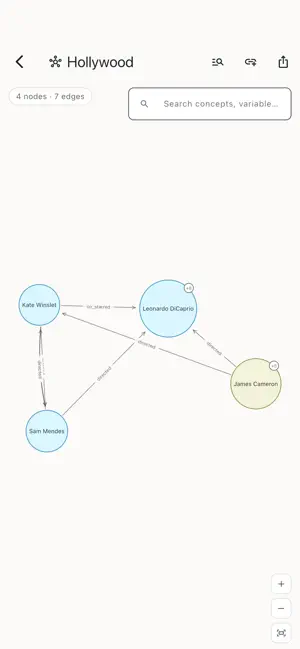
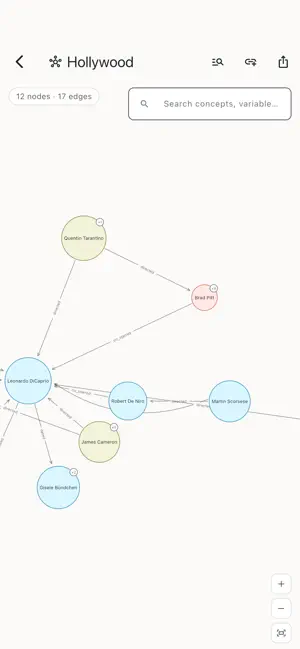
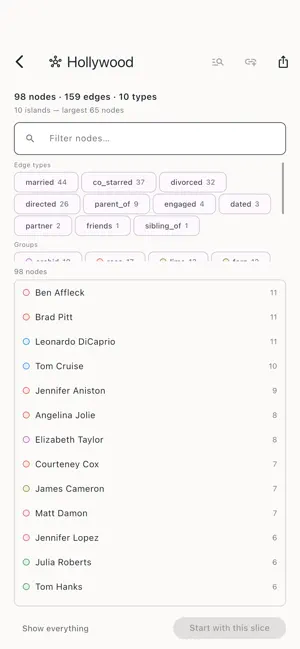
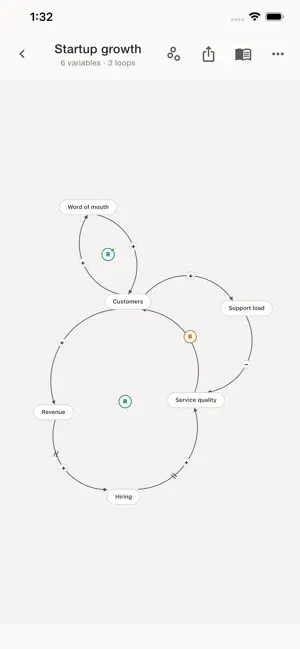
neoloopy is a local-first tool for systems thinking. Map any system as a causal-loop diagram, let neoloopy find the feedback loops that drive it, grow a Graph: a system map that holds your ideas next to live references to your models, variables, loops, and concepts — and model a process as a Petri net and keep every run as evidence. PROCESSES — PETRI NETS (PRO) • Draw a process on the canvas: places hold tokens, transitions fire, arcs connect them. • Check a draft's health before you run it. Missing data, disconnected elements and undocumented meanings are listed; the draft tells you when it is executable. • Step the process and keep the run. Every run is immutable, pinned to the exact source revision it ran from, and replays the same way every time. • Document each element's meaning in Process Docs, right next to the drawing. • Export a process with its saved source, runs and analyses, and import it elsewhere with an explicit identity decision — create, replace or duplicate. • Part of Pro; included for everyone during the launch period. What you build stays free to open and replay. GRAPH — YOUR SYSTEM MAP • Put an idea on the canvas and link it to the real thing: a model, a variable, a loop, a concept from your vault. References stay live, so the map is never a stale drawing of your thinking. • Focus on one node and the map re-centers around it. A +N badge counts its hidden relations — tap to bring them in, tap again to prune. • Search the structure. The board lists every node and relation with search and filters, so a hundred-node map is still navigable on a phone. • Plain files. Every graph is a Markdown note in your vault, and graphs import from and export to Cypher for tools that speak property graphs. CAUSAL LOOPS, FOUND FOR YOU • Draw a variable, connect causes to effects, and mark each link same-direction (+) or opposite (−). neoloopy continuously detects every closed feedback loop and badges it Reinforcing (R) or Balancing (B) — the heart of how systems grow, stall, and stabilize. • Recognize the patterns. Classic archetypes like Limits to Growth and Tragedy of the Commons surface when your structure matches them. • Read the dynamics. Mark delays, flag virtuous vs. vicious cycles, and see how much of your model sits inside feedback loops. • See an edit's impact before you commit it: which loops it creates and which it breaks. • Annotate richly. Write a note on any loop or variable to capture what it means and why it matters. STOCKS AND FLOWS • When a map is ready for more, draw it in stock-and-flow notation on the same canvas — stocks as tanks, flows as channels — and export the result as SVG. ENGAGE — BUILD FROM YOUR INTENT • Tell Engage what you want a model to help you understand or decide. It asks one model-specific question at a time until the next useful increment is clear — not a generic checklist. • Guidance stays scoped to the model in front of you, so it asks about what your model actually depends on. • Pick a journey up where you left it, or end it and start another. LEARN AS YOU GO • A built-in systems-thinking glossary explains every term — causal link, polarity, delay, reinforcing, balancing — right where you need it. LOCAL-FIRST BY DESIGN • No account required. Download it and work offline. • Your models and graphs are plain Markdown files in a folder on your device — yours to keep, back up, and open in other tools. • Obsidian-compatible vault format. Your thinking is never locked in. • Search languages: English is always on; turn on Korean for a vault and its search index covers Korean text as well. • No ads, no tracking, no analytics inside the app. • Optional cross-device Sync (in development) is end-to-end encrypted: notes are encrypted on your device before they ever leave it, so we relay only ciphertext and cannot read your models. Map a business, a habit, a team, an ecosystem, a policy, a process — anything with moving parts that affect each other. Think in loops, and keep the map.
What’s new
Version 3.8.0 · Updated October 14, 2026
Process models come to iPhone and iPad. Draw a Petri net on the canvas — places, transitions and arcs — check the draft's health, step it, and keep every run as immutable evidence pinned to the exact source it ran from. Document each element in Process Docs, and export a process with its runs and analyses or import one with an explicit identity decision. Process models are part of Pro, the same subscription as the quantitative layer. During the launch period, creating and running processes in the app is included for everyone; what you build stays free to open and replay. Also in 3.8.0: • Search languages: English stays the main language; turn on Korean for a vault and its search index covers Korean text. • Show or hide the quantitative graph inspector on the canvas.
App privacy
The developer, Abraham Kim, reported these privacy practices to Apple.
Data Not Linked to You
The following data, which may be collected but is not linked to your identity, may be used for the following purposes:
- Contact Info: Email Address
- User Content: Other User Content
Used for: App Functionality
Alternatives to neoloopy
Looking for apps like neoloopy? Here are 6 similar apps on the App Store. The highest rated is Systemiq - Systems Thinking AI (5.0/5), and all 6 are free to download.
-
 Causal Loop Diagram
-
 Systemiq - Systems Thinking AI
5.0
Systemiq - Systems Thinking AI
5.0
-
 Punch: visual shared spaces
5.0
Punch: visual shared spaces
5.0
-
 Clarity - Guided Thinking
5.0
Clarity - Guided Thinking
5.0
-
 Genius Thinking
-
 IdeaHub AI
| App | Rating | Price | Last updated | Compare |
|---|---|---|---|---|
| neoloopy | – | Free | October 14, 2026 | |
| Causal Loop Diagram | – | Free | Sep 11, 2026 | Compare |
| Systemiq - Systems Thinking AI | 5.0 / 5 (2) | Free | May 14, 2026 | Compare |
| Punch: visual shared spaces | 5.0 / 5 (4) | Free | Oct 6, 2026 | Compare |
| Clarity - Guided Thinking | 5.0 / 5 (2) | Free | May 13, 2026 | Compare |
| Genius Thinking | – | Free | Jan 28, 2026 | Compare |
| IdeaHub AI | – | Free | Feb 11, 2026 | Compare |
Compare neoloopy with the top alternatives: ratings, updates, ASO score and keyword gaps →