

DocuDone: AI PDF Editor & Sign
Abdul Momin Sakib Utilities iPhoneiPadiPod touch
DocuDone: AI PDF Editor & Sign is a free Utilities app for iPhone and iPad by Abdul Momin Sakib. Requires iOS 16.0. Updated October 22, 2026.
- Price
- Free
- on the App Store
- Size
- 130 MB
- Age 4+
- Updated
- Oct 22
- 2026 · v1.2.8
Screenshots


About DocuDone: AI PDF Editor & Sign
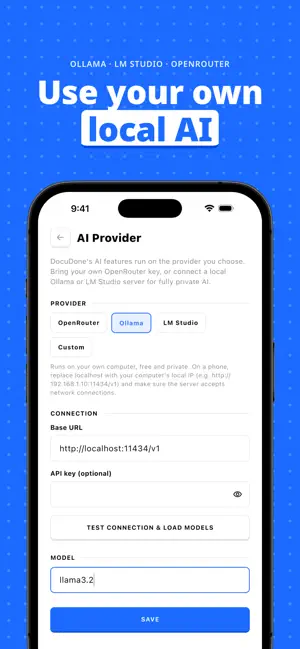
Stop renting your documents. And your AI. Most PDF apps charge monthly, then charge again for AI credits. DocuDone does neither. You get a complete offline PDF toolkit, and AI runs on the model you choose: hundreds of models via OpenRouter, or a model on your own computer with Ollama or LM Studio. No subscriptions. No AI credits. No accounts required. BRING YOUR OWN AI (FREE) AI Document Chat Ask questions about any PDF and get answers grounded in its text. AI Summarizer Turn long documents into short, specific summaries in one tap. AI Translator Translate every page of a PDF into the language you need. Works With the AI You Already Use Use your OpenRouter key, a local Ollama or LM Studio server, or any OpenAI-compatible endpoint. Your key stays on your device, and text goes straight to your provider, never through our servers. FREE TOOLS PDF Viewer & Collections Smooth scrolling, custom folders, dark-first design. Full-text search across titles and OCR-extracted content. ID & Document Scanner with OCR Edge detection turns physical papers, receipts, and documents into clean, searchable PDFs. Use the built-in ID scanner to scan passports, driver's licenses, and IDs instantly. Built-in OCR extracts text layers automatically. PDF Page Organizer Drag-and-drop to reorder, rotate, delete, insert blank pages, or pull pages from other PDFs. Freehand Ink & Text Annotations Sketch, highlight, and draw on any page with touch or Apple Pencil. Add text annotations with custom fonts. Signing App & Digital Signatures Create and save vector signatures. DocuDone is your ultimate offline signing app—drop, resize, rotate, and position signatures on any page. Form Filling & Autofill Fill interactive AcroForm fields (text, checkboxes). Save your details once to auto-fill forms instantly. Free PDF Convert & Format Converters • Image to PDF: Convert JPEG to PDF, picture to PDF, or compile multi-photo documents. • Word to PDF Converter: Convert Office documents (DOCX, XLSX, PPTX) into clean PDFs. • PDF to TXT, Markdown, CSV, and Image. • PDF Splitter: break any PDF into individual pages. • Photo2PDF: Build high-quality PDFs from gallery photos instantly. PDF Merger Concatenate multiple documents into a single continuous PDF. PDF Compressor Reduce file sizes significantly while maintaining quality. Print, Extract & Fonts Print via AirPrint, pull images and attachments out of any PDF, and use your own .ttf or .otf fonts. DOCUDONE PRO — One-Time Purchase Document Diff Engine Side-by-side PDF comparison. Insertions in green, deletions in red, with stats per page. AI Auto-Tagging Classify and tag documents based on content semantics for effortless smart search. AI-Powered Autofill Maps unmatched form fields to your profile with a step-by-step matching visualizer. Watermarker Custom text or image watermarks with configurable transparency, rotation, and size. PDF Cropper Trim margins and crop page dimensions to a custom size with live preview. Password Protect & Remove Encrypt PDFs with owner/user passwords, or decrypt and remove locks from protected files. PDF Sanitizer Wipe metadata, hyperlinks, attachments, and hidden data layers before sharing. PDF Diagnostics Audit font tables, syntax errors, and structural metadata for full file health reports. Batch Processing Apply compression or watermarking to dozens of files in one operation. WHY DOCUDONE? Your files stay on your device. No sign-in, no cloud, no tracking. Even the AI can run 100% offline on your own hardware with Ollama or LM Studio. Replace your old xerox scanner with the safest, fastest way to edit, convert, sign, and organize PDFs—completely offline. Download the ultimate PDF toolkit today. Upgrade once. Use it for life. Terms of Use (EULA): https://www.apple.com/legal/internet-services/itunes/dev/stdeula/
What’s new
Version 1.2.8 · Updated October 22, 2026
- Bring your own AI: connect your preferred AI provider and use AI features without credits - Choose your scan page size, and landscape scans now keep their orientation - Scanned PDF pages now share a uniform size with clean white padding - Bug fixes and improvements
App privacy
The developer, Abdul Momin Sakib, reported these privacy practices to Apple.
Data Not Linked to You
The following data, which may be collected but is not linked to your identity, may be used for the following purposes:
- Usage Data: Product Interaction
- Contact Info: Email Address, Name
- Identifiers: User ID, Device ID
- Diagnostics: Crash Data, Performance Data
Used for: Analytics, App Functionality
Alternatives to DocuDone: AI PDF Editor & Sign
Looking for apps like DocuDone: AI PDF Editor & Sign? Here are 6 similar apps on the App Store. The highest rated is File2PDF: PDF Converter (4.0/5), and all 6 are free to download.
-
 Document Signer .
-
 AirShare - Wifi Photo Download
-
 File2PDF: PDF Converter
4.0
File2PDF: PDF Converter
4.0
-
 Convert PDF to Word Easy
-
 PDF Scanner & Editorㅤ
-
 芊芊鸟
芊芊鸟
| App | Rating | Price | Last updated | Compare |
|---|---|---|---|---|
| DocuDone: AI PDF Editor & Sign | – | Free | October 22, 2026 | |
| Document Signer . | – | Free | Oct 7, 2026 | Compare |
| AirShare - Wifi Photo Download | – | Free | Jul 22, 2026 | Compare |
| File2PDF: PDF Converter | 4.0 / 5 (1) | Free | May 23, 2026 | Compare |
| Convert PDF to Word Easy | – | Free | May 20, 2026 | Compare |
| PDF Scanner & Editorㅤ | – | Free | Sep 24, 2026 | Compare |
| 芊芊鸟 | – | Free | May 6, 2025 | Compare |