

Pixel a Go-Go!
Cameron Banga Utilities iPhoneiPadiPod touch
Pixel a Go-Go! is a free Utilities app for iPhone and iPad by Cameron Banga. Requires iOS 26.0. Updated July 3, 2026.
- Price
- Free
- on the App Store
- Size
- 32 MB
- Age 4+
- Updated
- Jul 3
- 2026 · v1.0.5
Screenshots


About Pixel a Go-Go!
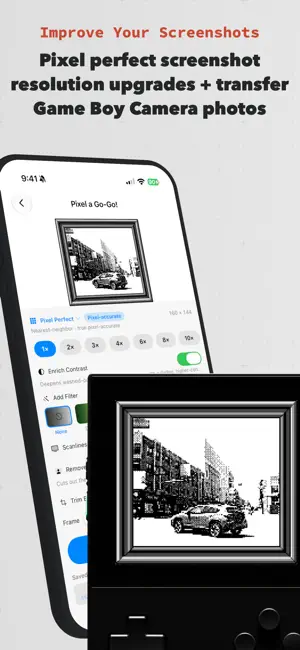
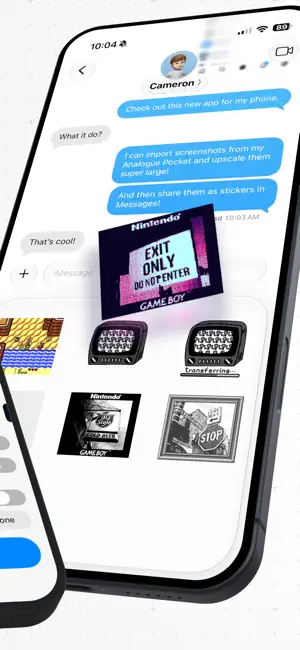
Tiny retro screenshots, blown up beautifully. Pixel a Go-Go! rescues your Game Boy Camera photo captures and retro game screenshots from blurry stretching — and turns them into crisp, oversized art worth sharing. PIXEL-PERFECT UPSCALING • Pixel Perfect — true nearest-neighbor scaling that keeps every pixel a perfect square • Lanczos upscaling for newer consoles — clean, photographic resampling for softer enlargements IMPORT FROM EVERYWHERE • Print your Game Boy Camera photos directly to your device with the GameBoy Camera Adapter Duo cable. • Bring in captures from Analogue Pocket, Nintendo Switch 2, Game Boy Camera, your Photos, and Files • Automatic system detection tags each shot: Game Boy, GBA, NES, SNES, Genesis, Neo Geo, and more RESTYLE LIKE IT'S 198X • Retro color filters: DMG green, amber phosphor, cyberpunk, rainbow, glow, and custom duotones • Flip on CRT scanlines for true arcade-cabinet vibes • Remove backgrounds to pop a sprite onto a clean canvas MORE RETRO MAGIC • Decode classic Game Boy Printer photos • Turn favorite frames into iMessage stickers • Upscale right from the Share Sheet or with Shortcuts and Siri PRIVATE BY DESIGN • 100% on-device — your images never leave your iPhone • No account, no ads, no tracking FREE TO PLAY, PRO TO FLEX Start free with pixel-perfect upscaling. Unlock Go-Go! Pro for unlimited upscales, Lanczos upscaling, every retro filter, background removal, and stickers. Level up your screenshots. Pixel a Go-Go! Pro is an auto-renewing subscription. Your subscription automatically renews unless cancelled at least 24 hours before the end of the current period; manage or cancel anytime in your App Store account settings. Price and billing period are shown in theapp before purchase. Privacy Policy: https://pixel.cameron.software/privacy.html Terms of Use: https://pixel.cameron.software/terms.html
What’s new
Version 1.0.5 · Updated July 3, 2026
- Updated wallpaper exporting, now you can export 5K desktop wallpapers! - More details on uploading/importing screenshots - You can share the app with friends from Settings - Import screenshots from your clipboard on app open
App privacy
The developer, Cameron Banga, reported these privacy practices to Apple.
Data Not Linked to You
The following data, which may be collected but is not linked to your identity, may be used for the following purposes:
- Identifiers: Device ID
- Usage Data: Product Interaction, Other Usage Data
- Diagnostics: Crash Data, Performance Data, Other Diagnostic Data
- Purchases: Purchase History
- User Content: Photos or Videos
Used for: Analytics, App Functionality, Other Purposes
Alternatives to Pixel a Go-Go!
Looking for apps like Pixel a Go-Go!? Here are 6 similar apps on the App Store. The highest rated is Plants of Concern (5.0/5), and all 6 are free to download.
-
 Plants of Concern
5.0
Plants of Concern
5.0
-
 Microwave Wattage Converter
-
 Levita Controller
-
 MillClock
4.2
MillClock
4.2
-
 Filament.uno
3.7
Filament.uno
3.7
-
 Tabless
4.8
Tabless
4.8
| App | Rating | Price | Last updated | Compare |
|---|---|---|---|---|
| Pixel a Go-Go! | – | Free | July 3, 2026 | |
| Plants of Concern | 5.0 / 5 (2) | Free | Apr 16, 2026 | Compare |
| Microwave Wattage Converter | – | Free | Sep 15, 2025 | Compare |
| Levita Controller | – | Free | Oct 19, 2026 | Compare |
| MillClock | 4.3 / 5 (4) | Free | May 24, 2025 | Compare |
| Filament.uno | 3.7 / 5 (3) | Free | Mar 4, 2026 | Compare |
| Tabless | 4.8 / 5 (12) | Free | Sep 16, 2025 | Compare |
Compare Pixel a Go-Go! with the top alternatives: ratings, updates, ASO score and keyword gaps →