

Cresca: Personal AI Assistant
Cresca, Inc. Business iPhoneiPadiPod touchApple Watch
Cresca: Personal AI Assistant is a free Business app for iPhone and iPad by Cresca, Inc. Rated 5.0/5 from 3 ratings. Requires iOS 16.4.
- Rating
- 5.0
- 3 ratings
- Price
- Free
- on the App Store
- Size
- 55 MB
- Age 17+
- Updated
- Oct 21
- 2026 · v1.3
Screenshots


About Cresca: Personal AI Assistant
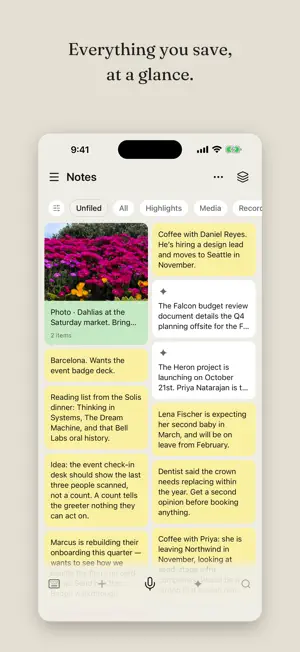
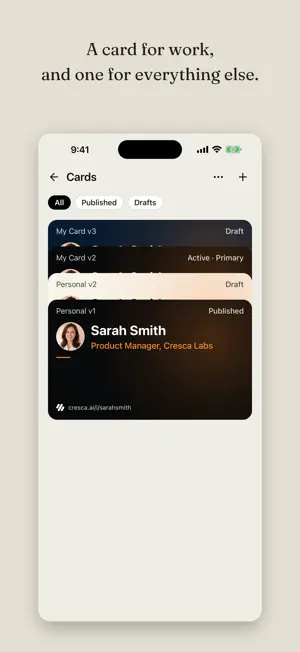
Your personal AI assistant for people and connections. Sticky notes that show up when it matters. Just ask. Cresca keeps track of the people in your life, so you don't have to. Say it, type it or snap it. Cresca turns it into a sticky note, files it under the right person, and brings it back when it matters. • Capture what happened. Speak it, type it, or add a photo, a video, a file or a link. It's saved right away, and with AI on, Cresca sorts it out for you. • One place for each person. Who they are, what you talked about, what you promised. Cresca suggests where things belong and you have the last word. • Organize your memory. Keep notes in memories, and archive what you're done with so it stops cluttering your lists. • Just ask. "What did we discuss with Acme?" Ask Cresca about anyone or anything you've saved. The answer comes back with the notes it was drawn from. Photos, files and short videos can go with your question. • Groups. Share posts and ask questions together with the people you do things with. • Summaries you can lean on. Before you see someone again, read back what matters instead of scrolling months of notes. • Reminders and your own schedule. Put a reminder on any person, note or recording, keep your own events, and keep them in sync with your iPhone Calendar. • Record meetings. Long recordings keep going in the background. Afterwards Cresca turns them into a transcript and a short summary. • Your card, one tap. Share it by QR, NFC, or Apple Wallet, and keep everyone you meet. • On your wrist. The Apple Watch app shows your badge QR code and inbox, and records voice memos. • Made for events. Create and manage events, check people in, and never lose the thread. No feed. No public profile. No display ads. Your data is never used to train AI, and you can turn AI off any time in Settings. You can delete your account and data from the app.
What’s new
Version 1.3 · Updated October 21, 2026
• Groups: share posts and ask questions together with the people you do things with. • One name everywhere: your assistant is now Cresca, and you reach it with Ask Cresca. • Bug fixes and improvements.
App privacy
The developer, Cresca, Inc., reported these privacy practices to Apple.
Data Linked to You
The following data, which may be collected and linked to your identity, may be used for the following purposes:
- Purchases: Purchase History
- Location: Precise Location
- Contact Info: Physical Address, Email Address, Name, Phone Number, Other User Contact Info
- Contacts: Contacts
- User Content: Photos or Videos, Audio Data, Customer Support, Other User Content
- Identifiers: User ID, Device ID
- Usage Data: Product Interaction
- Diagnostics: Crash Data, Performance Data
- Other Data: Other Data Types
Used for: App Functionality
Alternatives to Cresca: Personal AI Assistant
Looking for apps like Cresca: Personal AI Assistant? Here are 6 similar apps on the App Store. The highest rated is navNote (5.0/5), and all 6 are free to download.
-
 navNote
5.0
navNote
5.0
-
 Hybrix Lab
5.0
Hybrix Lab
5.0
-
 Mylo - Expensing on autopilot
-
 EEON: AI Memory & Notes
5.0
EEON: AI Memory & Notes
5.0
-
 Argn Mobile
5.0
Argn Mobile
5.0
-
 Hutfin Real Estate
5.0
Hutfin Real Estate
5.0
| App | Rating | Price | Last updated | Compare |
|---|---|---|---|---|
| Cresca: Personal AI Assistant | 5.0 / 5 (3 ratings) | Free | October 21, 2026 | |
| navNote | 5.0 / 5 (1) | Free | May 11, 2026 | Compare |
| Hybrix Lab | 5.0 / 5 (1) | Free | Sep 16, 2026 | Compare |
| Mylo - Expensing on autopilot | – | Free | Jul 15, 2026 | Compare |
| EEON: AI Memory & Notes | 5.0 / 5 (3) | Free | Oct 17, 2026 | Compare |
| Argn Mobile | 5.0 / 5 (2) | Free | Oct 21, 2026 | Compare |
| Hutfin Real Estate | 5.0 / 5 (2) | Free | Sep 16, 2026 | Compare |