

Airlink | Screen Mirroring
Soroush Chehresa Utilities iPhoneiPadiPod touch
Airlink | Screen Mirroring is a free Utilities app for iPhone and iPad by Soroush Chehresa. Requires iOS 17.6. Updated June 10, 2026.
- Price
- Free
- on the App Store
- Size
- 14 MB
- Age 4+
- Updated
- Jun 10
- 2026 · v1.0.0
Screenshots


About Airlink | Screen Mirroring
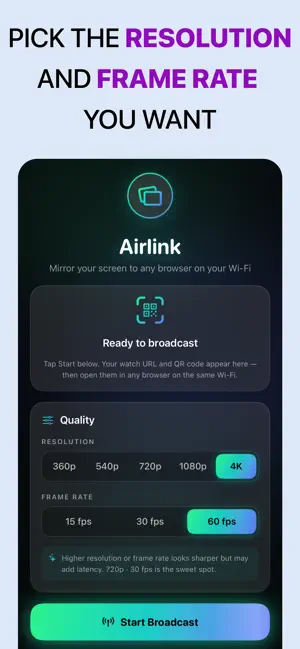
Airlink turns any nearby browser into a screen for your iPhone or iPad. Tap record, and your live screen appears in any web browser on the same Wi-Fi network — no cables, no accounts, no cloud, and no apps to install on the other device. Your phone does all the work. Airlink runs entirely on your device and streams over your local Wi-Fi, so your screen never leaves your network. Just show the watch link or QR code, and anyone on the same Wi-Fi can open it in Safari, Chrome, Edge, or any modern browser and start watching in real time. Perfect for demos, tutorials, presentations, gaming, classrooms, and pair-work — anywhere you want your screen on a bigger display without AirPlay receivers or a streaming service. HOW IT WORKS • Tap Start Broadcast • A watch link and QR code appear on your device • On a laptop, TV, or another phone, scan the QR or open the link in any browser • Your live screen plays instantly WHY AIRLINK • Real-time, low-latency mirroring over local Wi-Fi • Works in any modern web browser — nothing to install on the viewer • No cloud, no accounts, no sign-up — your screen stays on your network • Mirrors your entire screen, including app and system audio • Choose your quality — pick the resolution and frame rate that fit your network • Clean, simple, one-tap experience GREAT FOR • Product demos and client presentations • Recording tutorials and walkthroughs on a big screen • Showing photos, videos, or slides to a room • Mobile gaming on a larger display • Teaching and classroom sharing • Pair programming and design reviews PRIVATE BY DESIGN Airlink streams only over your local Wi-Fi network. Nothing is uploaded to the internet, there are no accounts, and there is no tracking. Viewers connect directly to your device. Note: Airlink and the viewing device must be on the same Wi-Fi network. Some public or guest networks block device-to-device connections; a personal hotspot works as an alternative. Download Airlink and put your screen on any browser — in seconds. Privacy and policy: https://mydishview.com/mirror-privacy.html Terms of use: https://mydishview.com/mirror-terms.html
App privacy
The developer, Soroush Chehresa, reported these privacy practices to Apple.
Data Not Collected
The developer does not collect any data from this app.
Alternatives to Airlink | Screen Mirroring
Looking for apps like Airlink | Screen Mirroring? Here are 6 similar apps on the App Store. The highest rated is Cast to Browser (5.0/5), and all 6 are free to download.
-
 Cast to Browser
5.0
-
 Cast to TV + Screen Mirroring
3.3
-
 Screen Mirroring to Any Device
4.4
-
 Screen Mirroring: Cast to TV |
5.0
-
 Screen Mirroring | Smart Cast
4.4
-
 AirPlay : Screen Mirroring
4.5
| App | Rating | Price | Last updated | Compare |
|---|---|---|---|---|
| Airlink | Screen Mirroring | – | Free | June 10, 2026 | |
| Cast to Browser | 5.0 / 5 (4) | Free | Mar 16, 2026 | Compare |
| Cast to TV + Screen Mirroring | 3.3 / 5 (3) | Free | Jun 22, 2026 | Compare |
| Screen Mirroring to Any Device | 4.4 / 5 (70) | Free | Jul 1, 2026 | Compare |
| Screen Mirroring: Cast to TV | | 5.0 / 5 (6) | Free | Oct 26, 2026 | Compare |
| Screen Mirroring | Smart Cast | 4.4 / 5 (10) | Free | Jul 2, 2026 | Compare |
| AirPlay : Screen Mirroring | 4.5 / 5 (259) | Free | May 11, 2026 | Compare |