

Dev Keyboard: Code & Symbols
Anshika Maurya Developer Tools iPhoneiPadiPod touch
Dev Keyboard: Code & Symbols is a free Developer Tools app for iPhone and iPad by Anshika Maurya. Rated 1.0/5 from 1 ratings. Requires iOS 15.0.
- Rating
- 1.0
- 1 ratings
- Price
- Free
- on the App Store
- Size
- 11 MB
- Age 4+
- Updated
- Sep 12
- 2026 · v2026.09.11
Screenshots
About Dev Keyboard: Code & Symbols
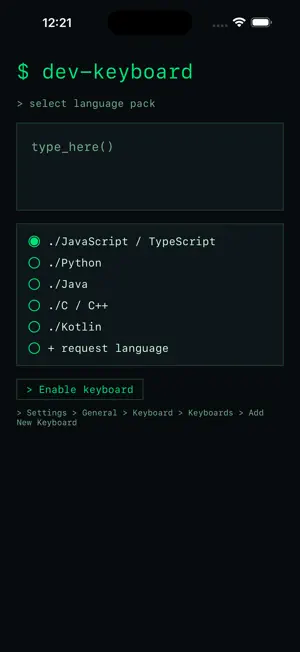
Dev Keyboard is a terminal-styled coding keyboard that puts the symbols you actually type one tap away. A PC-style layout (Esc, Ctrl, Shift, Alt, Cmd, Tab, Caps) sits above quick rows of developer symbols and brackets. FEATURES - PC-style modifier row and key layout - One-tap brackets and symbols: {} [] () => ; / \ | and more - Long-press letters for extra developer symbols - Language packs: JavaScript / TypeScript, Python, Java, C / C++, Kotlin - Terminal aesthetic: monospace, dark, distraction-free - Privacy-first: no Full Access required, nothing leaves your device Type code faster in any app - notes, chat, editors, terminals.
What’s new
Version 2026.09.11 · Updated September 12, 2026
Bug fixes and performance improvements.
App privacy
The developer, Anshika Maurya, reported these privacy practices to Apple.
Data Not Linked to You
The following data, which may be collected but is not linked to your identity, may be used for the following purposes:
- Purchases: Purchase History
Used for: Analytics, App Functionality
Alternatives to Dev Keyboard: Code & Symbols
Looking for apps like Dev Keyboard: Code & Symbols? Here are 6 similar apps on the App Store. The highest rated is TypeTab: Coding Keyboard (5.0/5), and all 6 are free to download.
-
 TypeTab: Coding Keyboard
5.0
-
 Termiux
4.5
-
 Blink Shell, Build & Code
3.1
-
 a-Shell
4.6
-
 Textastic Code Editor
4.7
-
 Runestone Text Editor
4.7
| App | Rating | Price | Last updated | Compare |
|---|---|---|---|---|
| Dev Keyboard: Code & Symbols | 1.0 / 5 (1 rating) | Free | September 12, 2026 | |
| TypeTab: Coding Keyboard | 5.0 / 5 (1) | Free | Sep 14, 2026 | Compare |
| Termiux | 4.5 / 5 (12) | Free | Oct 7, 2026 | Compare |
| Blink Shell, Build & Code | 3.1 / 5 (425) | Free | Sep 17, 2026 | Compare |
| a-Shell | 4.6 / 5 (568) | Free | Nov 2, 2026 | Compare |
| Textastic Code Editor | 4.7 / 5 (2,571) | Free | Oct 21, 2026 | Compare |
| Runestone Text Editor | 4.7 / 5 (2,115) | Free | Sep 10, 2026 | Compare |