

Churun - Nail Photo Editor
Takahiro Kinoshita Photo & Video iPhoneiPadiPod touch
Churun - Nail Photo Editor is a free Photo & Video app for iPhone and iPad by Takahiro Kinoshita. Requires iOS 18.0. Updated October 26, 2026.
- Price
- Free
- on the App Store
- Size
- 21 MB
- Age 4+
- Updated
- Oct 26
- 2026 · v1.6.3
Screenshots


About Churun - Nail Photo Editor
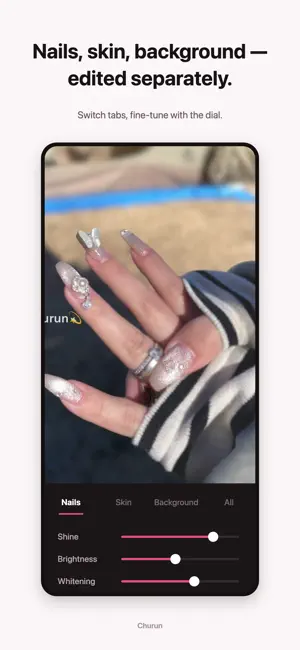
Add gloss to the nails only. Even out the skin only. Blur the background only. A photo editor for nail work, built by a working salon owner. For salon shots and for keeping track of your own nails alike. FEATURES • AI that separates nails, skin and background Just pick a photo, and you can adjust the nails, the skin and the background each on their own. • Never lose a pixel of the nail Smoothing and blur reach the skin and background only. The gloss, texture and edges of the nail stay untouched. • Set the mood in one tap Color filters made for nail photos, plus presets that save the adjustments you use every day, keep your look consistent. • Full resolution, start to finish Edit and save back to your library at the original quality of your photo. • Export with your salon watermark Place your own logo or salon name anywhere on the photo. • Fully offline, fully private Every photo is processed on your device. Nothing is ever uploaded to a server. PREMIUM PLANS Choose a monthly or a yearly plan. Both include exactly the same features; only the billing period differs. Export without a watermark and use every editing feature. You can try the editing features on the free plan. Exports carry a watermark, and some features are for Premium plans. Subscriptions renew automatically for the period you choose and can be cancelled at any time from your Apple ID account settings. Terms of Use: https://churun.vercel.app/en/terms-of-service.html
What’s new
Version 1.6.3 · Updated October 26, 2026
Photos taken under warm bulbs or by a window can now get their natural colors back with a single tap on something white. You can also open photos in Churun straight from the Photos app. ・Next to Temperature in the All tab, tap "White", then tap something in the background that should be white or gray, like paper or a towel. The yellow or blue tint from your lights is removed, and nail colors tinted by the light come closer to how they really look ・Afterward, use "Strength" to fine-tune the effect, or "Pick again" to choose a different spot ・The white reference is also saved in presets, so you can reuse it on other photos taken under the same lights ・In the Photos app, open a photo, tap Share, and choose "Churun" to start editing that photo right away, at full quality ・You can now try the yearly plan free for 1 week (for first-time subscribers) If anything about the results doesn't look right, we'd love to hear your feedback.
App privacy
The developer, Takahiro Kinoshita, reported these privacy practices to Apple.
Data Not Collected
The developer does not collect any data from this app.
Alternatives to Churun - Nail Photo Editor
Looking for apps like Churun - Nail Photo Editor? Here are 6 similar apps on the App Store. The highest rated is NailTech - Nail Image Editor (4.2/5), and all 6 are free to download.
-
 Nailmaker: Nail Salon Photos
-
 NailTech - Nail Image Editor
4.2
-
 Nailux: AI Nail Designs
-
 Elara AI Face & Beauty Editor
-
 NeoPixel Photo Editor
-
 GlamTips
| App | Rating | Price | Last updated | Compare |
|---|---|---|---|---|
| Churun - Nail Photo Editor | – | Free | October 26, 2026 | |
| Nailmaker: Nail Salon Photos | – | Free | Jul 22, 2026 | Compare |
| NailTech - Nail Image Editor | 4.2 / 5 (5) | Free | Aug 30, 2026 | Compare |
| Nailux: AI Nail Designs | – | Free | Jun 24, 2026 | Compare |
| Elara AI Face & Beauty Editor | – | Free | Mar 22, 2026 | Compare |
| NeoPixel Photo Editor | – | Free | Nov 2, 2026 | Compare |
| GlamTips | – | Free | Jun 15, 2026 | Compare |