

CANchecked
CANchecked GmbH Utilities iPhoneiPadiPod touch
CANchecked is a free Utilities app for iPhone and iPad by CANchecked GmbH. Requires iOS 16.4. Updated October 5, 2026.
- Price
- Free
- on the App Store
- Size
- 29 MB
- Age 4+
- Updated
- Oct 5
- 2026 · v1.1.0
Screenshots

About CANchecked
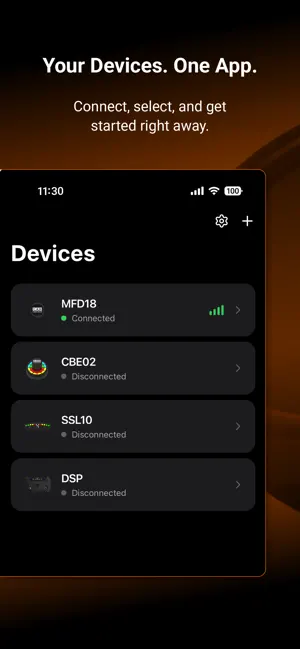
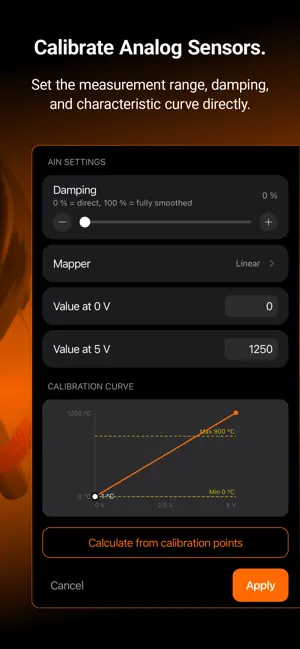
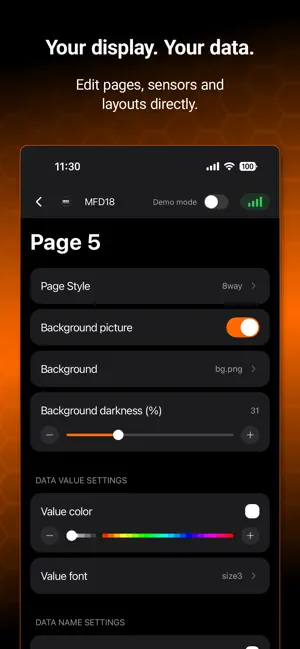
With the CANchecked app, you can configure supported CANchecked devices directly from your iPhone. The connection to the device is established via Bluetooth – no PC or Wi-Fi connection is required. At launch, the app supports the CANchecked MFD18 and the Vandal DSP. CONFIGURE YOUR DEVICE Change your device settings directly in the app. For the MFD18, this includes: • Display brightness and orientation • CAN bus speed and termination • Sensor assignments and units • Gear calculation • Data logging • Controls and rotary encoders • Sleep and wake behavior EDIT DISPLAY PAGES Configure up to ten display pages. Choose the desired layout and define which sensors should be displayed. Depending on the layout, you can also adjust colors, scales, value ranges, fonts, and additional display options. Custom startup images, backgrounds, and gauge needle graphics can be transferred from your iPhone to the device. VIEW LIVE DATA Read the current sensor values from the connected device directly in the app. This allows you to quickly verify sensor assignments and incoming data. SET UP WARNINGS Create warnings based on available sensor values. Select the sensor, threshold, and condition, and define which action should be triggered. The MFD18 supports warning messages on the display, the Glow Ring, and the MPP2 output, among other options. MANAGE FILES Transfer TRI and TRX files from your iPhone to the device. Existing files can be selected, downloaded, or deleted. EXPORT LOG FILES Transfer recorded log files to your iPhone. Measurement data can be exported as CSV or VBO files or saved in the native file format. UPDATE FIRMWARE The app notifies you via push notification when new device updates are available. Available firmware updates can then be transferred to the connected device via Bluetooth. No PC or Wi-Fi connection is required. Available features depend on the connected device and the installed firmware. The app can only be used with supported CANchecked or Vandal hardware. SAFETY NOTICE Only configure your device while the vehicle is stationary. Do not use the app while driving.
What’s new
Version 1.1.0 · Updated October 5, 2026
- Updated Storeeintrag - Modern UI - Bugfixes
App privacy
The developer, CANchecked GmbH, reported these privacy practices to Apple.
Data Not Collected
The developer does not collect any data from this app.
Alternatives to CANchecked
Looking for apps like CANchecked? Here are 6 similar apps on the App Store. The highest rated is Health Documents (5.0/5), and all 6 are free to download.
-
 Health Documents
5.0
Health Documents
5.0
-
 Archivr: Pack & Lock Archives
5.0
Archivr: Pack & Lock Archives
5.0
-
 LITE BLOX
-
 Watchlog Bluetooth
-
 SFK
SFK
-
 Maestro Snap
4.3
Maestro Snap
4.3
| App | Rating | Price | Last updated | Compare |
|---|---|---|---|---|
| CANchecked | – | Free | October 5, 2026 | |
| Health Documents | 5.0 / 5 (1) | Free | May 29, 2026 | Compare |
| Archivr: Pack & Lock Archives | 5.0 / 5 (2) | Free | Oct 11, 2026 | Compare |
| LITE BLOX | – | Free | Sep 7, 2026 | Compare |
| Watchlog Bluetooth | – | Free | Apr 8, 2026 | Compare |
| SFK | – | Free | Mar 14, 2026 | Compare |
| Maestro Snap | 4.3 / 5 (6) | Free | Sep 29, 2026 | Compare |
Compare CANchecked with the top alternatives: ratings, updates, ASO score and keyword gaps →