

Daystead: Visual Daily Routine
Robert Corbin Health & Fitness iPhoneiPadiPod touch
Daystead: Visual Daily Routine is a paid Health & Fitness app for iPhone and iPad by Robert Corbin. Requires iOS 17.0. Updated October 7, 2026.
- Price
- 1.99 USD
- on the App Store
- Size
- 3 MB
- Age 4+
- Updated
- Oct 7
- 2026 · v2.0.1
Screenshots
Save to Pinterest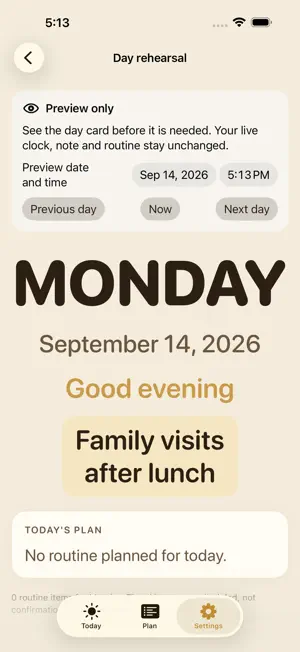


About Daystead: Visual Daily Routine
Preview another date and time using your current weekly routine, note and display settings without changing the live day card. HOW IT WORKS 1. Open Settings and tap Rehearse another day. 2. Choose a date and time, or step to the next or previous day. 3. Check the routine, current note behavior and quiet-hours face, then return to Now. The live day card, weekly plan, family photo, quiet hours and caregiver handoff remain available. Snapshot date formatting now follows the same calendar time zone. WHAT TO KNOW Preview does not change the device clock, clear the live note or dim the screen. Timed routine items are plans, not confirmations of completion. A note appears only on its assigned date. This is a display and coordination tool, not a medical monitor. iPhone and iPad.
What’s new
Version 2.0.1 · Updated October 7, 2026
A clearer App Store name and search details. No other changes in this update.
App privacy
The developer, Robert Corbin, reported these privacy practices to Apple.
Data Not Collected
The developer does not collect any data from this app.
Alternatives to Daystead: Visual Daily Routine
Looking for apps like Daystead: Visual Daily Routine? Here are 6 similar apps on the App Store. The highest rated is Medical Assitant (5.0/5), and 5 of the 6 are free to download.
-
 Medical Assitant
5.0
-
 Alzheimer's
5.0
-
 Really Good Water: Tracker
5.0
-
 Recollect - Dementia Care
5.0
-
 Stroke Recovery
5.0
-
 Neck Stretching Exercises
5.0
| App | Rating | Price | Last updated | Compare |
|---|---|---|---|---|
| Daystead: Visual Daily Routine | – | 1.99 USD | October 7, 2026 | |
| Medical Assitant | 5.0 / 5 (1) | 5.99 USD | May 25, 2026 | Compare |
| Alzheimer's | 5.0 / 5 (1) | Free | Jul 8, 2026 | Compare |
| Really Good Water: Tracker | 5.0 / 5 (1) | Free | Nov 23, 2026 | Compare |
| Recollect - Dementia Care | 5.0 / 5 (7) | Free | Nov 6, 2026 | Compare |
| Stroke Recovery | 5.0 / 5 (4) | Free | Apr 25, 2026 | Compare |
| Neck Stretching Exercises | 5.0 / 5 (3) | Free | Jan 12, 2025 | Compare |