

Toss-up: Group Scheduler
Werner van den Bergh Productivity iPhoneiPadiPod touch
Toss-up: Group Scheduler is a free Productivity app for iPhone and iPad by Werner van den Bergh. Requires iOS 17.0. Updated October 19, 2026.
- Price
- Free
- on the App Store
- Size
- 5 MB
- Age 4+
- Updated
- Oct 19
- 2026 · v1.1.2
Screenshots
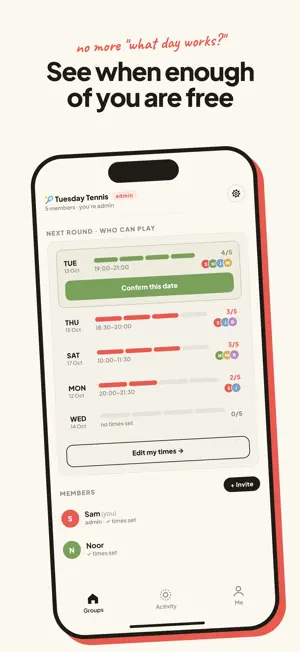
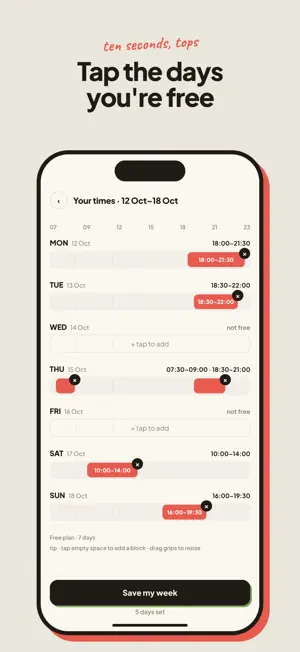


About Toss-up: Group Scheduler
Recurring plans, without the group chat chaos. Toss-up is a tiny scheduling tool for the people you keep seeing. Tennis partners, your D&D party, the supper club, band practice, hiking buddies. Not one-off events. Crews that meet every week. You know how it goes. The group chat works for a month. Then three people answer, someone says "next week?", and the group quietly stops meeting. One person ends up doing all the chasing. Toss-up automates that boring back-and-forth. HOW IT WORKS 1. Drop your times. Each member taps the days they're free this week. Takes ten seconds, no calendar permissions needed. 2. See the overlap. Toss-up highlights the days where enough people can make it. 3. Admin confirms. One tap, everyone gets notified, the week is locked in. Then it rolls forward automatically. No new poll, no new link, no chasing. That's the whole point. WHY NOT A POLL? Doodle and When2Meet are built for one-off events. Toss-up is recurring by default. Set up your crew once and every week it asks the same small question, finds the overlap, and gets you a date. THE DETAILS • Sign up with just an email. No password, ever. • Set a minimum group size, like "at least 4 for doubles." Toss-up only suggests dates that hit it. If no day works, it rolls to next week. • Invite your crew with a link. They tap, type their email, they're in. • Free plan covers one group with a 7-day window, enough for most crews. Plus ($2.99/mo) gets you three groups and a 28-day window. Pro ($6.99/mo) goes up to ten groups. Stop chasing. Start playing. Questions? [email protected]
What’s new
Version 1.1.2 · Updated October 19, 2026
Inviting friends is simpler. Each group now has one invite link. Share or copy it straight from the invite sheet, and anyone who has it can join. Inviting by email has moved to its own row, and a new Manage invites screen lets you reset the link if it ends up somewhere it shouldn't. You can now clear your availability. Remove all your times and save, and the group stops counting you as free. Before, the old times stayed put. If you've started more groups than your plan includes, the Groups screen now says so plainly and tells you your groups keep working. It used to show a confusing "4 of 3". Plus a fix: if you reset an invite link on another device, the app now picks up the new link instead of sharing the old one.
App privacy
The developer, Werner van den Bergh, reported these privacy practices to Apple.
Data Linked to You
The following data, which may be collected and linked to your identity, may be used for the following purposes:
- Identifiers: User ID, Device ID
- Usage Data: Product Interaction
- Contact Info: Email Address, Name
- User Content: Other User Content
Used for: Analytics, App Functionality
Data Not Linked to You
The following data, which may be collected but is not linked to your identity, may be used for the following purposes:
- Diagnostics: Crash Data
Used for: App Functionality
Alternatives to Toss-up: Group Scheduler
Looking for apps like Toss-up: Group Scheduler? Here are 6 similar apps on the App Store. The highest rated is Bare Habits (5.0/5), and all 6 are free to download.
-
 Times That Work Group Schedule
-
 Gather Group Calendar
-
 Align: Group Events, Made Easy
-
 raia AI
-
 Bare Habits
5.0
Bare Habits
5.0
-
 Happy Habit – Habit Tracker
| App | Rating | Price | Last updated | Compare |
|---|---|---|---|---|
| Toss-up: Group Scheduler | – | Free | October 19, 2026 | |
| Times That Work Group Schedule | – | Free | Aug 20, 2026 | Compare |
| Gather Group Calendar | – | Free | Jun 26, 2026 | Compare |
| Align: Group Events, Made Easy | – | Free | Jul 27, 2026 | Compare |
| raia AI | – | Free | Mar 26, 2026 | Compare |
| Bare Habits | 5.0 / 5 (1) | Free | Oct 9, 2026 | Compare |
| Happy Habit – Habit Tracker | – | Free | Oct 21, 2026 | Compare |