

VPN ShieldFlow: Secure Wi-Fi
Alfa-Razvitie, OOO Utilities iPhoneiPadiPod touchApple Watch
VPN ShieldFlow: Secure Wi-Fi is a free Utilities app for iPhone and iPad by Alfa-Razvitie, OOO. Rated 4.3/5 from 21 ratings. Requires iOS 16.0.
- Rating
- 4.3
- 21 ratings
- Price
- Free
- on the App Store
- Size
- 94 MB
- Age 4+
- Updated
- Oct 8
- 2026 · v0.68.12
Screenshots



About VPN ShieldFlow: Secure Wi-Fi
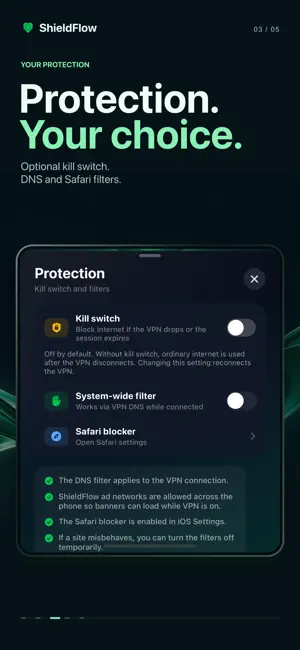
Connect your iPhone or iPad to a VPN with ShieldFlow. Let Auto choose an available server or pick a location yourself, with connection controls together on one screen. CHOOSE AND CONNECT • Use automatic server selection or choose an available location yourself. • See connection status, remaining session time, transfer rates and data used. • Pause or stop the VPN from the app. TOOLS CLOSE AT HAND • Run a connection speed test. • Open ShieldFlow from a Home Screen widget. • Use Siri and Shortcuts for connection controls. • Check connection status in the Apple Watch companion app. • Contact support from the app. Optional DNS filtering works while the VPN is connected. Enable the separate Safari content blocker in iOS Settings. YOUR PREFERENCES Choose Light, Dark or System appearance. ShieldFlow is available in 21 languages and follows your iOS app language setting. SESSION ACCESS Watch a video ad to get time for a free VPN session. The app shows the remaining time. VPN access ends when session time runs out. With the kill switch off, the VPN disconnects and ordinary internet is used. The optional kill switch is off by default; you can change it in Settings. Follow the in-app prompts to get more session time. On first connection, iOS asks permission to add a VPN configuration. Server availability and connection performance depend on your network and selected location.
Ratings & reviews
4.3
21 ratings
What’s new
Version 0.68.12 · Updated October 8, 2026
Improved loading of video ads and banners and handling of temporary ad service errors.
App privacy
The developer, Alfa-Razvitie, OOO, reported these privacy practices to Apple.
Data Used to Track You
The following data may be used to track you across apps and websites owned by other companies:
- Purchases: Purchase History
- Location: Coarse Location
- User Content: Customer Support
- Identifiers: User ID, Device ID
- Usage Data: Product Interaction, Advertising Data, Other Usage Data
- Diagnostics: Crash Data, Performance Data
- Other Data: Other Data Types
Data Linked to You
The following data, which may be collected and linked to your identity, may be used for the following purposes:
- Purchases: Purchase History
- Location: Coarse Location
- User Content: Customer Support
- Identifiers: User ID, Device ID
- Usage Data: Product Interaction, Advertising Data, Other Usage Data
- Diagnostics: Performance Data, Other Diagnostic Data, Crash Data
- Other Data: Other Data Types
Used for: Third-Party Advertising, Analytics, App Functionality
Alternatives to VPN ShieldFlow: Secure Wi-Fi
Looking for apps like VPN ShieldFlow: Secure Wi-Fi? Here are 6 similar apps on the App Store. The highest rated is Ekho VPN (5.0/5), and all 6 are free to download.
-
 Art VPN: Secure VPN Proxy
4.6
Art VPN: Secure VPN Proxy
4.6
-
 Privify: Secure VPN LITE Proxy
2.3
Privify: Secure VPN LITE Proxy
2.3
-
 BritVPN: UK VPN for Expats
3.0
BritVPN: UK VPN for Expats
3.0
-
 Fast VPN: Private Proxy Shield
4.2
Fast VPN: Private Proxy Shield
4.2
-
 AtmosVPN: Secure VPN
4.1
AtmosVPN: Secure VPN
4.1
-
 Ekho VPN
5.0
Ekho VPN
5.0
| App | Rating | Price | Last updated | Compare |
|---|---|---|---|---|
| VPN ShieldFlow: Secure Wi-Fi | 4.3 / 5 (21 ratings) | Free | October 8, 2026 | |
| Art VPN: Secure VPN Proxy | 4.6 / 5 (63) | Free | Oct 19, 2026 | Compare |
| Privify: Secure VPN LITE Proxy | 2.3 / 5 (6) | Free | Oct 20, 2026 | Compare |
| BritVPN: UK VPN for Expats | 3.0 / 5 (2) | Free | Oct 21, 2026 | Compare |
| Fast VPN: Private Proxy Shield | 4.3 / 5 (4) | Free | Sep 11, 2026 | Compare |
| AtmosVPN: Secure VPN | 4.1 / 5 (7) | Free | Sep 17, 2026 | Compare |
| Ekho VPN | 5.0 / 5 (1) | Free | Oct 27, 2026 | Compare |