

Chrono flip timer
书玉 简 Utilities iPhoneiPadiPod touchMac
Chrono flip timer is a free Utilities app for iPhone and iPad by 书玉 简. Requires iOS 17.0. Updated September 30, 2026.
- Price
- Free
- on the App Store
- Size
- 6 MB
- Age 4+
- Updated
- Sep 30
- 2026 · v2.1
Screenshots
About Chrono flip timer
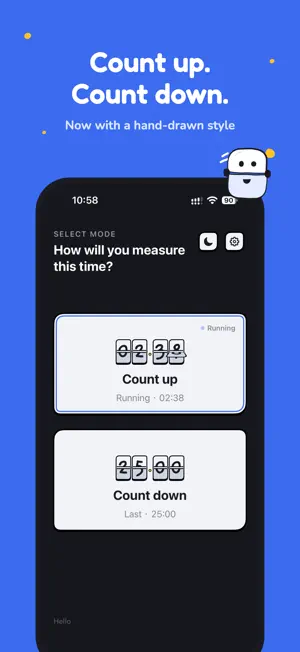
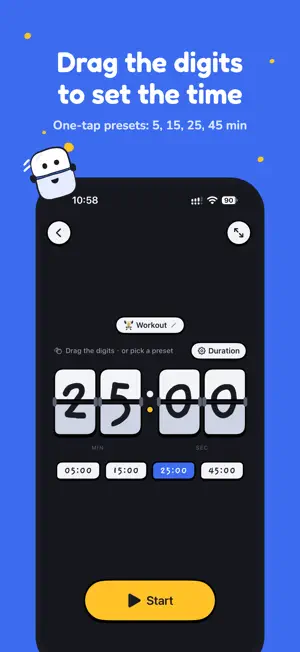
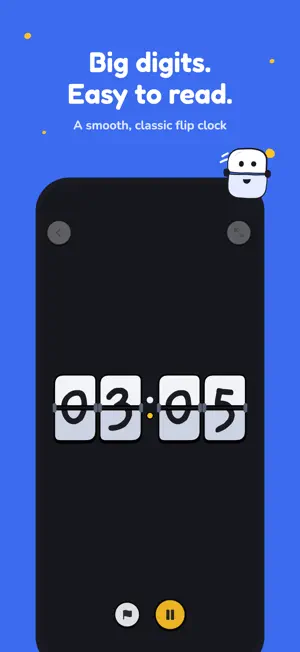
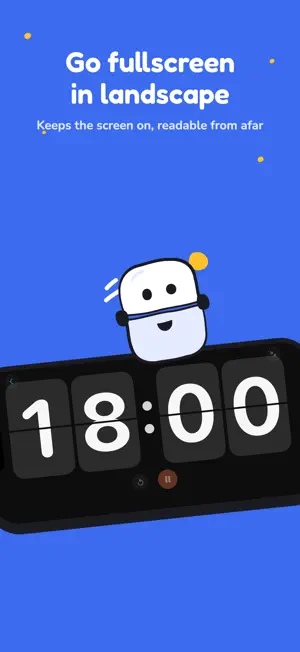
Chrono flip timer brings count-up and countdown timing together in a clean, classic flip-clock interface. Large, readable digits and smooth flip animations help you stay focused on every passing second. COUNT UP & COUNT DOWN • Count up starts automatically after a 3-2-1 countdown (optional) — perfect for workouts, talks, meetings, and study sessions • Record laps during count up and copy them all after pausing • Tap or drag the flip digits to set a countdown • Use quick presets for 5, 15, 25, or 45 minutes, or set hours, minutes, and seconds precisely • Add a label to your countdown (like Study or Break) and see it on the Lock Screen, in notifications, and on the start screen • Timers continue across app launches until you pause or reset them LOCK SCREEN & DYNAMIC ISLAND • Follow the remaining time and progress of a countdown in a Live Activity on the Lock Screen and in the Dynamic Island — no need to open the app • Get a notification when time is up, even when your iPhone is locked or you are in another app MADE FOR FOCUS • View an extra-large fullscreen clock in landscape • Keep the screen awake while a timer is running • Get sound, vibration, and a celebration animation when time is up • Double-tap an empty area to hear the current time • Automatically remember your last countdown duration YOUR TIMER, YOUR WAY • Two interface styles: clean Standard, or sticker-like Hand-drawn with hand-lettered flip digits and a full-screen 3-2-1 and finish screen • Choose Classic Black, High Contrast, or Stage flip themes in the Standard style • Choose light, dark, or system appearance; the app icon follows Dark Mode, with Dark and Sun alternate icons • Use multiple interface languages with matching voice announcements • Designed for iPhone, iPad, and Mac • No ads, no tracking, and no personal data collection Whether you are focusing with a Pomodoro session, cooking, training, presenting, or running a meeting, Chrono flip timer keeps time clear and easy to see.
What’s new
Version 2.1 · Updated September 30, 2026
• A new hand-drawn app icon that turns dark in Dark Mode, plus Dark and Sun alternate icons (Settings › App icon). • New optional Hand-drawn interface style: sticker-like buttons and cards and hand-lettered flip digits. Switch anytime in Settings › Interface style; the Standard look stays the default. • In the hand-drawn style: a full-screen 3-2-1 before count up, a smiling celebration with one-tap "Break 5 min" or "Again" when a countdown ends, and a matching Lock Screen Live Activity and Dynamic Island. • A shorter Home Screen name, "Chrono timer", so it no longer gets cut off under the icon. • A close button on the hand-drawn finish screen, and paused timers now show "Paused" on the start screen. • Send feedback by email right from Settings. • Fixes: notifications no longer arrive late after the first permission prompt, and Live Activities stay in sync when you start, pause or reset quickly.
App privacy
The developer, 书玉 简, reported these privacy practices to Apple.
Data Not Collected
The developer does not collect any data from this app.
Alternatives to Chrono flip timer
Looking for apps like Chrono flip timer? Here are 6 similar apps on the App Store.
-
 Yokoku - ビジュアルタイマー
-
 Stepwave
-
 Times Up! Timer & Stopwatch
-
 HypeDay - Countdown Widgets
-
 Timer tick
-
 toki — physics clock
| App | Rating | Price | Last updated | Compare |
|---|---|---|---|---|
| Chrono flip timer | – | Free | September 30, 2026 | |
| Yokoku - ビジュアルタイマー | – | Free | Sep 10, 2026 | Compare |
| Stepwave | – | Free | Aug 7, 2026 | Compare |
| Times Up! Timer & Stopwatch | – | Free | Oct 18, 2026 | Compare |
| HypeDay - Countdown Widgets | – | Free | Feb 18, 2026 | Compare |
| Timer tick | – | Free | Oct 3, 2026 | Compare |
| toki — physics clock | – | Free | Sep 21, 2026 | Compare |
Compare Chrono flip timer with the top alternatives: ratings, updates, ASO score and keyword gaps →