

BabyDance Party
菊 黄 Entertainment iPhoneiPadiPod touch
BabyDance Party is a free Entertainment app for iPhone and iPad by 菊 黄. Requires iOS 17.0. Updated July 8, 2026.
- Price
- Free
- on the App Store
- Size
- 27 MB
- Age 17+
- Updated
- Jul 8
- 2026 · v1.0
Screenshots


About BabyDance Party
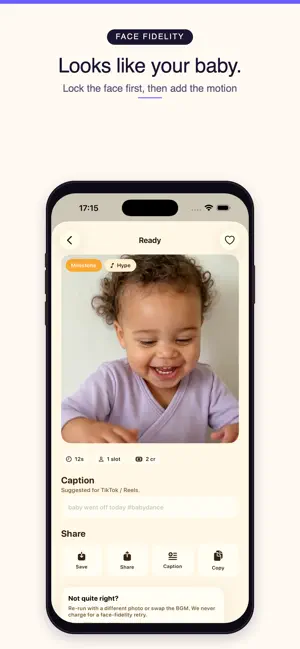
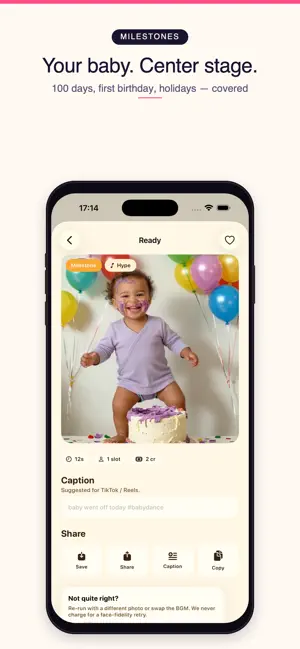
Your baby is the headliner. Throw the party. Baby Dance Party turns a single photo into a high-quality AI dance video in about a minute or two. Unlike other baby-dance apps that only do solo clips, we built it around the moments that actually get shared: twin sync, sibling battles, Dad-lift swings, Mom cradle sways, pet duets, full family conga lines, and milestone moments like 100 days, first birthday, Halloween, Christmas, and Lunar New Year. Every template is named, previewed, and tagged before you generate — no more blind picking. This is a preview build: every template is unlocked and there is nothing to buy. WHY PARENTS ARE SWITCHING • It actually looks like your baby. We run a two-stage face-fidelity pipeline: a reference frame locks your child's features into the scene before motion is added. Other apps skip this step — that's why their videos look like a stranger dancing. • Templates that fit real life. 30 launch templates across 5 themes: – Solo Spotlight: Hip-Hop, K-Pop, Latin, Disco, Bollywood, Ballet – Duet Party: Twin Sync, Sibling Battle, Dad Lift, Mom Cradle, Pet Party, Family Conga – Milestone: 1 Month, 100 Days, First Birthday, Halloween, Christmas, Lunar New Year – Costume Party: Dino, Astronaut, Princess, Superhero, Animal Parade, Robot – Trending: Baby Shark, Gangnam, Neon Idol, Upside-Down Sway, Bolly TikTok, Afrobeat • Multi-input templates no one else has. Drop in two siblings, a parent, or your dog — the only app that doesn't cap you at one face. • Honest face-fidelity hints. Some templates work better with front-facing photos. We tell you before you generate, not after. • Made for sharing. Vertical 9:16 export, captions ready for TikTok, Reels, Stories, and the family group chat. Save back to Photos with one tap. HOW IT WORKS 1. Pick a template — twin sync, dad lift, dino stomp, anything. 2. Drop in 1–3 photos. Vision-based quality hints flag low-light or far-away shots. 3. Tap Generate. Your video lands in the Library in about a minute or two. 4. Save, share, or remix with a different beat. PRIVACY FIRST No account, no email, no ads. To generate your video, the photos you select are sent to Replicate, Inc. (USA) over a secure connection and used only to create your video — never to train AI models. You are asked to agree before anything is sent. Full policy: babydanceparty.app/privacy This app is a tool for parents and guardians to create and share videos of their own family.
App privacy
The developer, 菊 黄, reported these privacy practices to Apple.
Data Not Collected
The developer does not collect any data from this app.
Alternatives to BabyDance Party
Looking for apps like BabyDance Party? Here are 6 similar apps on the App Store. The highest rated is PawdanceAI (5.0/5), and all 6 are free to download.
-
 PawdanceAI
5.0
PawdanceAI
5.0
-
 PetDance!
-
 Danceify - AI Dance Videos
5.0
Danceify - AI Dance Videos
5.0
-
 Spectrum Access: Enabled Media
4.5
Spectrum Access: Enabled Media
4.5
-
 JVC Headphones
1.6
JVC Headphones
1.6
-
 Dance Yourself - funny face
3.8
Dance Yourself - funny face
3.8
| App | Rating | Price | Last updated | Compare |
|---|---|---|---|---|
| BabyDance Party | – | Free | July 8, 2026 | |
| PawdanceAI | 5.0 / 5 (9) | Free | Jun 4, 2026 | Compare |
| PetDance! | – | Free | Jun 1, 2026 | Compare |
| Danceify - AI Dance Videos | 5.0 / 5 (11) | Free | Oct 28, 2026 | Compare |
| Spectrum Access: Enabled Media | 4.5 / 5 (150) | Free | Oct 12, 2026 | Compare |
| JVC Headphones | 1.6 / 5 (75) | Free | Oct 13, 2026 | Compare |
| Dance Yourself - funny face | 3.8 / 5 (131) | Free | Jan 1, 2026 | Compare |
Compare BabyDance Party with the top alternatives: ratings, updates, ASO score and keyword gaps →