

NoteFall Piano
Jorge Lee Music iPhoneiPadiPod touch
NoteFall Piano is a paid Music app for iPhone and iPad by Jorge Lee. Rated 5.0/5 from 1 ratings. Requires iOS 18.0. Updated June 16, 2026.
- Rating
- 5.0
- 1 ratings
- Price
- 4.99 USD
- on the App Store
- Size
- 22 MB
- Age 4+
- Updated
- Jun 16
- 2026 · v1.0
Screenshots


About NoteFall Piano
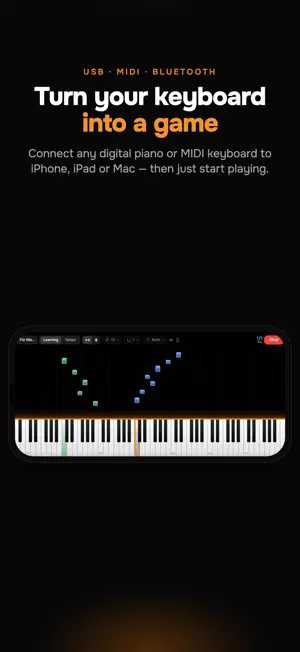
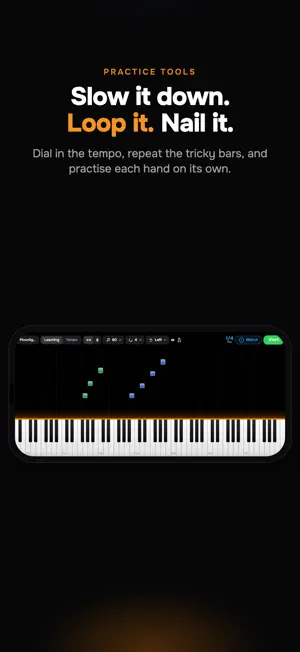
NoteFall — a gamified way to practice on your MIDI keyboard NoteFall sits somewhere between a game and a practice tool. Connect a MIDI keyboard, pick an exercise or a piece, and play the notes as they fall oward the keys in time with the metronome. The app listens to every key you press and gives you instant audio and visual feedback — no waiting, no scoring screens between attempts. What it isn't NoteFall isn't a full game — there are no scores, no leaderboards, no daily challenges. And it isn't a replacement for lessons or real practice — it won't teach you technique, posture, phrasing, or musicality. That's what a teacher and time at the bench are for. What it is: a way to make the repetitive parts of practice less of a slog. Drilling a scale at 80 BPM, looping the four bars you keep flubbing, getting your hands used to a new key — the falling-notes format makes those reps easier to start and easier to stick with. What's included - Scales — major, natural minor, harmonic minor, and jazz modes, across 1 to 4 octaves - Arpeggios — major and minor triads plus dominant 7ths and 9ths - Famous pieces — short, recognizable excerpts from Bach, Beethoven, Mozart, Chopin, Debussy and others Controls that get out of your way - Adjustable tempo with a precise metronome — slow it down, then push the BPM up - Hand separation — left, right, or both together - Subdivision control — quarter notes, eighths, triplets, sixteenths - Repeat loops to drill the bars that aren't sticking - Mute the metronome or the piano sound independently Optional add-ons NoteFall is a one-time purchase. Two optional packs extend it — no subscription, no ads: - Exercise Pack — Hanon Part 1 and selected Part 2 études, plus the full set of scales and arpeggios in every key, mode, and octave span - Custom Content Pack — import any MusicXML or MIDI file and play it back as a falling-notes exercise. Use the companion website at https://notefall.jrglee.dev to turn a MusicXML or MIDI file into an import link, then tap it on your device to open it straight in the app — useful for sheet music you've found online, exported from a notation app, or transcribed yourself Requirements NoteFall is designed for use with a MIDI keyboard (USB or Bluetooth). It will run without one, but the experience is built around playing on real keys.
App privacy
The developer, Jorge Lee, reported these privacy practices to Apple.
Data Not Collected
The developer does not collect any data from this app.
Alternatives to NoteFall Piano
Looking for apps like NoteFall Piano? Here are 6 similar apps on the App Store. The highest rated is Contrapunctus: Second Voice (5.0/5), and 3 of the 6 are free to download.
-
 Contrapunctus: Second Voice
5.0
Contrapunctus: Second Voice
5.0
-
 Learn Piano - e1i
-
 FretNotes
3.0
FretNotes
3.0
-
 Set Theory Calculator
5.0
Set Theory Calculator
5.0
-
 See Music Pro: Sight Reading
-
 Falling Notes Piano Trainer
4.7
Falling Notes Piano Trainer
4.7
| App | Rating | Price | Last updated | Compare |
|---|---|---|---|---|
| NoteFall Piano | 5.0 / 5 (1 rating) | 4.99 USD | June 16, 2026 | |
| Contrapunctus: Second Voice | 5.0 / 5 (2) | 4.99 USD | Aug 6, 2026 | Compare |
| Learn Piano - e1i | – | Free | Apr 14, 2026 | Compare |
| FretNotes | 3.0 / 5 (1) | 0.99 USD | Feb 13, 2025 | Compare |
| Set Theory Calculator | 5.0 / 5 (4) | 3.99 USD | Sep 24, 2026 | Compare |
| See Music Pro: Sight Reading | – | Free | Aug 17, 2026 | Compare |
| Falling Notes Piano Trainer | 4.7 / 5 (6) | Free | Jul 6, 2026 | Compare |
Compare NoteFall Piano with the top alternatives: ratings, updates, ASO score and keyword gaps →