

Took!
Jahyeon Ko Productivity iPhoneiPadiPod touch
Took! is a free Productivity app for iPhone and iPad by Jahyeon Ko. Rated 3.8/5 from 4 ratings. Requires iOS 17.0. Updated October 24, 2026.
- Rating
- 3.8
- 4 ratings
- Price
- Free
- on the App Store
- Size
- 34 MB
- Age 4+
- Updated
- Oct 24
- 2026 · v1.4.1
Screenshots



About Took!
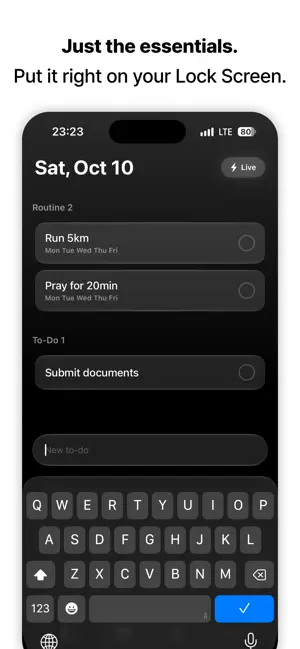
Hate complexity? Meet Took — the world's easiest to-do list. Projects, tags, due dates, priorities… managing a to-do app becomes a chore of its own. Took removes all of it. Write it down, check it off. That's the whole app. ■ Jot it down, check it off Open the app and today's to-dos are right there. Type, and tap when you're done. Finished items gather at the bottom, so your day stays in view. ■ Right on your Lock Screen Wake your phone and your to-dos are already there, on a Lock Screen card. Check things off without even opening the app. ■ No app needed One Shortcut button and you can jot something down the moment it comes to mind. Put it on your Lock Screen, Home Screen — anywhere. ■ Home Screen widget Keep today's list right on your Home Screen. Check items off straight from the widget. ■ On Apple Watch too Glance at what's left in the Smart Stack, right from your wrist. ■ Your order, your way Long-press and drag to reorder. Choose whether new to-dos land at the bottom or the top. ■ Make it yours — Took Pro Theme colors, fonts, widget styles — all up to you. Plus unlimited to-dos. The fastest way to manage your day. Write it down, check it off. Today's to-dos? Took! Terms of Use (EULA): https://www.apple.com/legal/internet-services/itunes/dev/stdeula/ Privacy Policy: https://took.gojaehyun.com/privacy.html?lang=en
What’s new
Version 1.4.1 · Updated October 24, 2026
A round of small fixes. - iPad mini in landscape and the iPhone Duo inner screen now split into two columns: to-dos and calendar. - Pick a day on the calendar and write straight onto that day. - The keyboard stays up after you add a line, so you can keep going. - The large title now scrolls away naturally, and top spacing is tuned per device.
App privacy
The developer, Jahyeon Ko, reported these privacy practices to Apple.
Data Not Linked to You
The following data, which may be collected but is not linked to your identity, may be used for the following purposes:
- Identifiers: Device ID
Used for: App Functionality
Alternatives to Took!
Looking for apps like Took!? Here are 6 similar apps on the App Store. The highest rated is LiveNote - LockScreen Memo App (5.0/5), and all 6 are free to download.
-
 LiveNote - LockScreen Memo App
5.0
LiveNote - LockScreen Memo App
5.0
-
 딸깍 - 링크, 스크린샷, 메모 한 곳에 저장
3.7
딸깍 - 링크, 스크린샷, 메모 한 곳에 저장
3.7
-
 Alt: AI Meeting Notes
4.8
Alt: AI Meeting Notes
4.8
-
 Eisenhower Matrix: Todo & Task
4.6
Eisenhower Matrix: Todo & Task
4.6
-
 DailyHack
4.7
DailyHack
4.7
-
 Trace - AI Calendar, Planner
4.2
Trace - AI Calendar, Planner
4.2
| App | Rating | Price | Last updated | Compare |
|---|---|---|---|---|
| Took! | 3.8 / 5 (4 ratings) | Free | October 24, 2026 | |
| LiveNote - LockScreen Memo App | 5.0 / 5 (45) | Free | Aug 28, 2026 | Compare |
| 딸깍 - 링크, 스크린샷, 메모 한 곳에 저장 | 3.7 / 5 (3) | Free | May 12, 2026 | Compare |
| Alt: AI Meeting Notes | 4.8 / 5 (46) | Free | Oct 25, 2026 | Compare |
| Eisenhower Matrix: Todo & Task | 4.6 / 5 (103) | Free | Oct 25, 2026 | Compare |
| DailyHack | 4.7 / 5 (106) | Free | Oct 18, 2026 | Compare |
| Trace - AI Calendar, Planner | 4.2 / 5 (18) | Free | Oct 25, 2026 | Compare |
Compare Took! with the top alternatives: ratings, updates, ASO score and keyword gaps →