

ManualBook
Hashing LLC Productivity iPhoneiPadiPod touch
ManualBook is a free Productivity app for iPhone and iPad by Hashing LLC. Requires iOS 18.0. Updated October 12, 2026.
- Price
- Free
- on the App Store
- Size
- 3 MB
- Age 4+
- Updated
- Oct 12
- 2026 · v1.1
Screenshots
About ManualBook
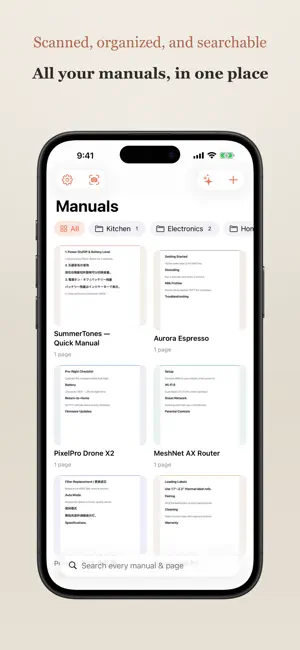
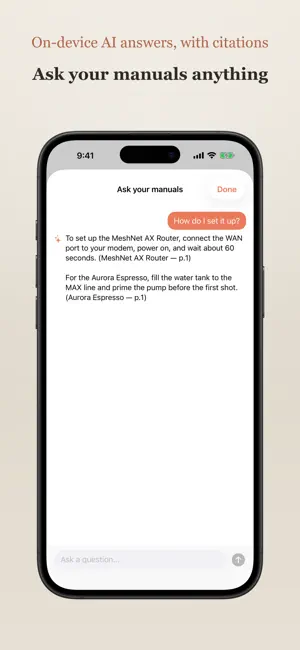
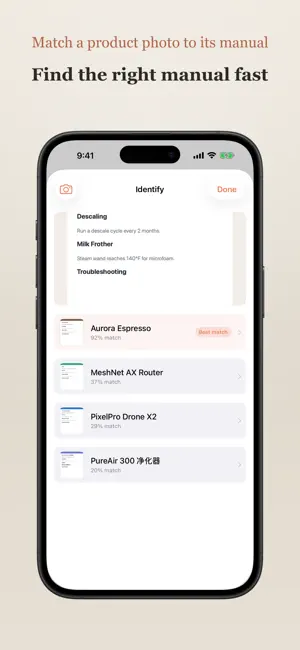
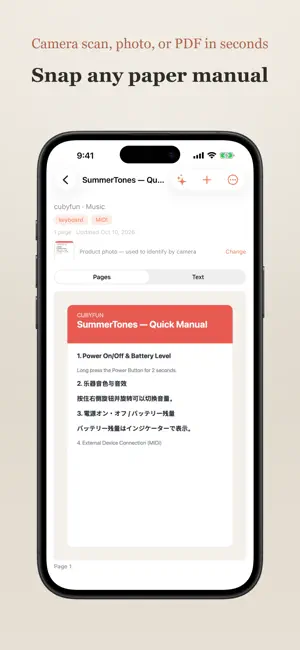
Paper manuals pile up in drawers — and the one you need is never there. ManualBook turns that pile into a searchable library on your phone. Now it also answers your questions and finds the right manual from a photo. Scan a manual with your camera, snap a photo, or import a PDF. ManualBook reads every word on the page — in English, Spanish, German, French, Chinese, Japanese, and more — entirely on your device, so you can find any detail in seconds. How it works • Capture: the built-in document scanner auto-detects edges and straightens the page. Or import straight from Photos or Files — images and PDFs alike. • Recognize: on-device text recognition reads each page, including mixed English / Chinese / Japanese, with no internet and nothing uploaded. • Search: full-text search across every manual and every page, with matches highlighted and a tap to jump right to the page. • Ask: ask a question in plain language and get an answer drawn from your own manuals — generated by on-device AI, with page citations, and nothing uploaded. • Identify: not sure which manual you need? Snap a photo of the product and ManualBook matches it to the right manual — on-device. • Organize: group manuals into folders, add tags, and keep brand and notes together. • Share to ManualBook: send a PDF or photo from any app — Safari, Files, Mail, Photos — straight into your library, scanned and filed automatically. • Export: turn any manual back into a shareable PDF. Private by design • Everything runs on your iPhone. Text recognition and AI answers happen on-device — your manuals are never uploaded to us, and there are no accounts, servers, analytics, or trackers. • Optional iCloud Sync keeps your library in your own private iCloud, encrypted by Apple, so it's there on all your devices. We never see it. Free to start • Your first manuals are on the house. A single one-time purchase unlocks unlimited manuals and AI answers — no subscription. Stop hoarding paper. Scan it once, find it forever.
What’s new
Version 1.1 · Updated October 12, 2026
What's new in 1.1 • Search results now open the manual at the exact page. • Ask your manuals finds the right pages for questions written in Chinese or Japanese. • Identify by camera shows more realistic match scores. • Long PDFs import using less memory. • A warmer look that matches the app icon, plus fixes throughout. AI answers and unlimited manuals are included in the one-time unlock. Thanks for using ManualBook!
App privacy
The developer, Hashing LLC, reported these privacy practices to Apple.
Data Not Collected
The developer does not collect any data from this app.
Alternatives to ManualBook
Looking for apps like ManualBook? Here are 6 similar apps on the App Store. The highest rated is Bibliome (5.0/5), and all 6 are free to download.
-
 Aido Receipts
-
 PicList: AI Listing Generator
-
 Warranty Tracker (No Ads)
-
 Bibliome
5.0
Bibliome
5.0
-
 daily planner
-
 Rivet: Life Planner
| App | Rating | Price | Last updated | Compare |
|---|---|---|---|---|
| ManualBook | – | Free | October 12, 2026 | |
| Aido Receipts | – | Free | Jul 21, 2026 | Compare |
| PicList: AI Listing Generator | – | Free | Aug 9, 2026 | Compare |
| Warranty Tracker (No Ads) | – | Free | Apr 2, 2026 | Compare |
| Bibliome | 5.0 / 5 (1) | Free | Oct 10, 2026 | Compare |
| daily planner | – | Free | Jan 6, 2026 | Compare |
| Rivet: Life Planner | – | Free | Oct 6, 2026 | Compare |
Compare ManualBook with the top alternatives: ratings, updates, ASO score and keyword gaps →