

HITTER: Volleyball Highlights
Schmidt Digital LLC Sports iPhoneiPadiPod touchApple Watch
HITTER: Volleyball Highlights is a free Sports app for iPhone and iPad by Schmidt Digital LLC. Rated 5.0/5 from 4 ratings. Requires iOS 26.0.
- Rating
- 5.0
- 4 ratings
- Price
- Free
- on the App Store
- Size
- 28 MB
- Age 4+
- Updated
- Oct 15
- 2026 · v2.1.2
Screenshots


About HITTER: Volleyball Highlights
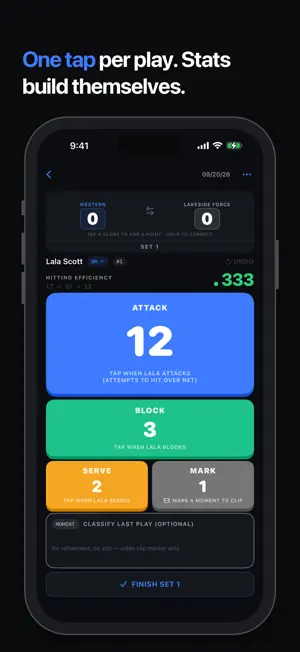
Track the game. Get the reel. You watch the game. You tap the plays. HITTER cuts the reel. Tap once for each play, and when the game ends HITTER turns your own footage into a captioned highlight reel of your player, on your iPhone or iPad, in seconds. No editing, no evening scrubbing through game film, no upload, no subscription. Every tap also tracks hitting efficiency, so stats come with the reel. Built for outside, opposite, and middle hitters. One player at a time. ALL YOU NEED IS AN iPHONE Start a game, tap START FILMING, and HITTER records while you track. Everything else is optional, and each addition makes it better: - A tripod keeps the footage steady and your hands free. - An Apple Watch turns your wrist into the remote. The phone films from the tripod; you tap from anywhere in the gym. - A second iPhone or iPad can film instead, with its built-in Camera app. HOW IT WORKS 1. Start a game in HITTER and tap START FILMING. Handheld is fine; a tripod is steadier. 2. Tap the big button each time your player attacks, then mark it a kill or an error. Optionally track blocks and serves too. 3. Tap END GAME. Every play is already linked to the footage and saved to Photos. Your highlight reel is ready. Player on the bench? Tap STANDBY. The camera keeps rolling, and when you tap a play, the last 15 seconds are kept. Answer a call mid-game and filming picks itself back up. VIDEO HIGHLIGHTS Every play you tap becomes a clip. HITTER merges them into one video with an intro and outro card, captions for each clip, and the player's name and jersey number. Preview clips, adjust timing, and set the clip length. Export landscape, vertical, or square for any social feed. Spotlight (Pro) visually highlights your athlete in the video. Free reels include a small HITTER watermark. Pro removes it for clean, recruiting-ready reels. TRACK FROM YOUR WRIST OR ANOTHER DEVICE Wearing an Apple Watch? Log plays with one tap from your wrist, mark kills and errors, and put filming in standby or resume it. Out of range? Taps wait on the watch and sync when you return. Two devices? Film with the Camera app on one and track in HITTER on the other. Your tracking syncs through your Apple account, so the reel builds where the video is. REAL HITTING STATS Every tap you make for the reel is also a stat. Hitting efficiency is (Kills − Errors) ÷ Attacks: it rewards putting the ball away and counts the errors, which kills alone never show. HITTER does the math, live per set, summarized per game, and trended across the year and all-time with splits for OH, OPP, and MB. See live score and efficiency on your lock screen, and share a stat card after any set or game. SHRINK GAME FILM A full game recording is several gigabytes. HITTER can reduce it to one small video of just the plays you keep, then offers to delete the original. A 12 GB game becomes a few hundred megabytes, and you can still edit reels afterward. Free. GREATEST HITS Favorite your player's best plays and HITTER builds a reel across games: all favorites, or any date range. (Pro) HAND OFF A WHOLE PLAYER Send a HITTER Pack to your player. It bundles their stats and saved clips into one file, so they can open it in HITTER on their own device and build their own reels. BUILT FOR iPad On iPad, everything is side by side: roster and player, tap buttons and the running play list, clip list and a large preview. Your games, every device. YOURS, PRIVATELY HITTER has no accounts and no servers. Your footage is processed on device and saved to your Photos. Your stats live in your private iCloud account, sync across your devices, and are still there if you delete the app. FREE TO START. PRO FOREVER. HITTER is free to download: track one player, shrink game film, and make watermarked reels. A one-time Pro purchase removes the watermark and adds Greatest Hits, Spotlight, unlimited players, trend charts, and per-position breakdowns. One purchase covers your household through Family Sharing.
What’s new
Version 2.1.2 · Updated October 15, 2026
NEW IN 2.1.2 WATCH THE TOUR New to HITTER? Tap Watch on the Home screen, or open Help, for a 3-minute tour of the whole app, chapter by chapter. SPOTLIGHT, AIMED AT THE RIGHT FRAME Drag the Spotlight frame slider to the moment your player is in view, then tap them. The ring lights up at that frame. Plus fixes and improvements. NEW IN 2.1: ENHANCED ON iPAD The roster and a player side by side. While tracking, see a running list of the plays so far, right next to the tap buttons. Your games are already there. Also in 2.1: - Cleaner screens: the controls now live in the system toolbars - Faster syncing between your iPhone and iPad during a game - Bug fixes and stability improvements - Requires iOS 26 HITTER now films the game. All you need is an iPhone. Start a game, tap START FILMING, and HITTER records while you track. Every play you tap becomes a clip, saved to Photos during the game, and your highlight reel is ready the moment you tap END GAME. No editing. A second device is no longer required. Two still works well: one films from a tripod while you tap plays on the device in your hand. Player on the bench? Tap STANDBY. The camera keeps rolling, and when you tap a play, the last 15 seconds are kept. Answer a call mid-game and filming picks itself back up. APPLE WATCH Your wrist is the remote. Put the phone on a tripod and track from anywhere in the gym: one tap per play, mark kills and errors, and control filming. Out of range? Taps wait on the watch and sync when you return. Also in 2.0: - A letterbox viewfinder with the controls beside the picture, not over it - Bigger tap targets on the tracking screen - A cleaner New Game form, with filming ready to go - A new app icon Track the game. Get the reel.
App privacy
The developer, Schmidt Digital LLC, reported these privacy practices to Apple.
Data Not Collected
The developer does not collect any data from this app.
Alternatives to HITTER: Volleyball Highlights
Looking for apps like HITTER: Volleyball Highlights? Here are 6 similar apps on the App Store. The highest rated is Skyball Volleyball (5.0/5), and all 6 are free to download.
-
 Skyball Volleyball
5.0
Skyball Volleyball
5.0
-
 Tavo - AI Volleyball Analytics
-
 SI Wildcats
4.4
SI Wildcats
4.4
-
 VolleyVision: Volleyball Coach
4.6
VolleyVision: Volleyball Coach
4.6
-
 Balltime AI
3.1
Balltime AI
3.1
-
 iStatVball 3
4.6
iStatVball 3
4.6
| App | Rating | Price | Last updated | Compare |
|---|---|---|---|---|
| HITTER: Volleyball Highlights | 5.0 / 5 (4 ratings) | Free | October 15, 2026 | |
| Skyball Volleyball | 5.0 / 5 (2) | Free | Oct 16, 2026 | Compare |
| Tavo - AI Volleyball Analytics | – | Free | Oct 2, 2026 | Compare |
| SI Wildcats | 4.4 / 5 (7) | Free | Sep 9, 2026 | Compare |
| VolleyVision: Volleyball Coach | 4.6 / 5 (124) | Free | Oct 9, 2026 | Compare |
| Balltime AI | 3.1 / 5 (29) | Free | Apr 28, 2026 | Compare |
| iStatVball 3 | 4.6 / 5 (626) | Free | Oct 8, 2026 | Compare |