

Keeplock: Burst Photo Cleaner
Kazuki Sugitani Photo & Video iPhoneiPadiPod touch
Keeplock: Burst Photo Cleaner is a free Photo & Video app for iPhone and iPad by Kazuki Sugitani. Requires iOS 17.0. Updated July 21, 2026.
- Price
- Free
- on the App Store
- Size
- 13 MB
- Age 4+
- Updated
- Jul 21
- 2026 · v1.2.0
Screenshots


About Keeplock: Burst Photo Cleaner
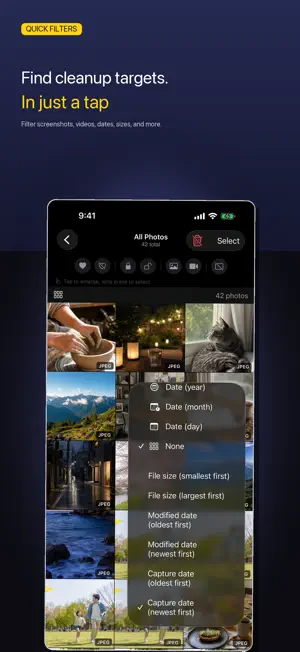
Most people don't clean up their photos because they're afraid of deleting something important. Keeplock fixes that. Keep the handful of shots you want to keep — they're automatically excluded from every delete action in the app. Then cull boldly: open when storage fills up, apply a saved deletion rule in one tap, and clean up in bulk. Anything you remove stays in Recently Deleted for 30 days. — Save your deletion rules, clean up in one tap Save filter presets like "screenshots older than 3 months," "videos over 10 MB," or "iPhone shots over 1 month old." When storage gets tight, tap the preset on the home screen to review and clear matching photos. — Keep your keepers safe Keeplock's Keep is a deletion safety valve. Keep the handful of photos you want to keep, and they're automatically excluded from bulk deletes, Best Shots, and swipe-to-delete alike. The delete confirmation shows exactly what's protected ("X kept"), so you always know what's safe. — Best Shots recommend the one worth keeping Keeplock automatically groups visually similar shots (bursts, brackets, RAW) and uses AI to suggest the shot to keep from each group, considering smiles, expressions, and overall photo quality. Narrow down hundreds of frames in an instant. Grouping expands progressively in the background, and every bit of analysis happens on-device. — Discover well-shot photos you haven't kept yet Keep Candidates surfaces well-shot photos you haven't kept yet — tap to Keep the ones you like. Available once you've kept 80 or more photos (free up to 100 kept photos, unlimited with Premium). All analysis happens on-device. — Duplicate detection Photos with identical file size, resolution, and format are grouped together. Tap "Keep newest, delete the rest" to clean up in one action. — Find photos by how you shoot - Media type (photo / video / Live Photo / panorama / screenshot / HDR / portrait) - File format (JPEG / HEIC / PNG / RAW / DNG / GIF / WebP / TIFF / BMP / QuickTime / MP4) - Camera model (auto-aggregated from EXIF) - Season, aspect ratio, EXIF settings (35mm focal length, aperture, ISO) — iPad and iPhone Use the same workflow on iPad or iPhone. Light / Dark / System appearance supported. — Local-first, private by design - Zero network calls. No analytics SDKs - Only photos with full-resolution data on device are processed (iCloud-only photos are skipped) - Requires only Photos read and add permissions - No proprietary cloud — nothing leaves your device — Pricing - Monthly: ¥300/month - Yearly: ¥2,700/year (~25% savings vs monthly) - Lifetime: ¥4,800 one-time (no auto-renewal) - Existing lifetime purchasers keep full access at no extra cost. — Premium features - Unlimited keeps (free protects up to 100; Premium is unlimited) - Bulk-delete Best Shots (free is view-only; Premium clears the group in one tap) - Adjust the grouping strictness (similarity sensitivity) - Save unlimited filter presets (free saves 1) - See your smiling photos together (on-device detection; free shows the 10 oldest, Premium shows all) Subscriptions are billed to your Apple Account and auto-renew unless turned off at least 24 hours before the end of the current period. Manage or cancel anytime in Settings → Apple Account → Subscriptions. Terms of Service: https://landing-tawny-xi-59.vercel.app/terms Privacy Policy: https://landing-tawny-xi-59.vercel.app/privacy Support: https://landing-tawny-xi-59.vercel.app/support
What’s new
Version 1.2.0 · Updated July 21, 2026
- Best Shots recommendations redesigned: smiles, open-mouth expressions, and overall photo appeal now carry more weight - Photo analysis runs at a higher resolution for better face and expression detection (your library is re-analyzed automatically in the background after updating) - In near-tie groups, the photo with the most expressive smile now appears first - Improved smile detection reliability
App privacy
The developer, Kazuki Sugitani, reported these privacy practices to Apple.
Data Not Collected
The developer does not collect any data from this app.
Alternatives to Keeplock: Burst Photo Cleaner
Looking for apps like Keeplock: Burst Photo Cleaner? Here are 6 similar apps on the App Store.
-
 Arelio: Photo Cleaner
-
 Vampire - The Photo Cullin App
-
 Turnr: Rotate & Clean Photos
-
 Lumera Camera
-
 BurstShotsShare
-
 Capture WOW Plus
| App | Rating | Price | Last updated | Compare |
|---|---|---|---|---|
| Keeplock: Burst Photo Cleaner | – | Free | July 21, 2026 | |
| Arelio: Photo Cleaner | – | Free | Oct 5, 2026 | Compare |
| Vampire - The Photo Cullin App | – | Free | Jul 9, 2026 | Compare |
| Turnr: Rotate & Clean Photos | – | Free | Feb 23, 2026 | Compare |
| Lumera Camera | – | Free | Sep 25, 2026 | Compare |
| BurstShotsShare | – | Free | Feb 5, 2025 | Compare |
| Capture WOW Plus | – | Free | Oct 8, 2026 | Compare |