

Murmur: On-Device AI Music
Konstantin Tabakov Music iPhoneiPadiPod touch
Murmur: On-Device AI Music is a free Music app for iPhone and iPad by Konstantin Tabakov. Rated 5.0/5 from 2 ratings. Requires iOS 26.0.
- Rating
- 5.0
- 2 ratings
- Price
- Free
- on the App Store
- Size
- 72 MB
- Age 4+
- Updated
- Oct 19
- 2026 · v2.2.2
Screenshots



About Murmur: On-Device AI Music
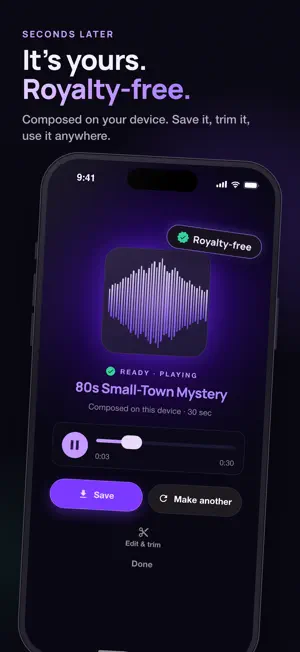
Murmur composes original, royalty-free music on your iPhone, for your photos and videos, games, podcasts and focus sessions. No cloud, no subscription, no waiting on a server. NEW: SCORE MODE Pick a photo or a video and Murmur composes a soundtrack for it, right on your iPhone. Choose a feeling if you like (epic, chill, emotional, playful…), and Orpheus writes music as long as your video. Preview it over your clip, then save the video with its new music to Photos, share it, or post it to Instagram. Your photos and videos never leave your phone. You can also share a photo or video to Murmur straight from Photos. IDEAS THAT FIT THE SCENE On iPhones with Apple Intelligence, Apple's on-device model looks at your photo or video and suggests three different musical ideas that fit it: a mountain hike gets something adventurous, a rainy window something cozy. On other iPhones, Score still works: start from our presets or Story Worlds, or write your own prompt. NEW: MOMENTS 31 ready-made soundtracks for the moments people film most: birthdays, weddings, the dog park, travel, pool parties, graduations, holidays and more. STORY WORLDS, NOW WITH SEARCH 40+ cinematic film and game moods. Search them by place, mood or scene, pick one, and Murmur scores it. STYLES FROM 30+ COUNTRIES New regional styles from more than 30 countries, so a photo from Lisbon, Kyoto or Rio can sound like the place. MEET ORPHEUS Murmur's engine, powered by Stability AI, composes a full track in seconds and goes up to 6 minutes long. Describe a scene, a mood or the instruments you want, or start from one of 200+ curated styles. Its model was trained on licensed and Creative Commons audio. IN YOUR LANGUAGE Murmur speaks English, German, French, Spanish, Portuguese, Japanese, Italian, Korean, Polish, Ukrainian and Simplified Chinese. Describe your music in your own words: prompts in other languages are translated on your iPhone before the track is made. MADE FOR CREATORS • Soundtracks for Reels, short videos, vlogs and photo posts • Loops and soundtracks for indie games • Beds for podcasts, ads and presentations • Lo-fi, ambient, cinematic, electronic, jazz, acoustic and many more PRIVATE AND OFFLINE Every track is generated on your iPhone. Your prompts, photos, videos and music never leave your phone, and after a one-time model download the music engine works fully offline. GO LIVE Live mode streams a continuous instrumental set in real time. Steer it like a DJ with the knob deck: fade beat, bass, keys, pads, guitar, strings and more in and out while it plays, then save the jam to your Library. YOUR LIBRARY Save tracks, rename them, trim, fade and loop them in the editor, and export WAV files ready for your edit. FREE AND PRO Murmur is free to download, with free tracks every day. Free scores cover photos and videos up to 30 seconds, and exported videos carry a small "Made with Murmur" mark. Murmur Pro is a one-time purchase, not a subscription. It unlocks unlimited tracks up to 6 minutes each, scores for full-length videos without the mark, all styles and Story Worlds, custom prompts, Live mode without limits and WAV export. ROYALTY-FREE Music you make with Murmur is yours to use, with no licensing fees for us or the model providers. As with any AI-generated audio, automated content-matching systems can occasionally flag a false match; that is disputable with the platform. REQUIREMENTS Orpheus, the engine Score mode uses, needs iOS 26 or later. iPhone 15 Pro and newer get the full engine (a one-time download of about 2.1 GB); older iPhones get Orpheus Small, a lighter version made for them (about 1.2 GB, tracks up to 2 minutes). On iOS 18, Murmur uses the Classic engine. Wi-Fi recommended; you can switch engines in Settings. Scene ideas need Apple Intelligence: iPhone 15 Pro or newer with iOS 27 and Apple Intelligence turned on. Orpheus is powered by Stability AI and licensed under the Stability AI Community License. Terms: murmurapps.com/terms
What’s new
Version 2.2.2 · Updated October 19, 2026
- Better VoiceOver support: the track options in the Library, the editor's sliders and trim handles, the Live pads and the progress while a track is being made are now all reachable and spoken - Bug fixes and improvements
App privacy
The developer, Konstantin Tabakov, reported these privacy practices to Apple.
Data Not Linked to You
The following data, which may be collected but is not linked to your identity, may be used for the following purposes:
- Purchases: Purchase History
- Identifiers: User ID
- Usage Data: Product Interaction
- Diagnostics: Crash Data, Performance Data
Used for: Analytics, App Functionality
Alternatives to Murmur: On-Device AI Music
Looking for apps like Murmur: On-Device AI Music? Here are 6 similar apps on the App Store. The highest rated is Melovy - AI Music Generator (5.0/5), and all 6 are free to download.
-
 Music Kitchen - Local AI songs
4.0
Music Kitchen - Local AI songs
4.0
-
 Melovy - AI Music Generator
5.0
Melovy - AI Music Generator
5.0
-
 MuzicGenerator - AI Music
5.0
MuzicGenerator - AI Music
5.0
-
 LyricsPro - Ai Music Creator
5.0
LyricsPro - Ai Music Creator
5.0
-
 LittySong: AI Song & Music
4.5
LittySong: AI Song & Music
4.5
-
 AI Song & Music Maker - Foxify
3.0
AI Song & Music Maker - Foxify
3.0
| App | Rating | Price | Last updated | Compare |
|---|---|---|---|---|
| Murmur: On-Device AI Music | 5.0 / 5 (2 ratings) | Free | October 19, 2026 | |
| Music Kitchen - Local AI songs | 4.0 / 5 (2) | Free | Mar 28, 2026 | Compare |
| Melovy - AI Music Generator | 5.0 / 5 (3) | Free | Oct 16, 2026 | Compare |
| MuzicGenerator - AI Music | 5.0 / 5 (3) | Free | Feb 26, 2026 | Compare |
| LyricsPro - Ai Music Creator | 5.0 / 5 (2) | Free | Mar 30, 2026 | Compare |
| LittySong: AI Song & Music | 4.5 / 5 (25) | Free | Aug 6, 2026 | Compare |
| AI Song & Music Maker - Foxify | 3.0 / 5 (2) | Free | Sep 28, 2026 | Compare |