

Find My Device · Find Air
BEGAMOB GLOBAL LIMITED Utilities iPhoneiPadiPod touch
Find My Device · Find Air is a free Utilities app for iPhone and iPad by BEGAMOB GLOBAL LIMITED. Rated 4.5/5 from 129 ratings. Requires iOS 17.0.
- Rating
- 4.5
- 129 ratings
- Price
- Free
- on the App Store
- Size
- 36 MB
- Age 4+
- Updated
- Aug 29
- 2026 · v1.2.8
Screenshots



About Find My Device · Find Air
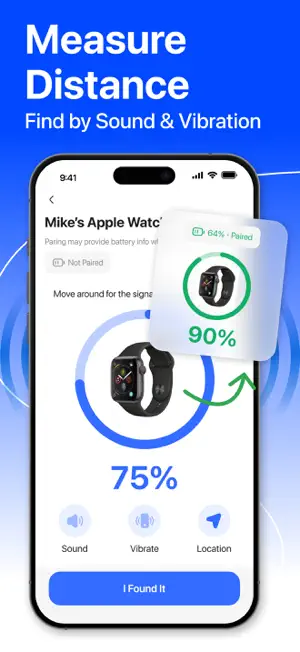
Find My Device · Find Air helps you quickly find nearby Bluetooth devices and keep your important gadgets within reach. Whether you are looking for earbuds, headphones, smartwatches, tablets, speakers, phones, fitness trackers, or other Bluetooth accessories, this device finder makes it easier to scan, detect, and locate your lost device. KEY FEATURES Find Nearby Bluetooth Devices Scan for nearby Bluetooth devices and view detected items in a clear list. The app helps you find devices such as: • Earbuds • Wireless headphones • Bluetooth speakers • Smartwatches • Fitness trackers • Phones and tablets • Bluetooth accessories • Other supported nearby devices Bluetooth Device Scanner Use the built-in Bluetooth scanner to search again whenever you need. The app scans nearby Bluetooth signals and shows available devices so you can start locating the one you need. Signal Strength Finder Select a detected device and view a signal strength indicator. As you move closer to the device, the signal can become stronger, helping you understand whether you are getting nearer or farther away. This makes it easier to find devices hidden under pillows, inside bags, around desks, in another room, or near your current location. Simple Device List All detected devices are displayed in one organized list. You can quickly check nearby devices, select the item you want to find, and begin tracking it with the signal screen. Find Lost Gadgets Faster If you often misplace Bluetooth devices, this app gives you a simple way to search for them. It is useful for finding commonly lost items such as earbuds, headphones, watches, speakers, and other Bluetooth-enabled gadgets. Easy Search Again Need to refresh the list? Use Search Again to rescan nearby devices and update results. This helps when your device moves, reconnects, or appears after a few moments. Support and Guidance Find My Device · Find Air includes support information to help users understand how to scan, search, and locate Bluetooth devices more effectively. WHY USE FIND MY DEVICE · FIND AIR? • Find nearby Bluetooth devices quickly • Search for earbuds, headphones, speakers, watches, phones, and more • Use Bluetooth signal strength to guide your search • Rescan nearby devices anytime • View detected devices in a simple list • Helpful for home, office, travel, school, or daily use • Clean interface with easy controls • Useful for locating misplaced gadgets nearby SUBSCRIPTION INFORMATION Find My Device · Find Air may offer premium access through subscription plans. Subscription options, pricing, trial availability, and renewal terms may vary by country or region and will be shown clearly before purchase. Payment will be charged to your Apple ID account at confirmation of purchase. Subscriptions automatically renew unless canceled at least 24 hours before the end of the current subscription period. You can manage or cancel your subscription in your App Store account settings. Any unused portion of a free trial period, if offered, may be forfeited when you purchase a subscription. Privacy Policy: https://begamob.com/policy.html Term of uses: https://begamob.com/ofs-termofuse.html
Ratings & reviews
4.5
129 ratings
What’s new
Version 1.2.8 · Updated August 29, 2026
Enjoy better device tracking with new features, performance upgrades, and general bug fixes in this update.
App privacy
The developer, BEGAMOB GLOBAL LIMITED, reported these privacy practices to Apple.
Data Used to Track You
The following data may be used to track you across apps and websites owned by other companies:
- Identifiers: User ID, Device ID
- Usage Data: Product Interaction
- Diagnostics: Crash Data, Performance Data, Other Diagnostic Data
Data Not Linked to You
The following data, which may be collected but is not linked to your identity, may be used for the following purposes:
- Contact Info: Name
- Identifiers: User ID, Device ID
- Usage Data: Product Interaction
- Diagnostics: Crash Data, Performance Data, Other Diagnostic Data
Used for: Third-Party Advertising, Analytics
Alternatives to Find My Device · Find Air
Looking for apps like Find My Device · Find Air? Here are 6 similar apps on the App Store. The highest rated is Find Now - AI Find My Device (4.7/5), and all 6 are free to download.
-
 Find Now - AI Find My Device
4.7
Find Now - AI Find My Device
4.7
-
 Air Tag Detector: Find Tracker
4.6
Air Tag Detector: Find Tracker
4.6
-
 PodFinder: Find My Headphones
3.5
PodFinder: Find My Headphones
3.5
-
 Find My Device: Scan & Track
3.9
Find My Device: Scan & Track
3.9
-
 Phone Tracker - Find Device
1.3
Phone Tracker - Find Device
1.3
-
 Ble Scanner Bluetooth Finder
4.3
Ble Scanner Bluetooth Finder
4.3
| App | Rating | Price | Last updated | Compare |
|---|---|---|---|---|
| Find My Device · Find Air | 4.5 / 5 (129 ratings) | Free | August 29, 2026 | |
| Find Now - AI Find My Device | 4.7 / 5 (658) | Free | Oct 12, 2026 | Compare |
| Air Tag Detector: Find Tracker | 4.6 / 5 (156) | Free | Sep 21, 2026 | Compare |
| PodFinder: Find My Headphones | 3.5 / 5 (36) | Free | May 23, 2026 | Compare |
| Find My Device: Scan & Track | 3.9 / 5 (91) | Free | Jul 30, 2026 | Compare |
| Phone Tracker - Find Device | 1.3 / 5 (88) | Free | Oct 28, 2025 | Compare |
| Ble Scanner Bluetooth Finder | 4.3 / 5 (53) | Free | Sep 1, 2026 | Compare |