

PassVault - Password Safe
Hilal Balci Utilities iPhoneiPadiPod touch
PassVault - Password Safe is a free Utilities app for iPhone and iPad by Hilal Balci. Requires iOS 15.1. Updated June 19, 2026.
- Price
- Free
- on the App Store
- Size
- 36 MB
- Age 4+
- Updated
- Jun 19
- 2026 · v1.0
Screenshots

About PassVault - Password Safe
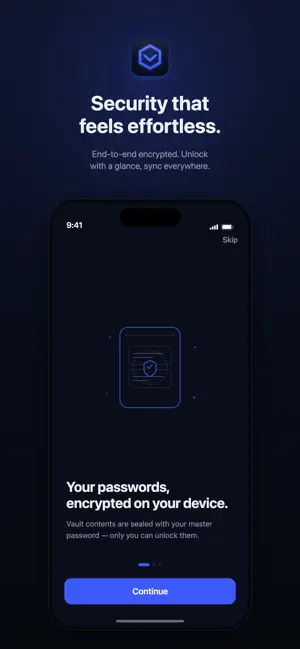
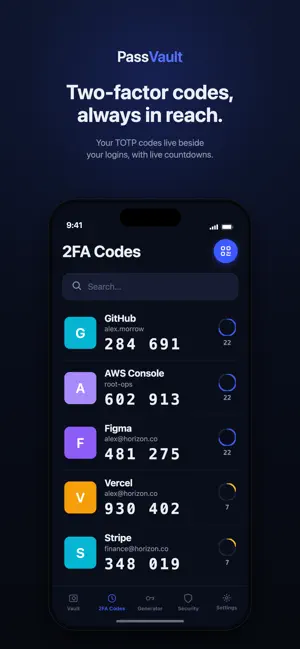
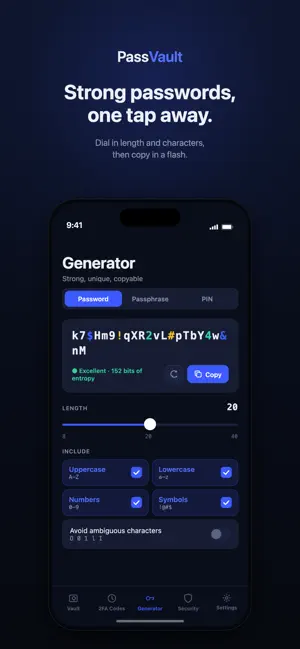
PassVault is a password manager built for people who take privacy seriously — without making security feel like work. Everything in your vault is end-to-end encrypted on your device with your master password. We can't see it, reset it, or hand it over. Unlock in a moment with Face ID, and your logins, notes, and everything are right where you need them. WHY PASSVAULT End-to-end encryption. Your data is sealed before it ever leaves your device. Face ID unlock — fast access without compromising on safety. Optional encrypted sync keeps every device in step. ONE CALM, SECURE VAULT Store logins and secure notes in one place. Favorites, folders, and instant search across titles, usernames, and URLs. Swipe to copy a username or password in a single tap. STRONG PASSWORDS, INSTANTLY Generate passwords, passphrases, UUIDs or PINs. Dial in length and character sets; avoid ambiguous characters. See real-time strength and entropy before you save. SECURITY THAT WATCHES YOUR BACK A security score with clear, fixable steps. Breach monitoring flags accounts caught in known data leaks. Surfaces weak, reused, and aging passwords. PRIVACY BY DESIGN Auto-lock with an adjustable timeout. Clipboard auto-clear after copying. Hides vault contents in the app switcher and blocks screenshots. Create your master password, save your recovery code, and you're in control. No tracking. No ads. Just your passwords, protected. PassVault Premium is an auto-renewing subscription. • PassVault Premium (Monthly) — $2.99 per month • PassVault Premium (Annual) — $24.99 per year Payment is charged to your Apple Account at confirmation of purchase. The subscription automatically renews unless it is cancelled at least 24 hours before the end of the current period. Your account is charged for renewal within 24 hours prior to the end of the current period. You can manage or cancel your subscription in your Apple Account settings after purchase. Terms of Use (EULA): https://thepassvault.com/terms Privacy Policy: https://thepassvault.com/privacy
App privacy
The developer, Hilal Balci, reported these privacy practices to Apple.
Data Linked to You
The following data, which may be collected and linked to your identity, may be used for the following purposes:
- Purchases: Purchase History
- Contact Info: Email Address
- User Content: Other User Content
- Identifiers: User ID
Used for: App Functionality
Alternatives to PassVault - Password Safe
Looking for apps like PassVault - Password Safe? Here are 6 similar apps on the App Store. The highest rated is Password Tool Help (5.0/5), and all 6 are free to download.
-
 PassVault: Secure Pass Manager
-
 HexaVault Password Manager
-
 Finalpass
-
 PassCode Creator
-
 PassStore - Password Safe
-
 Password Tool Help
5.0
Password Tool Help
5.0
| App | Rating | Price | Last updated | Compare |
|---|---|---|---|---|
| PassVault - Password Safe | – | Free | June 19, 2026 | |
| PassVault: Secure Pass Manager | – | Free | Jun 25, 2026 | Compare |
| HexaVault Password Manager | – | Free | Apr 26, 2026 | Compare |
| Finalpass | – | Free | Aug 22, 2024 | Compare |
| PassCode Creator | – | Free | Mar 31, 2026 | Compare |
| PassStore - Password Safe | – | Free | May 25, 2026 | Compare |
| Password Tool Help | 5.0 / 5 (1) | Free | Jun 11, 2025 | Compare |