

Blurize: Offline Face Blur
OKAN ATABAG Photo & Video iPhoneiPadiPod touch
Blurize: Offline Face Blur is a free Photo & Video app for iPhone and iPad by OKAN ATABAG. Requires iOS 15.5. Updated October 29, 2026.
- Price
- Free
- on the App Store
- Size
- 141 MB
- Age 4+
- Updated
- Oct 29
- 2026 · v1.12.2
Screenshots


About Blurize: Offline Face Blur
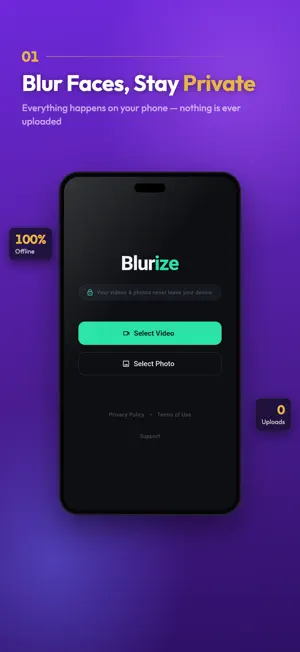
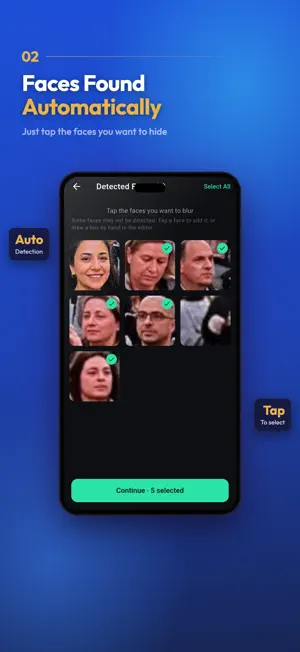
Blurize is the private way to hide faces and license plates in your photos and videos — and it all happens 100% on your device. Your media never leaves your device. No account needed. Just open, blur and save. Protecting kids in a holiday video, hiding bystanders before you post, anonymizing a dashcam clip or a screen recording: Blurize finds every face and plate automatically and lets you choose exactly which ones to conceal. WHY BLURIZE 100% OFFLINE & PRIVATE Everything runs on your phone. Your photos and videos never leave your device — turn off your internet and Blurize still works. This is our core promise, not a setting. AUTOMATIC FACE DETECTION Every face is found in a single tap and shown as a thumbnail. Pick the ones to hide and keep the rest sharp. In videos, faces stay covered as they move — even across camera cuts. LICENSE PLATES TOO Blurize detects license plates in dashcam footage, street videos and photos, and hides them with the same tools you use for faces. CHANGE THE VOICE Stay anonymous beyond the face: make a voice deeper, higher, robotic, or set your own pitch, and hear it before you export. Blurize never uses the microphone — it only changes the audio already in your video. MANY PHOTOS AT ONCE Pick several photos and hide the faces and plates in all of them in one go. SHARE STRAIGHT INTO BLURIZE Send photos or a video to Blurize from Photos or any other app with the Share button. MANY CONCEAL STYLES • Gaussian Blur — smooth, natural censoring • Pixelate — classic mosaic look • Black & White — desaturate the face • Solid Color — cover with any color • Emoji Stickers — fun overlays that follow movement Oval or rectangular masks, plus manual boxes you can draw and track across the timeline. YOUR WORK IS SAVED Every import becomes a project on your device. Close the app and come back later — your scan and edits are exactly where you left them. WHAT YOU SEE IS WHAT YOU GET The preview uses the real export engine, and export runs on your phone's own hardware, straight to your gallery. FREE & PREMIUM Free includes blur and pixelate, photos, and videos up to 1 minute. Blurize Premium unlocks: • Videos up to 10 minutes • No Blurize watermark • All conceal styles — B&W, color, emoji • Export in original quality • Ad-free experience Payment is charged to your Apple ID at confirmation of purchase. Subscriptions auto-renew unless turned off at least 24 hours before the end of the current period. Manage or cancel anytime in your App Store account settings. Terms of Use (EULA): https://www.apple.com/legal/internet-services/itunes/dev/stdeula/ Privacy Policy: https://blurize.app/privacy No microphone access. No face recognition. No collection of your media — ever. Your photos and videos are yours, and they stay that way.
What’s new
Version 1.12.2 · Updated October 29, 2026
A big update — and all of it still happens on your phone: - Blur license plates: Blurize finds plates in your videos and photos and hides them with the same tools you use for faces. - Change the voice in your videos: deeper, higher, robotic or your own pitch, with a preview before you export. - Hide faces and plates in several photos at once. - Share photos or a video to Blurize straight from Photos or any other app. - Already bought Premium? It comes back by itself after a reinstall, and Blurize checks for it before asking you to pay again. - Rate Blurize or report a problem from the Account screen — add your email if you'd like a reply. - Now in Italian, Dutch and Russian. - Plus faster, lighter editing and many fixes, including faces in portrait photos.
App privacy
The developer, OKAN ATABAG, reported these privacy practices to Apple.
Data Used to Track You
The following data may be used to track you across apps and websites owned by other companies:
- Identifiers: Device ID
Data Linked to You
The following data, which may be collected and linked to your identity, may be used for the following purposes:
- Location: Coarse Location
- Identifiers: Device ID, User ID
- Usage Data: Product Interaction, Advertising Data
- Diagnostics: Other Diagnostic Data
- Purchases: Purchase History
- Contact Info: Email Address
- User Content: Customer Support
Used for: Third-Party Advertising, Developer’s Advertising or Marketing, Analytics, App Functionality
Data Not Linked to You
The following data, which may be collected but is not linked to your identity, may be used for the following purposes:
- Diagnostics: Performance Data, Crash Data
Used for: Third-Party Advertising, Analytics, App Functionality
Alternatives to Blurize: Offline Face Blur
Looking for apps like Blurize: Offline Face Blur? Here are 6 similar apps on the App Store. The highest rated is PicStrip: Blur Faces in Video (5.0/5), and all 6 are free to download.
-
 TapMask
-
 Blur Photo, Face, Background
-
 PicStrip: Blur Faces in Video
5.0
PicStrip: Blur Faces in Video
5.0
-
 Blur Kids - Face Blur
-
 BlurClip - Blur Video
-
 ReciproMeter
3.0
ReciproMeter
3.0
| App | Rating | Price | Last updated | Compare |
|---|---|---|---|---|
| Blurize: Offline Face Blur | – | Free | October 29, 2026 | |
| TapMask | – | Free | Jul 28, 2026 | Compare |
| Blur Photo, Face, Background | – | Free | Jul 2, 2026 | Compare |
| PicStrip: Blur Faces in Video | 5.0 / 5 (1) | Free | Oct 10, 2026 | Compare |
| Blur Kids - Face Blur | – | Free | Oct 8, 2026 | Compare |
| BlurClip - Blur Video | – | Free | Sep 29, 2026 | Compare |
| ReciproMeter | 3.0 / 5 (1) | Free | Oct 16, 2026 | Compare |