

LLMster
Dave Sebek Productivity iPhoneiPadiPod touch
LLMster is a free Productivity app for iPhone and iPad by Dave Sebek. Rated 5.0/5 from 3 ratings. Requires iOS 26.0. Updated September 5, 2026.
- Rating
- 5.0
- 3 ratings
- Price
- Free
- on the App Store
- Size
- 10 MB
- Age 4+
- Updated
- Sep 5
- 2026 · v1.5
Screenshots



About LLMster
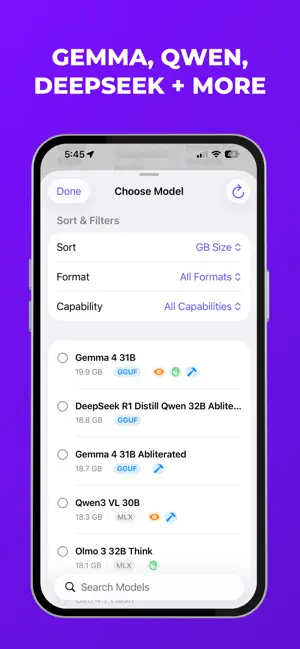
Local AI, in your pocket. LLMster is a fast, private iPhone and iPad client for models running on your LM Studio server. Stream replies, reasoning, tool activity, and image-based conversations from the models you host—in an app designed to feel at home on iOS. Private by design LLMster connects directly to the server you choose. There’s no LLMster account, telemetry, hosted chat service, or cloud relay in the middle. Your conversation library stays on your device, while model context stays with your configured server. External integrations run only when you choose to enable them. Your models, wherever you run them Keep your models on the machine built for them: a workstation, home server, or always-on computer. Run the LM Studio desktop app or LM Studio’s headless daemon, point LLMster at the host, and start chatting. No companion desktop client is required. Choose the right model without leaving the conversation: • Search or sort by name, size, or format, then pin favorites • See which models support vision, reasoning, or tool calls • Change models without starting a new chat Organized from the start Search chats by title, model, or folder. Browse recent conversations across every folder, then organize, rename, pin, or duplicate important threads. Move and protect your chats Share individual conversations as .llmster files and import them on another device while preserving messages, images, reasoning, tool history, and chat settings. Back up and restore your entire local chat library—including folders, pins, drafts, and attachments—with optional password protection. Backups do not include server addresses, authentication keys, or app-wide settings. LLMster also verifies transferred response context against your configured LM Studio server before continuing a chat. Vision, direct to your server Attach up to four screenshots, photos, or scanned pages to a message and send them to a compatible vision model. LLMster resizes and compresses images on your device before sending them, so the originals remain with you. Open any attachment and pinch to zoom when you need to inspect the details. Hands-free voice chat Talk naturally using on-device speech recognition and text-to-speech. Audio stays on your device; only the resulting text is sent to your configured server. Natural turn-taking and subtle haptics keep the conversation moving without touching the screen. Control each conversation Every chat can have its own: • Integrations already configured in LM Studio • Custom system prompt • Tool-call visibility • Live reasoning preference Stream reasoning as Markdown while the model works, or keep the interface quiet with a compact Thinking indicator and open the completed reasoning when you want it. Control response auto-scrolling, and choose System, Light, or Dark appearance with your preferred accent color. Rich responses, as they arrive LLMster renders streaming Markdown smoothly, including syntax-highlighted code with copy controls, inline and block math, tables, links, lists, and more. Export or share transcripts with their original Markdown intact. Keep going while you move on LLMster asks iOS to continue eligible responses after you leave the app. When the system starts continued processing, progress appears as a Live Activity on the Lock Screen and, on supported iPhones, in the Dynamic Island. When a background response completes, LLMster can notify you locally—without routing your conversation through a push server. Tap a notification or Live Activity to return to the correct conversation. Setup instructions are available at https://llmster.app/support
What’s new
Version 1.5 · Updated September 5, 2026
Version 1.5 adds new tools for managing your chats and server: - Import individual conversations or full-library backups directly from Settings. - Free server memory with Unload All Models, including summarizer and embedding models. - Start fresh with Reset App, which clears local data and returns you to setup. - Improved model selection when opening imported chats. - Refined the appearance of chat errors and recovery controls above the message composer.
App privacy
The developer, Dave Sebek, reported these privacy practices to Apple.
Data Not Collected
The developer does not collect any data from this app.
Alternatives to LLMster
Looking for apps like LLMster? Here are 6 similar apps on the App Store. The highest rated is VoxyAI (5.0/5), and all 6 are free to download.
-
 Astrid AI Client
-
 Local AI: Private Agent, LocAI
-
 Ranni - Agent on your phone
-
 Sencha: LLM Chat Client
-
 VoxyAI
5.0
-
 Volocal
3.0
| App | Rating | Price | Last updated | Compare |
|---|---|---|---|---|
| LLMster | 5.0 / 5 (3 ratings) | Free | September 5, 2026 | |
| Astrid AI Client | – | Free | Mar 18, 2026 | Compare |
| Local AI: Private Agent, LocAI | – | Free | Aug 19, 2026 | Compare |
| Ranni - Agent on your phone | – | Free | Sep 20, 2026 | Compare |
| Sencha: LLM Chat Client | – | Free | Oct 12, 2026 | Compare |
| VoxyAI | 5.0 / 5 (1) | Free | Jun 18, 2026 | Compare |
| Volocal | 3.0 / 5 (3) | Free | Apr 2, 2026 | Compare |
Compare LLMster with the top alternatives: ratings, updates, ASO score and keyword gaps →