

PocketToDo - Simple Tasks
IMAE Tasuku Productivity iPhoneiPadiPod touch
PocketToDo - Simple Tasks is a free Productivity app for iPhone and iPad by IMAE Tasuku. Requires iOS 17.0. Updated October 6, 2026.
- Price
- Free
- on the App Store
- Size
- 8 MB
- Age 4+
- Updated
- Oct 6
- 2026 · v1.2(6)
Screenshots
About PocketToDo - Simple Tasks
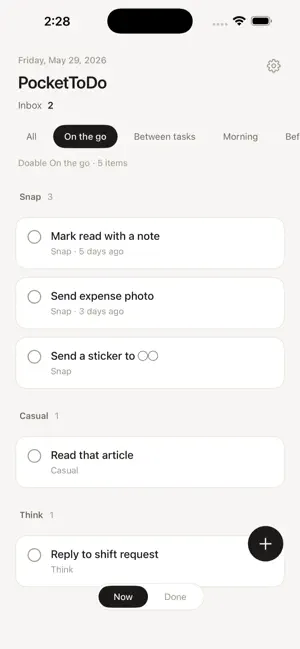
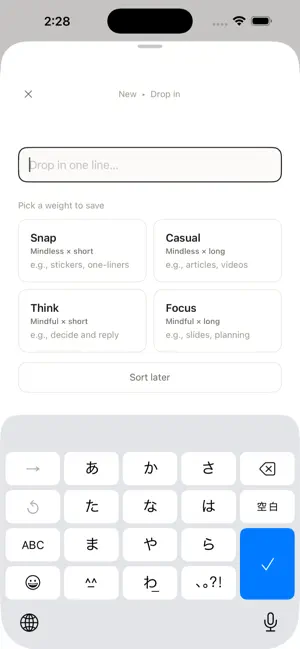
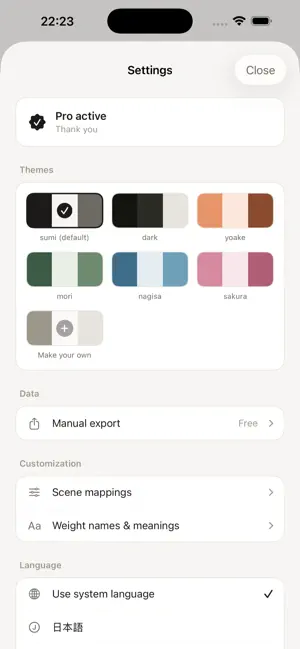
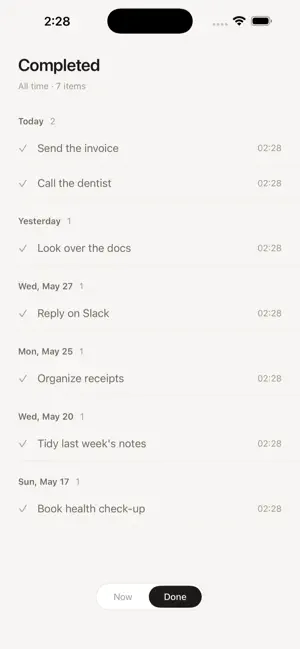
"Capture it before you forget." PocketToDo is a quiet ToDo app built around one thing: never losing the small tasks. --- ■ The big ones get done. The small ones slip. "Quick reply." "Submit the shift form." "Send that sticker." These small tasks get buried in long lists, lost in notification streams, and quietly pass their moment. But they're not big enough to deserve their own note. PocketToDo is a place to catch and finish exactly those — the small things that take two taps on your phone. --- ■ Just two ideas. 【When you capture: hold by weight】 On drop-in, pick one of 4 tiles — head (light/heavy) × time (short/long): Snap · Casual · Think · Focus 【When you pull: filter by scene】 On the home screen, switch between 4 scenes — and only the tasks doable right now appear, lightest first. On the go → Snap + Casual + Think Before bed → Snap only Morning → Snap + Casual Between tasks → Snap + Casual "What I can actually do, right now" — only that, in front of you. --- ■ Quiet by design. · No notifications. Nothing nags you. · Sorted by ease, not urgency. Small wins, stacked up. · One-line capture + one tap to weight. Three seconds, done. · Capture from Siri, Shortcuts, widgets, or the Action button — without opening the app. · Stored only on your device. No account, no sign-in. --- ■ Free features · Capture, edit, complete tasks · 4 scenes (On the go, Between tasks, Morning, Before bed) · Customize which weights appear per scene · Daily repeating tasks (complete it, and it comes back tomorrow) · One-line capture from Siri, Shortcuts, and the Action button · Home Screen and Lock Screen widgets, plus Control Center (iOS 18) · Last 7 days of completed history · Default + dark themes · Manual CSV export (keep an external record) --- ■ PocketToDo Pro features · Full history (no 7-day cutoff) · Review: tasks finished this week and month, weight breakdown, and streaks for daily tasks · 4 additional color themes (Yoake, Mori, Nagisa, Sakura) · Make up to 3 custom palettes of your own (widgets follow your theme) · The home-screen icon follows your chosen theme · Rename the 4 weights — both name and meaning — in your own words Pricing: $23.99 / year · $2.99 / month · $58.99 one-time ※ Yearly ≈ 39% off vs monthly (~$2/mo effective) ※ 7-day free trial on subscriptions ■ Terms (subscriptions) - Yearly: $23.99 / year (includes a 7-day free trial; billed after the trial ends) - Monthly: $2.99 / month (includes a 7-day free trial; billed after the trial ends) - Lifetime: $58.99 (one-time payment, no auto-renewal) Subscriptions (yearly, monthly) auto-renew unless canceled at least 24 hours before the end of the current period; payment is charged to your Apple ID at renewal. Manage or cancel anytime in Settings > Apple ID > Subscriptions. Terms of Use (Apple standard EULA): https://www.apple.com/legal/internet-services/itunes/dev/stdeula/ Privacy Policy: https://atimekusau535-hub.github.io/pockettodo/en/privacy.html --- ■ Privacy first PocketToDo collects no personal information whatsoever. Tasks and settings are stored only on your device, never sent to any server. We embed no analytics SDKs and no advertising SDKs. The best way to protect data is to not collect it in the first place. --- ■ Get in touch X (Twitter): @bon_dev_ Support: https://atimekusau535-hub.github.io/pockettodo/en/support.html Bugs and feature requests very welcome.
What’s new
Version 1.2(6) · Updated October 6, 2026
■ Complete tasks right from the widget Tap the circle on a Home Screen widget to check a task off without opening the app. Tap anywhere else to add, as before. ■ Large widget, split by weight The large widget sorts your tasks into the four weights. Your custom weight names show up too. ■ Small and medium widgets show newest first What you just added is at the top. The medium widget now shows up to six tasks in two columns. ■ Undo a completed task Tapping the circle now shows a check before the task goes away. Tap again to cancel, or use Undo at the bottom of the screen right after. Plus easier-to-read text and circles in the widgets.
App privacy
The developer, IMAE Tasuku, reported these privacy practices to Apple.
Data Not Linked to You
The following data, which may be collected but is not linked to your identity, may be used for the following purposes:
- Purchases: Purchase History
Used for: Analytics, App Functionality
Alternatives to PocketToDo - Simple Tasks
Looking for apps like PocketToDo - Simple Tasks? Here are 6 similar apps on the App Store. The highest rated is DayLift - Habit Tracker (5.0/5), and all 6 are free to download.
-
 Simpli - write & clear
-
 DayLift - Habit Tracker
5.0
DayLift - Habit Tracker
5.0
-
 Drimr
Drimr
-
 グルポケ-GroupPocket-
-
 Murmio: AI Voice To-Do List
-
 Peel: Sticky Note Scanner
| App | Rating | Price | Last updated | Compare |
|---|---|---|---|---|
| PocketToDo - Simple Tasks | – | Free | October 6, 2026 | |
| Simpli - write & clear | – | Free | Jun 25, 2026 | Compare |
| DayLift - Habit Tracker | 5.0 / 5 (1) | Free | Jul 20, 2026 | Compare |
| Drimr | – | Free | Jul 20, 2026 | Compare |
| グルポケ-GroupPocket- | – | Free | Oct 25, 2026 | Compare |
| Murmio: AI Voice To-Do List | – | Free | Aug 3, 2026 | Compare |
| Peel: Sticky Note Scanner | – | Free | Oct 15, 2026 | Compare |