

Juru AAC
Antonio Jose Paes de Andrade Junior Medical iPad
Juru AAC is a free Medical app for iPad by Antonio Jose Paes de Andrade Junior. Requires iOS 18.0. Updated September 7, 2026.
- Price
- Free
- on the App Store
- Size
- 11 MB
- Age 4+
- Updated
- Sep 7
- 2026 · v1.1
Screenshots



About Juru AAC
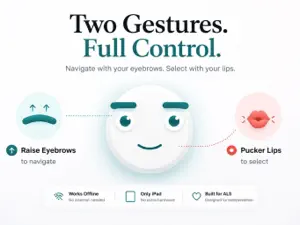
Juru AAC turns subtle facial gestures — or your gaze alone — into typed words and spoken speech. Designed primarily for people living with ALS (Amyotrophic Lateral Sclerosis) and people recovering from hemorrhagic stroke, Juru gives you a voice using only the muscles you can still move. No accounts. No internet connection. No data collection. Juru runs entirely on your iPad. TWO WAYS TO CONTROL IT You choose during setup, and you can change your mind at any time. Facial gestures. A brow raise navigates between letter groups. A short lip pucker (kiss) selects. A longer pucker undoes. Two gestures, full expression. Juru's calibration adapts to your range of motion, so the gestures work whether you can lift your eyebrows fully or just slightly. The thresholds are personal to you and tuned through a brief, guided setup. Eye tracking. Look at an option and hold your gaze to choose it. Juru builds this mode on iPadOS's own Eye Tracking, which also means Switch Control, Voice Control and Head Tracking operate the app. This choice exists because ALS is not the same for everyone, and not the same over time. As facial control changes, the way you speak through Juru does not have to. KEY FEATURES • Two-gesture text composition through a binary tree of letters • Eye tracking mode with large targets, and a Back card always within reach • Personalized calibration that adapts to your facial range of motion • Context-aware word prediction that weighs the sentence, not just the letters • Quick Words that shift with the time of day and with what you tend to say • Natural speech synthesis powered by Apple's voices • Full accessibility support: VoiceOver, Dynamic Type, Reduce Motion • Built for iPad's front camera face tracking — no extra hardware needed • Runs entirely offline — works on a plane, in rural homes, anywhere PRIVACY FIRST We collect nothing. Your camera feed never leaves your device — facial geometry is processed in real time by Apple's ARKit and immediately discarded. No video, no images, no analytics, no tracking. Your calibration thresholds stay privately on your iPad and never leave it. In eye tracking mode, Juru does not access the camera at all. Word prediction runs on device through CoreML. WHO IT IS FOR Juru AAC is built primarily for people living with ALS and people recovering from hemorrhagic stroke who can no longer reliably use a touch screen, keyboard, or voice. It is also useful for caregivers, speech-language pathologists, and families supporting them. Facial gesture mode works best for users who retain voluntary control over their eyebrows and lips. If a condition affects facial motor control — facial spasticity or significant tremor, for instance — eye tracking mode is likely the better fit, since it asks nothing of those muscles. We recommend trying both during setup to see which one answers your body. IMPORTANT Juru AAC is a communication assistance tool. It is not a medical device and is not intended to diagnose, treat, or monitor any medical condition. If you have clinical communication needs, please consult a speech-language pathologist or assistive technology specialist. REQUIREMENTS • iPad with iPadOS 18 or later • Facial gesture mode: a front-facing camera that supports face tracking, and adequate ambient lighting • Eye tracking mode: Eye Tracking switched on in Settings > Accessibility. Juru shows you the path the first time, but you are the one who enables it — no app is allowed to turn that feature on by itself Distinguished Winner of the Apple Swift Student Challenge 2026. Made with care in Recife, Brazil, by Antônio Paes de Andrade.
What’s new
Version 1.1 · Updated September 7, 2026
Eye Tracking You now choose how to control Juru. Alongside facial gestures, the app works entirely with iPad's Eye Tracking: look at a card and hold your gaze to choose it. Every control is now an accessibility button, so Switch Control, Voice Control and Head Tracking operate Juru too — all with features already built into iPad, no extra equipment. • Pick your mode on first launch, change it whenever you like • Tutorial adapted to each mode • A Back card always visible, between the two options • Settings with large targets, made to be used by gaze • The avatar follows the side in focus Smarter suggestions Suggested words now consider the context of your sentence, not just the letters you typed. Quick Words shift with the time of day and what you tend to say. Everything runs on your device. Nothing is recorded, stored, or sent anywhere
App privacy
The developer, Antonio Jose Paes de Andrade Junior, reported these privacy practices to Apple.
Data Not Collected
The developer does not collect any data from this app.
Alternatives to Juru AAC
Looking for apps like Juru AAC? Here are 6 similar apps on the App Store. The highest rated is My Voice AAC (5.0/5), and all 6 are free to download.
-
 Speak for Me - AAC Talk & TTS
-
 My CODI
-
 My Voice AAC
5.0
-
 MyVisualRoutine: Autism & ADHD
5.0
-
 Circle Alert Wellness Check In
4.3
-
 Speech Assistant - AAC Talker
5.0
| App | Rating | Price | Last updated | Compare |
|---|---|---|---|---|
| Juru AAC | – | Free | September 7, 2026 | |
| Speak for Me - AAC Talk & TTS | – | Free | Oct 17, 2026 | Compare |
| My CODI | – | Free | Oct 27, 2026 | Compare |
| My Voice AAC | 5.0 / 5 (3) | Free | May 31, 2026 | Compare |
| MyVisualRoutine: Autism & ADHD | 5.0 / 5 (3) | Free | Oct 29, 2026 | Compare |
| Circle Alert Wellness Check In | 4.3 / 5 (113) | Free | Sep 25, 2026 | Compare |
| Speech Assistant - AAC Talker | 5.0 / 5 (5) | Free | Aug 17, 2026 | Compare |
Compare Juru AAC with the top alternatives: ratings, updates, ASO score and keyword gaps →