

StitchWIP
Jessica Kordon Lifestyle iPhoneiPadiPod touch
StitchWIP is a free Lifestyle app for iPhone and iPad by Jessica Kordon. Requires iOS 15.1. Updated July 29, 2026.
- Price
- Free
- on the App Store
- Size
- 43 MB
- Age 4+
- Updated
- Jul 29
- 2026 · v1.0.6
Screenshots
About StitchWIP
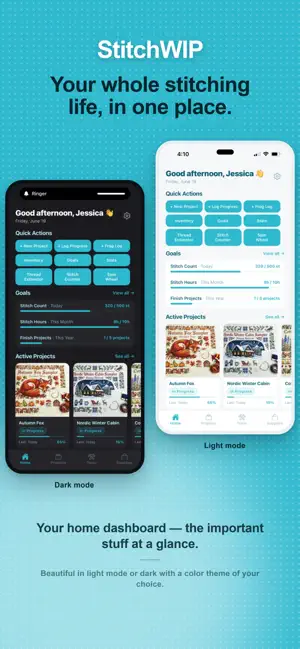
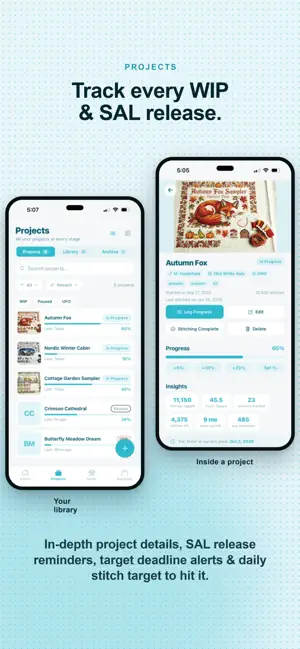
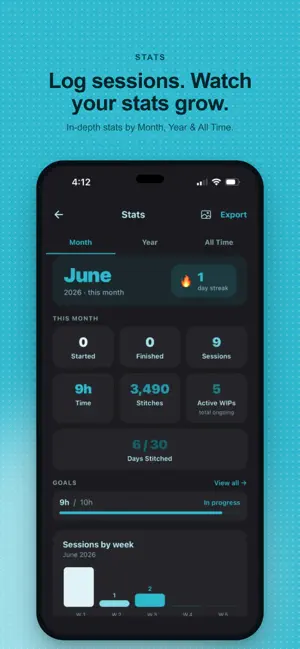
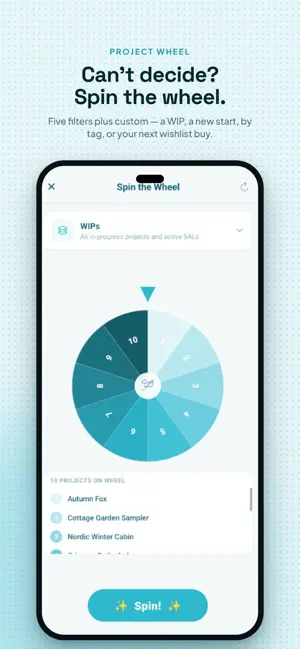
StitchWIP is the modern cross-stitch project tracker app. Whether you have one WIP or twenty, StitchWIP keeps everything organized — from your first stitch to the final finish. TRACK YOUR PROJECTS Log every WIP with stitch counts, fabric details, progress photos, and session logs. Set deadlines and let StitchWIP calculate your daily stitch pace automatically. Cataloguing a whole pile of WIPs? Quick Add lets you enter each one with just a name and stitch count — and keep adding without leaving the screen. Track Stitch-A-Long (SAL) schedules with part tracking and release date notifications. Record frog log entries when you rip out stitches so your progress history stays accurate. Every project gets its own stats too — sessions, hours, personal records, and a projected finish date. LOG YOUR SESSIONS Record every stitching session with time spent, stitch count, and notes. Correct or delete a past session at any time and your totals update automatically. Build a complete history of your craft — and watch your stats grow with every hour you log. MANAGE YOUR STASH Organize your full stash — threads by color number and quantity, fabric, needles, and other supplies, all sorted by category. Adding several colors at once? Use Bulk Add. Save your pattern library. Build a wishlist so nothing you love slips through the cracks. TOOLS FOR EVERY STITCHER · Color Charts — browse and search the full DMC range, filter by thread type, and see at a glance which colors are already in your stash · Stitch Counter — tap to count stitches with a running session timer · Fabric Calculator — calculate exact fabric size for any design at any count to include a border · Thread Estimator — estimate skeins needed by stitch count and strands then create a shopping list · Time Calculator — find out how long a pattern will really take at your own stitching speed · Project Wheel — can't decide what to stitch next, what to start, or what to buy from your wishlist? Spin to pick · Goal Tracker — daily, weekly, monthly, or yearly; set targets that update automatically from your projects and sessions · Reference — fabric counts, stitch types, needle sizes, and thread tips all in one place BEAUTIFUL STATS Monthly, yearly, and all-time stats show your total sessions, hours stitched, stitch counts, streaks, and finish rate. Export your stats to share your progress or keep a personal record. DESIGNED FOR YOUR CRAFT StitchWIP is built specifically for cross-stitch — not a generic crafting app with cross-stitch added on. Every detail is designed by a stitcher (me) to match how stitchers actually work. · Multiple themes including light and dark mode · Deadline reminders and daily stitch pace notifications · SAL release date notifications so you never miss a new part · Full data backup and restore · Works offline — your projects live right on your device Free to use with up to 3 projects, 30 stash items, 10 wishlist items, and 5 patterns. Unlock the full app with a single one-time purchase — no subscription and no recurring fees. The first time you tap a Pro feature, you get a 7-day free trial.
What’s new
Version 1.0.6 · Updated July 29, 2026
Stash top-ups, linen-accurate time estimates, safer restores, and a long list of fixes. • Adding a color you already own now tops up that color instead of starting a second card — and if your stash already has duplicates, a Merge bar appears in Supplies to fold them together, keeping your quantities and notes. • Pull down on Home to check for and apply updates, with details now in Settings → About. • Time Calculator has an "Aida (over 1) / Linen-evenweave (over 2)" toggle — linen estimates were coming out around four times too high. Counts now run 11 to 40. • Bulk thread entry is far less fiddly: the cursor lands in each new row, the keyboard opens with numbers ready, and Return moves down instead of leaving empty rows behind. • Restoring a backup is now all-or-nothing — if anything goes wrong partway, everything goes back as it was. • Dates behave properly across time zones: projects finished on the 1st no longer land in the previous month, gift dates no longer show a day early, and deadline reminders arrive on the right day. • Your finish date is now recorded when a project is completed, so "finish N projects" goals move along. • Archived projects no longer turn up in WIP Parade, Spin the Wheel, your current WIP count, or reminders. • Saving from the Session Tracker now properly stops the timer. • Spin the Wheel no longer squeezes your project list down to a single row. • Custom Theme now opens the Pro screen for free users instead of doing nothing. Happy stitching!
App privacy
The developer, Jessica Kordon, reported these privacy practices to Apple.
Data Not Linked to You
The following data, which may be collected but is not linked to your identity, may be used for the following purposes:
- Location: Coarse Location
- Usage Data: Product Interaction
- Diagnostics: Crash Data
Used for: Analytics, App Functionality
Alternatives to StitchWIP
Looking for apps like StitchWIP? Here are 6 similar apps on the App Store. The highest rated is X-Stitch Tracker: Cross Stitch (5.0/5), and all 6 are free to download.
-
 X-Stitch Tracker: Cross Stitch
5.0
X-Stitch Tracker: Cross Stitch
5.0
-
 StitchStreak
3.7
StitchStreak
3.7
-
 Stitchwork: Cross Stitch Chart
4.9
Stitchwork: Cross Stitch Chart
4.9
-
 Purl: Pattern Tracker
3.0
Purl: Pattern Tracker
3.0
-
 StitchStash: Cross Stitch
4.7
StitchStash: Cross Stitch
4.7
-
 Cross Stitch Journal
4.8
Cross Stitch Journal
4.8
| App | Rating | Price | Last updated | Compare |
|---|---|---|---|---|
| StitchWIP | – | Free | July 29, 2026 | |
| X-Stitch Tracker: Cross Stitch | 5.0 / 5 (18) | Free | Sep 24, 2026 | Compare |
| StitchStreak | 3.7 / 5 (3) | Free | Apr 25, 2026 | Compare |
| Stitchwork: Cross Stitch Chart | 4.9 / 5 (7) | Free | Oct 2, 2026 | Compare |
| Purl: Pattern Tracker | 3.0 / 5 (2) | Free | Aug 8, 2026 | Compare |
| StitchStash: Cross Stitch | 4.7 / 5 (25) | Free | Sep 13, 2026 | Compare |
| Cross Stitch Journal | 4.8 / 5 (25) | Free | Aug 29, 2026 | Compare |
Compare StitchWIP with the top alternatives: ratings, updates, ASO score and keyword gaps →