

klikWheel
Joshua Stoner Music iPhoneiPadiPod touch
klikWheel is a free Music app for iPhone and iPad by Joshua Stoner. Rated 4.5/5 from 6 ratings. Requires iOS 17.0. Updated September 10, 2026.
- Rating
- 4.5
- 6 ratings
- Price
- Free
- on the App Store
- Size
- 18 MB
- Age 4+
- Updated
- Sep 10
- 2026 · v1.6.1
Screenshots

About klikWheel
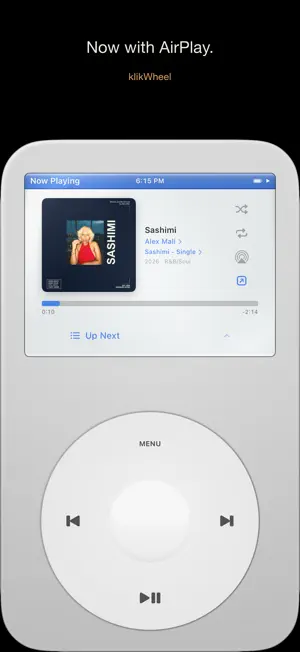
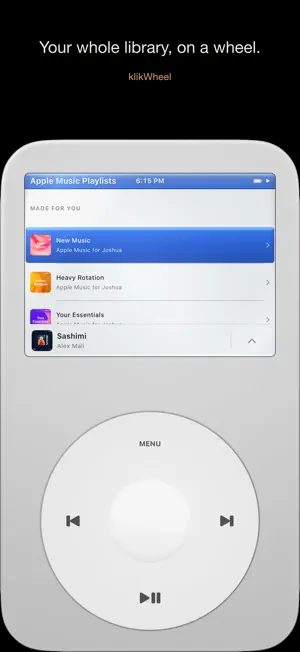
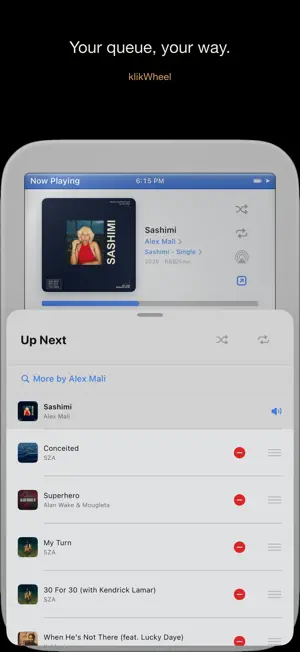
klikWheel is a music player you actually touch. Spin the wheel to scroll, press to play, and get through your library without looking at a grid of tiles. Play your own files or pull from Apple Music—through the same click-wheel either way, on iPhone and iPad. FEATURES • Scroll-wheel navigation with haptic clicks • Import your own library (MP3, FLAC, and more)—plays fully offline • Apple Music—search, browse by artist and album, explore playlists, play full tracks with your subscription • iPad—fullscreen, windowed, split • Backdrops—floating notes, a Metal aurora, or bokeh that react to what's playing • Hide Explicit—filters your local library and Apple Music at once, center-press to toggle • Sort albums A–Z or newest-first • Drag to scrub on the Now Playing screen • Block artists from your queue • Edit your Up Next queue—drag to reorder, swipe to remove • Local playlists—multi-select and search to build them fast • 12 collectible themes, 3 unlockable Pro themes • Extras: Brick, Snake, a Fidget toy, and a Clock • Full VoiceOver and Dynamic Type support No klikWheel account. No tracking. No ads. Just your music and a wheel. klikWheel is an original, unofficial tribute to the dedicated scroll-wheel music players of the 2000s. It is not affiliated with, endorsed by, or associated with Apple Inc.
Ratings & reviews
4.5
6 ratings
What’s new
Version 1.6.1 · Updated September 10, 2026
The click wheel, on a bigger canvas. klikWheel now runs natively on iPad—fullscreen, floating window, or side-by-side. Same wheel, same themes, same backdrop. The aurora now washes the whole canvas around the device instead of a strip along the top. Playlists, faster to build. Add Songs is a multi-select picker with search—tap everything you want, add it in one go. Long-press any song for Add to Playlist. Rename and delete right from the Playlists list. Apple Music, all of it. Your own playlists, Favorite Songs, Replay, and Shazam now show up in the library. Playlists with thousands of tracks play instead of hanging, and reopening a big one is instant. Albums in the right order. Multi-disc albums sort by disc, then track—local files and Apple Music alike. Also: "Remove from Library" asks before it deletes. Album art no longer goes missing on the first track of a playlist. The stray "Add Apple Music stations" row is gone. And if your imported library came up empty after the last update, it's back—nothing was deleted.
App privacy
The developer, Joshua Stoner, reported these privacy practices to Apple.
Data Not Collected
The developer does not collect any data from this app.
Alternatives to klikWheel
Looking for apps like klikWheel? Here are 6 similar apps on the App Store. The highest rated is myPod: Retro Music Player (5.0/5), and all 6 are free to download.
-
 dumb MUSIC
4.2
dumb MUSIC
4.2
-
 MusicPod: Classic Music Player
4.6
MusicPod: Classic Music Player
4.6
-
 myPod: Retro Music Player
5.0
myPod: Retro Music Player
5.0
-
 NewPod: Music Offline Player
4.1
NewPod: Music Offline Player
4.1
-
 MuseDial: Music Player
4.0
MuseDial: Music Player
4.0
-
 Jam-Pod
5.0
Jam-Pod
5.0
| App | Rating | Price | Last updated | Compare |
|---|---|---|---|---|
| klikWheel | 4.5 / 5 (6 ratings) | Free | September 10, 2026 | |
| dumb MUSIC | 4.2 / 5 (5) | Free | Aug 7, 2026 | Compare |
| MusicPod: Classic Music Player | 4.6 / 5 (13) | Free | Oct 21, 2026 | Compare |
| myPod: Retro Music Player | 5.0 / 5 (7) | Free | Oct 24, 2026 | Compare |
| NewPod: Music Offline Player | 4.1 / 5 (15) | Free | Oct 5, 2026 | Compare |
| MuseDial: Music Player | 4.0 / 5 (2) | Free | Aug 10, 2026 | Compare |
| Jam-Pod | 5.0 / 5 (1) | Free | Aug 24, 2026 | Compare |
Compare klikWheel with the top alternatives: ratings, updates, ASO score and keyword gaps →