

Align: Screen Time Blocker
Alisher Abdulin Productivity iPhoneiPadiPod touch
Align: Screen Time Blocker is a free Productivity app for iPhone and iPad by Alisher Abdulin. Rated 1.0/5 from 1 ratings. Requires iOS 16.2.
- Rating
- 1.0
- 1 ratings
- Price
- Free
- on the App Store
- Size
- 44 MB
- Age 4+
- Updated
- Sep 24
- 2026 · v1.0.3
Screenshots
About Align: Screen Time Blocker
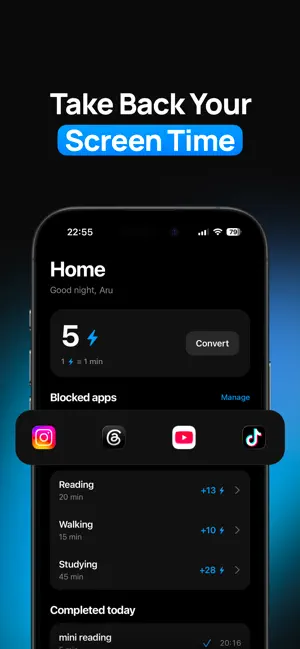
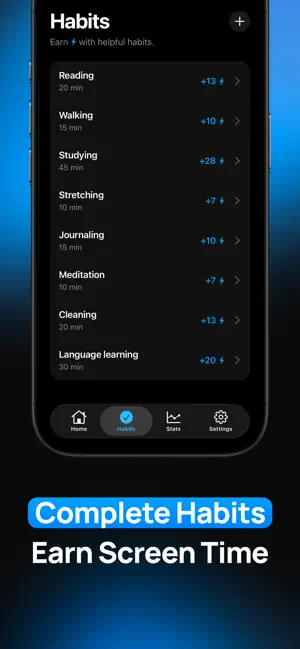
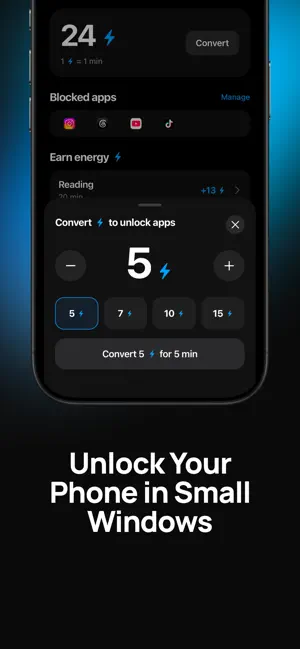
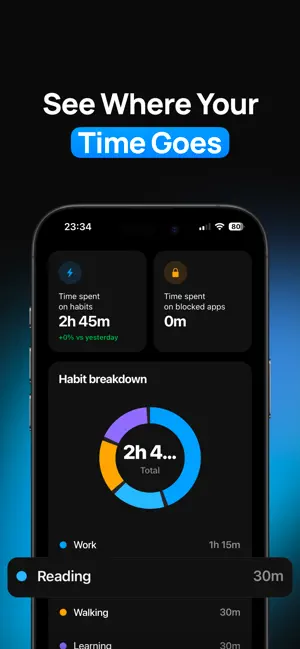
Most of the time you open Instagram, TikTok, or YouTube, you didn't decide to. Your hand just moved. Align is the pause between the impulse and the app: a moment to notice what you're about to do, and choose on purpose instead. ## HOW IT WORKS Choose the apps you want to use more intentionally. Each time you try to open one, Align pauses for a moment and asks whether this is what you really want to do. If you choose to continue, you can exchange your Energy Points for access to that app. If you don't have enough Energy Points, you'll earn them by completing a short habit. • Choose the apps that distract you most • Pause before opening them • Exchange Energy Points for app access • Complete short habits whenever you need to earn more Energy Points • Build healthier habits without giving up the apps you enjoy THE LOOP Pick a habit, start the timer, and follow it through. When it's done, you earn energy, and energy converts into unlock time for the apps you've protected. Healthy habits come first. Scrolling comes second, and on purpose. DESIGNED TO FEEL CALM Align isn't built to gamify your attention or guilt you into "less screen time." It's quiet and minimal, built around reflection: short moments to notice your triggers, your patterns, and what you actually want your time to go toward. YOUR DATA STAYS YOURS Align uses Apple's Screen Time and Family Controls frameworks directly on your device. We never see which apps you use or when. That stays on your phone. Align is for anyone tired of reaching the end of the day without knowing where their attention went, and who wants a calmer, more intentional relationship with their phone. Terms of Use (EULA): https://align-website-cyan.vercel.app/terms
What’s new
Version 1.0.3 · Updated September 24, 2026
Minor bug fixes.
App privacy
The developer, Alisher Abdulin, reported these privacy practices to Apple.
Data Linked to You
The following data, which may be collected and linked to your identity, may be used for the following purposes:
- Purchases: Purchase History
Used for: App Functionality
Data Not Linked to You
The following data, which may be collected but is not linked to your identity, may be used for the following purposes:
- Identifiers: Device ID
- Usage Data: Product Interaction
Used for: Analytics
Alternatives to Align: Screen Time Blocker
Looking for apps like Align: Screen Time Blocker? Here are 6 similar apps on the App Store. The highest rated is climbr: Screen Time Blocker (5.0/5), and all 6 are free to download.
-
 climbr: Screen Time Blocker
5.0
climbr: Screen Time Blocker
5.0
-
 Calmgate: Screen Time Blocker
-
 Locked In: Screen Time Blocker
4.8
Locked In: Screen Time Blocker
4.8
-
 Aside: Screen Time Blocker
-
 Echo - AI Voice Reminders
-
 Sero: Focus & App Blocker
5.0
Sero: Focus & App Blocker
5.0
| App | Rating | Price | Last updated | Compare |
|---|---|---|---|---|
| Align: Screen Time Blocker | 1.0 / 5 (1 rating) | Free | September 24, 2026 | |
| climbr: Screen Time Blocker | 5.0 / 5 (2) | Free | Aug 10, 2026 | Compare |
| Calmgate: Screen Time Blocker | – | Free | Jul 9, 2026 | Compare |
| Locked In: Screen Time Blocker | 4.8 / 5 (5) | Free | Jun 17, 2026 | Compare |
| Aside: Screen Time Blocker | – | Free | Jul 10, 2026 | Compare |
| Echo - AI Voice Reminders | – | Free | Jul 10, 2026 | Compare |
| Sero: Focus & App Blocker | 5.0 / 5 (1) | Free | Oct 18, 2026 | Compare |