

GPS Camera Map - WatermarkCam
Tri Noviantoro Photo & Video iPhoneiPadiPod touch
GPS Camera Map - WatermarkCam is a free Photo & Video app for iPhone and iPad by Tri Noviantoro. Requires iOS 17.0. Updated June 15, 2026.
- Price
- Free
- on the App Store
- Size
- 23 MB
- Age 4+
- Updated
- Jun 15
- 2026 · v1.0
Screenshots


About GPS Camera Map - WatermarkCam
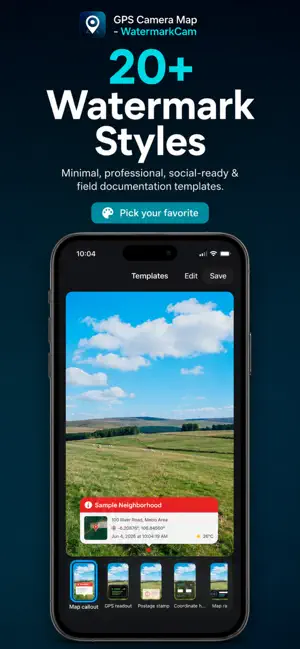
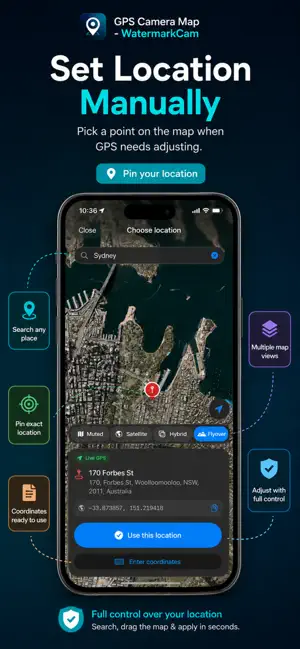
Welcome to GPS Camera Map – WatermarkCam! Capture photos with beautiful GPS, date, map, and weather watermarks burned in automatically. GPS Camera Map turns your iPhone or iPad into a smart location camera — see the full stamp live before you shoot, then save proof-ready photos in one tap. HOW IT WORKS: 1. Shoot: Open the camera, pick a watermark template, and preview your GPS stamp in real time. 2. Customize: Toggle location, map, weather, coordinates, notes, logo, and social handles — then adjust map style and zoom. 3. Save: Photos are stamped on your device and saved to your library. Browse recent captures in the in-app Gallery. FEATURES: • 20+ Watermark Templates: From classic GPS bars to map banners, compass dials, travel journal, blueprint field cards, and more. • Live Stamp Preview: See date, time, address, coordinates, map snapshot, and weather on screen before you capture. • GPS & Manual Location: Use live GPS or drop a pin on the map to set exactly where the stamp should show. • Map Snapshots: Embed a real map tile on your watermark with multiple map styles. • Weather on Stamp: Add current conditions to your photo when location is available. • Template Editor: Control every field, map size, logo image, custom notes, and social handles. • Camera Tools: Grid, horizon level, self-timer, and aspect ratios (9:16, 1:1, 4:3). • Photo Quality Options: Balanced, High, or Maximum resolution capture. • In-App Gallery: Browse, zoom, share, and manage stamped photos in one place. • iPad Friendly: Full-screen template picker and location map on iPad. • Privacy Focused: Photos are processed and stored on your device. We do not upload your images to our servers. GPS CAMERA MAP PRO SUBSCRIPTION: Unlock the full experience with GPS Camera Map Pro. Get access to every premium watermark template, full field controls, and Maximum photo quality. Subscription options: • Weekly Plan ($3.99) • Yearly Plan ($39.99)$39.99 Best Value (Prices may vary by region and are shown in the app before purchase.) SUBSCRIPTION TERMS: Payment will be charged to your Apple ID at confirmation of purchase. Subscriptions automatically renew unless canceled at least 24 hours before the end of the billing period. Your account will be charged for renewal within 24 hours prior to the end of the current period. Manage or cancel subscriptions in your App Store Account Settings. Privacy Policy: https://agarsupaya.com/gpscam/privacy-policy.html Terms of Use: https://agarsupaya.com/gpscam/terms-of-use.html Contact Support: [email protected]
App privacy
The developer, Tri Noviantoro, reported these privacy practices to Apple.
Data Not Collected
The developer does not collect any data from this app.
Alternatives to GPS Camera Map - WatermarkCam
Looking for apps like GPS Camera Map - WatermarkCam? Here are 6 similar apps on the App Store. The highest rated is Expono Camera (5.0/5), and all 6 are free to download.
-
 GPS Camera - Zaisus
-
 PinShot - Check-in Camera
-
 GeoStamp Cam: GPS Photo Video
-
 GEO: Timestamp GPS Map Camera
-
 CompressNStamp
-
 Expono Camera
5.0
| App | Rating | Price | Last updated | Compare |
|---|---|---|---|---|
| GPS Camera Map - WatermarkCam | – | Free | June 15, 2026 | |
| GPS Camera - Zaisus | – | Free | Jun 23, 2026 | Compare |
| PinShot - Check-in Camera | – | Free | Sep 27, 2026 | Compare |
| GeoStamp Cam: GPS Photo Video | – | Free | Oct 14, 2026 | Compare |
| GEO: Timestamp GPS Map Camera | – | Free | Jul 11, 2026 | Compare |
| CompressNStamp | – | Free | Sep 28, 2025 | Compare |
| Expono Camera | 5.0 / 5 (2) | Free | Oct 16, 2026 | Compare |