

Image to PDF read & convert
Muhmmad Azher Productivity iPhoneiPadiPod touch
Image to PDF read & convert is a free Productivity app for iPhone and iPad by Muhmmad Azher. Requires iOS 13.0. Updated June 26, 2026.
- Price
- Free
- on the App Store
- Size
- 45 MB
- Age 4+
- Updated
- Jun 26
- 2026 · v1.0.2
Screenshots


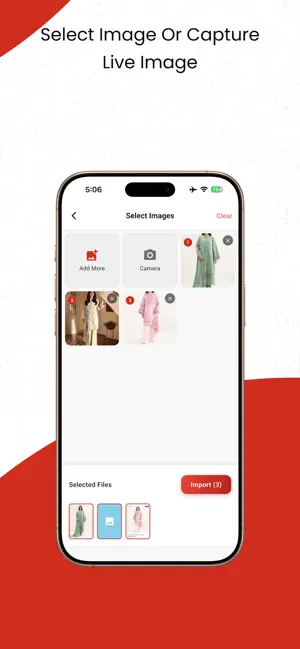
About Image to PDF read & convert
Image PDF Reader Converter is a simple and useful app to view, create, edit, merge, split, and manage PDF files on your device. Whether you want to read a PDF, convert images to PDF, combine multiple PDF files, extract selected pages, or make quick edits like crop, rotate, draw, and add e-signatures, this app gives you everything in one place. It is designed to be easy for everyone to use — students, office users, teachers, freelancers, and anyone who works with PDF documents. Main Features • PDF Viewer Open and read PDF files quickly with a smooth and simple reading experience. • Image to PDF Converter Convert images into PDF files in just a few taps. You can: Select photos from your gallery Take pictures with your mobile camera Create PDF files from document photos, notes, receipts, IDs, assignments, and more • Edit PDF Pages Make changes before saving your PDF. You can: Apply filters Rotate pages Crop pages Draw on pages Add your e-signature • Merge PDF Files Combine 2 or more PDF files into one single PDF file for better organization and easy sharing. • Split PDF Files Choose specific pages from a PDF and create a separate new PDF file. • File Management Manage your PDF files easily with built-in file tools: Share files Rename files Delete files Why Choose This App? Easy to use Fast and smooth performance Useful PDF editing tools Create PDF from gallery or camera Merge and split PDF files quickly Simple file management in one app If you are looking for a PDF reader, image to PDF converter, PDF editor, PDF merger, and PDF splitter, Image PDF Reader Converter is a great choice for everyday use.
What’s new
Version 1.0.2 · Updated June 26, 2026
- Bug fixes and performance improvements - Enhanced stability and smoother user experience
App privacy
The developer, Muhmmad Azher, reported these privacy practices to Apple.
Data Used to Track You
The following data may be used to track you across apps and websites owned by other companies:
- Location: Coarse Location
- Identifiers: Device ID
- Usage Data: Product Interaction
Data Not Linked to You
The following data, which may be collected but is not linked to your identity, may be used for the following purposes:
- Location: Coarse Location
- Identifiers: Device ID
- Usage Data: Product Interaction
Used for: Third-Party Advertising, Analytics
Alternatives to Image to PDF read & convert
Looking for apps like Image to PDF read & convert? Here are 6 similar apps on the App Store. The highest rated is BoxSmartly: Home & Moving (5.0/5), and all 6 are free to download.
-
 BoxSmartly: Home & Moving
5.0
BoxSmartly: Home & Moving
5.0
-
 Pic Collage Maker - Editor
-
 Compress Videos - Shrink Video
4.2
Compress Videos - Shrink Video
4.2
-
 Image to PDF - ZPDF
3.0
Image to PDF - ZPDF
3.0
-
 Photo to PDF & Image Converter
-
 Studio: Creator Studio
5.0
Studio: Creator Studio
5.0
| App | Rating | Price | Last updated | Compare |
|---|---|---|---|---|
| Image to PDF read & convert | – | Free | June 26, 2026 | |
| BoxSmartly: Home & Moving | 5.0 / 5 (2) | Free | Oct 23, 2026 | Compare |
| Pic Collage Maker - Editor | – | Free | Dec 29, 2023 | Compare |
| Compress Videos - Shrink Video | 4.2 / 5 (5) | Free | Jan 22, 2024 | Compare |
| Image to PDF - ZPDF | 3.0 / 5 (1) | Free | Apr 4, 2026 | Compare |
| Photo to PDF & Image Converter | – | Free | Oct 1, 2026 | Compare |
| Studio: Creator Studio | 5.0 / 5 (2) | Free | Sep 3, 2026 | Compare |