

Sketchwise: Learn How to Draw
Maxime Gheysen Education iPhoneiPadiPod touch
Sketchwise: Learn How to Draw is a free Education app for iPhone and iPad by Maxime Gheysen. Rated 1.0/5 from 1 ratings. Requires iOS 15.1.
- Rating
- 1.0
- 1 ratings
- Price
- Free
- on the App Store
- Size
- 71 MB
- Age 4+
- Updated
- Oct 22
- 2026 · v1.4.0
Screenshots

About Sketchwise: Learn How to Draw
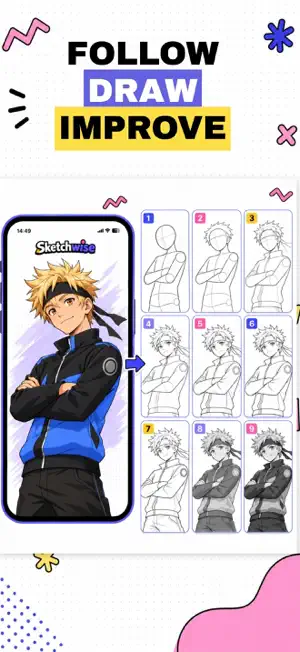
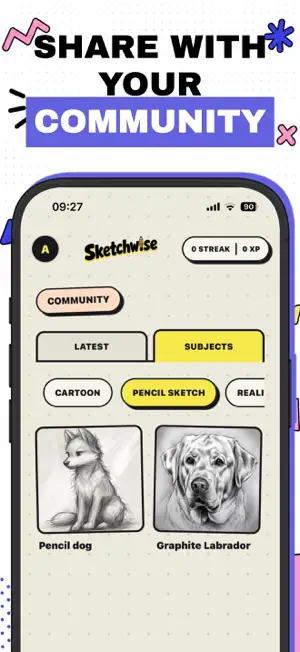
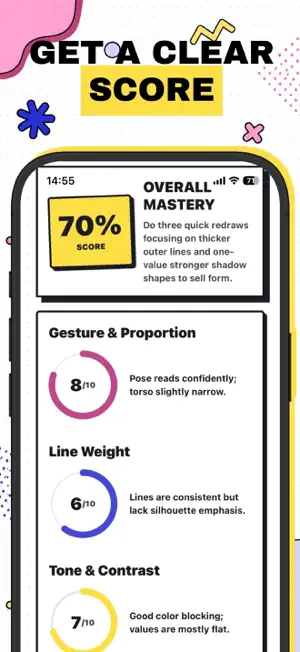
Sketchwise turns any photo into a step-by-step drawing lesson built for you, then coaches you through it stroke by stroke. HOW IT WORKS Pick a reference photo, a face, a pet, a building, anything you want to draw. Sketchwise studies it and builds a custom lesson broken into clear construction stages, each with its own guide image showing exactly what to put on the page. Draw each stage on real paper. Snap it. Get specific feedback on what is working and what to fix before you move on. A GUIDE IMAGE FOR EVERY STAGE No vague advice. Every step comes with a generated guide showing the shapes, proportions, contours, shading, or details for that stage, so you always know what the page should look like before you commit a line. FEEDBACK AS YOU GO, NOT JUST AT THE END Each step is reviewed on its own. You get a score, a short summary, the corrections that matter, and one clear next action. Mistakes get caught at stage two instead of surviving to the finished drawing. A SCORED FINAL REPORT Finish a lesson and get a full breakdown, proportions, shading, accuracy and more, each scored and explained, plus what you did well and what to focus on next time. CHOOSE YOUR STYLE AND LEVEL Pencil sketch, manga, watercolor, realistic graphite or cartoon, at beginner, intermediate or advanced. The same photo becomes a different lesson depending on what you pick. BUILT FOR REAL PAPER This is not a digital canvas. Use whatever you have, pencil, pen, notebook, sketchbook, and build skills that stay with you when the phone is away. TRACK REAL PROGRESS Finished drawings are saved to your gallery, and every completed lesson earns XP and builds your streak. Progress you can actually see, instead of a vague sense that you are getting better. DRAW TOGETHER Pin a finished drawing to the community wall, praise great lines, proportions and shading, and draw along with any drawing you like. Start a challenge to draw the same subject as your friends: compare the drawings side by side, vote, and see the People's choice and the Coach's pick. Friends can vote on the web, no app needed. TRY IT FREE Sample lessons, including five quick four-step ones, are free, with a guide image for every stage and an AI review of your drawing once a day, up to three times a month. A subscription adds custom lessons from your own photos. MADE FOR Absolute beginners who do not know where to start. People coming back to drawing after years away. Anyone who can copy a photo but wants to understand why it works. Manga, portrait and pencil sketchers who want structure instead of another blank page. Pick a photo and draw your first lesson today. Sketchwise is a subscription. Sample lessons are free; building custom lessons from your own photos requires an active subscription, which renews automatically unless cancelled at least 24 hours before the end of the current period. Manage or cancel anytime in your App Store account settings. This app follows the standard Apple Terms of Use (EULA): https://www.apple.com/legal/internet-services/itunes/dev/stdeula/
What’s new
Version 1.4.0 · Updated October 22, 2026
Meet Challenges: draw the same subject as your friends, compare the drawings side by side and vote. Friends can vote on the web, no app needed. - Quick lessons: five short lessons, one in each style, four easy steps each - Get an AI review of your drawing on any sample lesson - Pick up where you left off: if you leave a lesson unfinished and notifications are on, one gentle reminder the next day brings you back - New filters for the sample lessons and the community wall - Fixes and polish throughout
App privacy
The developer, Maxime Gheysen, reported these privacy practices to Apple.
Data Not Linked to You
The following data, which may be collected but is not linked to your identity, may be used for the following purposes:
- Identifiers: Device ID
- Usage Data: Product Interaction
- Diagnostics: Crash Data
- User Content: Photos or Videos
Used for: Analytics, App Functionality
Alternatives to Sketchwise: Learn How to Draw
Looking for apps like Sketchwise: Learn How to Draw? Here are 6 similar apps on the App Store. The highest rated is Retrace: Learn How to Draw (5.0/5), and all 6 are free to download.
-
 Retrace: Learn How to Draw
5.0
Retrace: Learn How to Draw
5.0
-
 Vangu: Learn to Draw
4.5
Vangu: Learn to Draw
4.5
-
 SketchPath: Learn to Draw
-
 Art Sketch: Learn Drawing
1.0
Art Sketch: Learn Drawing
1.0
-
 ArtifyAI
-
 Learn Drawing - Step by Step
| App | Rating | Price | Last updated | Compare |
|---|---|---|---|---|
| Sketchwise: Learn How to Draw | 1.0 / 5 (1 rating) | Free | October 22, 2026 | |
| Retrace: Learn How to Draw | 5.0 / 5 (1) | Free | Oct 13, 2026 | Compare |
| Vangu: Learn to Draw | 4.5 / 5 (42) | Free | Sep 8, 2026 | Compare |
| SketchPath: Learn to Draw | – | Free | Jun 28, 2026 | Compare |
| Art Sketch: Learn Drawing | 1.0 / 5 (1) | Free | Oct 21, 2026 | Compare |
| ArtifyAI | – | Free | Dec 22, 2025 | Compare |
| Learn Drawing - Step by Step | – | Free | Jun 27, 2025 | Compare |