

AFK Mouse Jiggler
Halit Uzan Utilities iPhoneiPadiPod touch
AFK Mouse Jiggler is a free Utilities app for iPhone and iPad by Halit Uzan. Rated 3.0/5 from 2 ratings. Requires iOS 15.1. Updated October 12, 2026.
- Rating
- 3.0
- 2 ratings
- Price
- Free
- on the App Store
- Size
- 65 MB
- Age 4+
- Updated
- Oct 12
- 2026 · v1.4.4
Screenshots


About AFK Mouse Jiggler
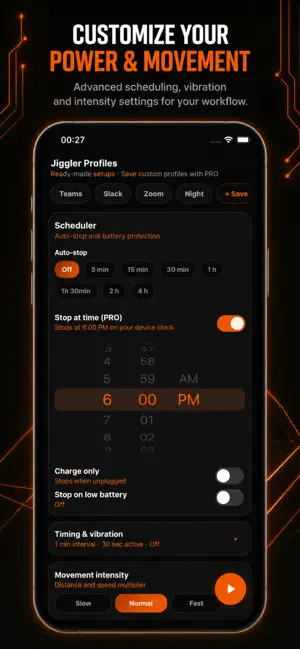
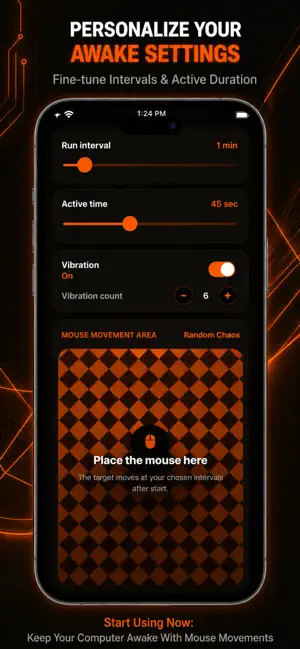
Working from home or stepping away from your desk? Don't let your computer fall asleep, lock you out, or change your status to "Away" on work messaging apps like Teams, Slack, or Skype! This app transforms your iPhone into an automatic mouse jiggler. Simply open the app, choose your preferred movement pattern, and place your optical mouse directly on your phone's screen. The app generates customized visual patterns that trick your optical mouse into thinking it's moving, keeping your computer fully awake and active. WHY YOU'LL LOVE IT: No Software Required: Perfect for strict corporate laptops. Since this works physically through your optical mouse, you don't need to install any shady software or USB drivers on your computer. Always Appear Online: Keep your status green and active on all your communication platforms while you take a break, grab a coffee, or read a document. Prevent Screen Locks: Stop typing in your password every 5 minutes. Keep your PC or Mac awake effortlessly. Remote Control (PRO): Pair a second iPhone and stop the jiggler on the other phone from anywhere. See whether your paired device is online and running, and end its session with one tap — ideal when someone else started the jiggler or you need to stop it without walking back to the desk. KEY FEATURES: 6 Advanced Movement Modes: Choose from Soft Drift, Corner Hop, Orbit, Scanner, Micro Jitter, and Random Chaos to simulate natural or specific mouse movements. Fully Customizable Timers: Set exactly how long the movement lasts and the intervals between movements. Remote Pairing & Stop: Connect two phones via Bluetooth or a pairing code. You approve every connection, and either device can stop the other's session remotely. Smarter Session Handling: When you lock your screen, the active session stops automatically so status stays accurate. Works with Optical Mice: Highly optimized contrasting patterns designed specifically to be picked up by standard optical mouse sensors. Sleek & Dark Interface: Battery-friendly dark design that won't drain your phone or hurt your eyes. Download now and take control of your computer's sleep schedule! (Note: This app requires an optical/laser mouse to function. It works by generating visual movement under the mouse sensor. Remote control requires a PRO subscription and an internet connection.) Terms of Use: https://www.apple.com/legal/internet-services/itunes/dev/stdeula/ Privacy Policy: https://www.afkmousejiggler.com/privacy
What’s new
Version 1.4.4 · Updated October 12, 2026
some bug fixed
App privacy
The developer, Halit Uzan, reported these privacy practices to Apple.
Data Used to Track You
The following data may be used to track you across apps and websites owned by other companies:
- Location: Coarse Location
- Identifiers: Device ID
- Usage Data: Product Interaction, Advertising Data
Data Linked to You
The following data, which may be collected and linked to your identity, may be used for the following purposes:
- Location: Coarse Location
- Identifiers: Device ID, User ID
- Usage Data: Product Interaction, Advertising Data
- Purchases: Purchase History
Used for: Third-Party Advertising, App Functionality
Alternatives to AFK Mouse Jiggler
Looking for apps like AFK Mouse Jiggler? Here are 6 similar apps on the App Store. The highest rated is Mouse Jiggler : Cursor Mover (4.7/5), and all 6 are free to download.
-
 Mouse Jiggler : Cursor Mover
4.7
Mouse Jiggler : Cursor Mover
4.7
-
 Mouse Jiggler – Cursor Mover
4.2
Mouse Jiggler – Cursor Mover
4.2
-
 iShake: Mouse Jiggler
4.0
iShake: Mouse Jiggler
4.0
-
 AI Mouse Jiggler
4.0
AI Mouse Jiggler
4.0
-
 GGMouse: Pro Mouse & Keyboard
3.9
GGMouse: Pro Mouse & Keyboard
3.9
-
 Vaydeer Mouse Jiggler
2.5
Vaydeer Mouse Jiggler
2.5
| App | Rating | Price | Last updated | Compare |
|---|---|---|---|---|
| AFK Mouse Jiggler | 3.0 / 5 (2 ratings) | Free | October 12, 2026 | |
| Mouse Jiggler : Cursor Mover | 4.7 / 5 (6) | Free | Oct 18, 2026 | Compare |
| Mouse Jiggler – Cursor Mover | 4.2 / 5 (17) | Free | Jul 2, 2026 | Compare |
| iShake: Mouse Jiggler | 4.0 / 5 (99) | Free | Dec 10, 2023 | Compare |
| AI Mouse Jiggler | 4.0 / 5 (120) | Free | Sep 19, 2026 | Compare |
| GGMouse: Pro Mouse & Keyboard | 3.9 / 5 (11) | Free | May 21, 2026 | Compare |
| Vaydeer Mouse Jiggler | 2.5 / 5 (8) | Free | Dec 30, 2025 | Compare |
Compare AFK Mouse Jiggler with the top alternatives: ratings, updates, ASO score and keyword gaps →