

The Journey - Self Growth Hub
Prism AI Tech(Chengdu) CO., Ltd. Productivity iPhoneiPadiPod touchMac
The Journey - Self Growth Hub is a free Productivity app for iPhone and iPad by Prism AI Tech(Chengdu) CO., Ltd. Requires iOS 18.6. Updated July 30, 2026.
- Price
- Free
- on the App Store
- Size
- 149 MB
- Age 4+
- Updated
- Jul 30
- 2026 · v1.0.1
Screenshots


About The Journey - Self Growth Hub
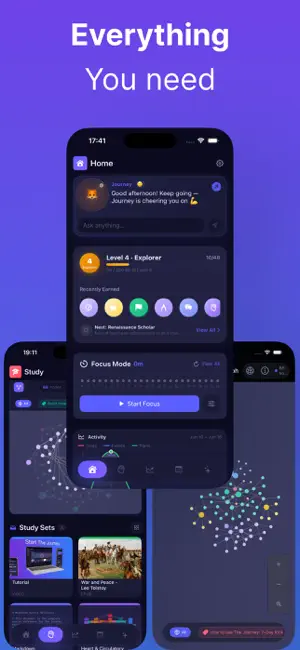
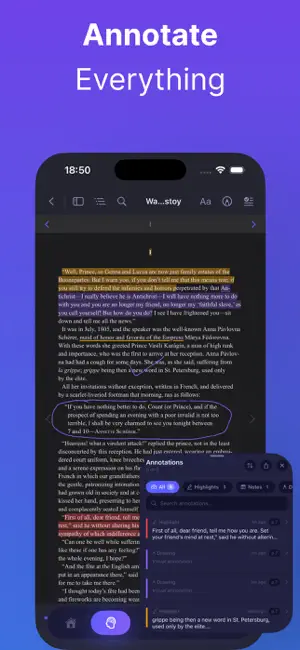
The Journey — Deep Learning Workstation & AI Growth Companion The Journey is a learning platform integrating knowledge graphs, deep reading, mind maps, FSRS, AI growth plans, focus timers, pixel pets, & an AI companion with memory. Five areas—Home Dashboard, Learning Center, Growth Planning, Schedule Management, Journey AI—link for knowledge-building & growth. Life is a continuous journey of learning and growth. Glad to walk this path with you. 1. Deep Reading & Annotation System One app for all digital learning materials: • Deep reading: PDF/EPUB with thumbnails, outline & search. Video/audio (MP4, MOV, MP3, M4A) timeline & saved progress. • Dual-document side-by-side: Two materials, eye-friendly backgrounds & progress tracking. • Annotation toolbox: Highlights, underlines, strikethroughs. PencilKit on PDF/EPUB. Quick notes on selection. • Review & export: Filter, search, jump to source, export all. 2. Knowledge Graph (Metal GPU Rendering) GPU knowledge network—your gains as a star map: • Metal shaders for fluid zoom, pan & interaction. • Auto relationship building: From Markdown titles, mind map nodes & growth plans. • Canvas control: Full screen, fit, refresh; filters & search; highlight matches; jump to content. 3. Mind Map Engine Infinite canvas mind maps: • Freedom: Branch layouts, inline edit, styles; nested sub-maps (breadcrumbs). • Handwriting & multimedia: PencilKit syncs with canvas; images. • AI & batch conversion: Topic → knowledge tree; Markdown ↔ mind map nodes. 4. Study Sets & Learning Modes (Study Set) • Project organization: Documents, mind maps & decks; cover colors & draggable tags. • Multi-device modes: iPad split; iPhone tabs; multi-doc tabs; toggle annotation, handwriting & excerpts. 5. Spaced Repetition (FSRS) FSRS (Free Spaced Repetition Scheduler) for max retention, min time: • Card types: Front/back, Cloze Deletion (one-tap mask), Image Occlusion. • Scheduling engine: Again/Hard/Good/Easy; stability-based intervals; new/learning-in-progress/review. • Stats & AI generation: Mastery, retention, forecasts, heatmaps; AI flashcards; Anki TSV/CSV. 6. Growth Plans & Schedule Management Wishes → paths: • Planning wizard: Manual or AI weekly goals, milestones & daily tasks. • Tasks & check-ins: Milestones; streaks (Streak) & recurring tasks. • Calendar integration: Day/Week/Month/Year; plan tasks; recurrence; Home one-tap complete. • Growth Hub: Category/status rings & progress curves. 7. Focus System & Pixel Electronic Pet Study time recorded: • Focus timer: Pomodoro, countdown, free mode; floating window; tags, backgrounds, white noise. • Pixel electronic pet: Retro pixels; mood, energy, happiness; XP from focus, flashcards & reading. Terrarium, widgets, bubble. 8. Journey AI — AI Travel Companion with Memory & Personality • 6 personalities: Warm Companion, Strict Mentor, Cheerful Friend, Calm Philosopher, Playful Creator, Efficient Assistant—or custom; Rive avatars. • Four-layer memory: Working, short-term, long-term & episodic local Markdown—view, edit, clear. • 7 Agents & tool calling: Growth, reflection, daily planning, knowledge, mind maps, motivation, progress; tasks, calendar, flashcards, nodes & Study Sets. 9. Markdown Knowledge Base • Rendering: Markdown, code, tables, LaTeX, Mermaid, images; edit/preview/split; outline. • Toolbar: Headings, bold, code, lists; counts; link to plans; one-tap mind map. 10. Global Search & Motivation • Search: Docs, articles, nodes, plans, flashcards; debounce, groups, Spotlight. • Badges & XP: 6 categories (Reading Master, Knowledge Builder, etc.), 5 rarities; late-night & streak detection. 11. Privacy & Cloud Sync • Local-first: On-device, no account; API Key in System Keychain. • Backup & sync: Backup with media, restore; CloudKit private iCloud sync. Terms of Use (EULA): https://www.apple.com/legal/internet-services/itunes/dev/stdeula/
What’s new
Version 1.0.1 · Updated July 30, 2026
Improved user experience: • Tap anywhere outside a text field to dismiss the keyboard in AI chat, the home quick input, study search, and all editing sheets—so the keyboard no longer blocks the screen or gets stuck open. • Fixed the “Jump to latest” button staying visible when you’re already at the bottom of the conversation; auto-scroll now correctly follows streaming replies while you’re at the bottom.
App privacy
The developer, Prism AI Tech(Chengdu) CO., Ltd., reported these privacy practices to Apple.
Data Not Collected
The developer does not collect any data from this app.
Alternatives to The Journey - Self Growth Hub
Looking for apps like The Journey - Self Growth Hub? Here are 6 similar apps on the App Store. The highest rated is Weekbook: Diary & Planner (5.0/5), and all 6 are free to download.
-
 Mailendar
-
 Weekbook: Diary & Planner
5.0
Weekbook: Diary & Planner
5.0
-
 Zettelkasten: Notes Graph
3.0
Zettelkasten: Notes Graph
3.0
-
 RoutineArc: Schedule Planner
-
 ToDoWise: Task & Idea Planner
5.0
ToDoWise: Task & Idea Planner
5.0
-
 Foldy: Notes, Habits, Planner
| App | Rating | Price | Last updated | Compare |
|---|---|---|---|---|
| The Journey - Self Growth Hub | – | Free | July 30, 2026 | |
| Mailendar | – | Free | Sep 11, 2026 | Compare |
| Weekbook: Diary & Planner | 5.0 / 5 (1) | Free | Oct 29, 2026 | Compare |
| Zettelkasten: Notes Graph | 3.0 / 5 (1) | Free | Aug 19, 2026 | Compare |
| RoutineArc: Schedule Planner | – | Free | Oct 27, 2026 | Compare |
| ToDoWise: Task & Idea Planner | 5.0 / 5 (3) | Free | Jun 29, 2024 | Compare |
| Foldy: Notes, Habits, Planner | – | Free | Sep 22, 2026 | Compare |