

PDF Merger - Join Document
Prince Boateng Utilities iPhoneiPadiPod touch
PDF Merger - Join Document is a free Utilities app for iPhone and iPad by Prince Boateng. Requires iOS 18.6. Updated July 15, 2026.
- Price
- Free
- on the App Store
- Size
- 14 MB
- Age 4+
- Updated
- Jul 15
- 2026 · v1.0
Screenshots
About PDF Merger - Join Document
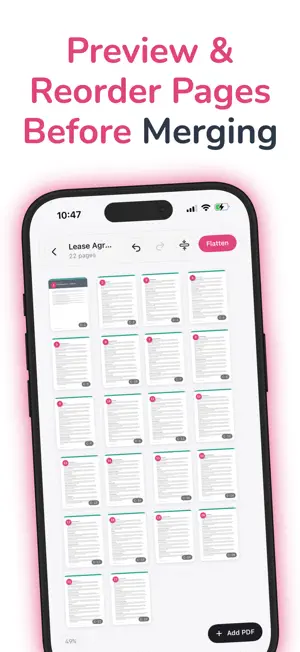
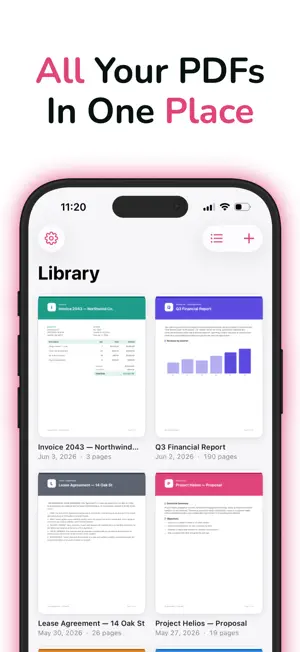
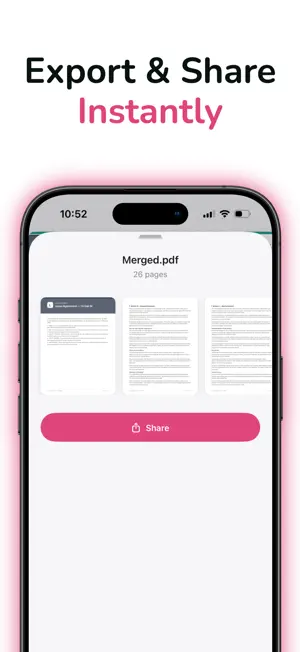
PDF Merger - Join Document is the fast and easy way to merge PDF files on your iPhone and iPad. Whether you're combining class notes, work documents, reports, contracts, receipts, or study materials, PDF Merger - Join Document helps you create a single organized PDF in seconds. With PDF Merger - Join Document, you can select multiple PDF files, arrange them in any order, merge documents instantly, preview the final result, and save or share your merged PDF. Everything is designed to be simple, fast, and reliable. Key Features • Merge multiple PDF files into one document • Reorder PDFs before merging • Combine class notes and study materials • Join reports, contracts, invoices, and forms • Preview merged PDFs before saving • Share PDFs using AirDrop, Mail, Messages, and more • Save merged documents directly to the Files app • Clean and easy-to-use interface • Fast PDF processing • Works offline without an internet connection Perfect For • Students combining lecture notes and assignments • Professionals organizing business documents • Teachers preparing learning materials • Freelancers managing contracts and invoices • Anyone who needs a simple PDF merger PDF Merger - Join Document is built for speed and convenience. No complicated tools, no unnecessary steps—just select your files, arrange them, and merge PDFs in seconds. Unlike many PDF tools, PDF Merger - Join Document focuses on the features you actually need. Merge PDF files quickly, organize documents effortlessly, and keep your workflow productive. ### Why Choose PDF Merger - Join Document? • Simple PDF merger for everyday use • Secure on-device processing • No account required • Fast document merging • Easy file management • Reliable PDF performance • Optimized for iPhone and iPad Download PDF Merger - Join Document today and start merging PDF files, combining documents, organizing reports, and creating professional PDFs with ease. Savory All Access • Length: 1 year • Price: $39.99 per year, $5.99 Weekly and $7.99 Lifetime(auto-renews) • Terms of Use: https://www.apple.com/legal/internet-services/itunes/dev/stdeula/ • Privacy Policy https://docs.google.com/document/d/1BEjrJbCCzoT3zg93KfoluUAz3SbvsSlI/edit?usp=sharing&ouid=112960935200730147417&rtpof=true&sd=true
App privacy
The developer, Prince Boateng, reported these privacy practices to Apple.
Data Not Collected
The developer does not collect any data from this app.
Alternatives to PDF Merger - Join Document
Looking for apps like PDF Merger - Join Document? Here are 6 similar apps on the App Store.
-
 PDF Merger - Combine, Join PDF
-
 Merge PDFs: Combine and Split
-
 Stvori PDF: Scan to PDF
-
 PDF & HTML Merger
-
 Too Simple: Photo to PDF
-
 Dentix
| App | Rating | Price | Last updated | Compare |
|---|---|---|---|---|
| PDF Merger - Join Document | – | Free | July 15, 2026 | |
| PDF Merger - Combine, Join PDF | – | Free | Sep 5, 2026 | Compare |
| Merge PDFs: Combine and Split | – | Free | Jul 7, 2026 | Compare |
| Stvori PDF: Scan to PDF | – | Free | Jun 14, 2026 | Compare |
| PDF & HTML Merger | – | Free | Apr 10, 2026 | Compare |
| Too Simple: Photo to PDF | – | Free | Mar 6, 2026 | Compare |
| Dentix | – | Free | Feb 27, 2026 | Compare |